Best AI News Prank Generator for Joke Newscasts 2026
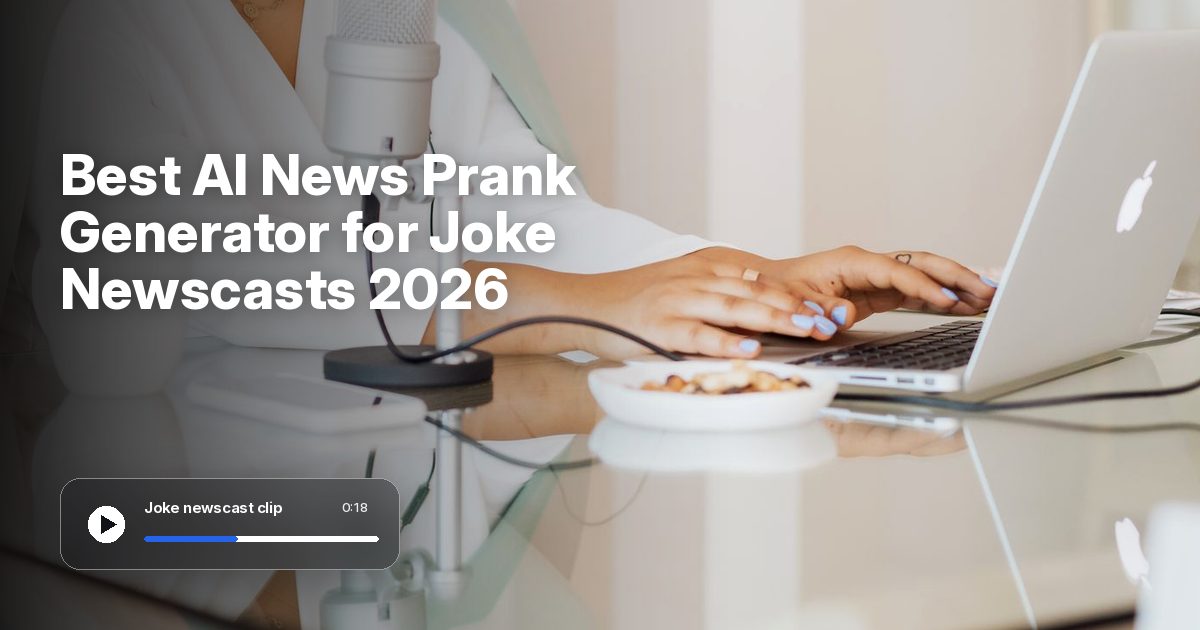
The best AI news prank generator for a clearly labeled joke newscast is Zoice, our top pick for turning one photo of a fictional or stock anchor into a Host that speaks your script. Upload a clear still, paste a bulletin that is obviously a joke, and Zoice lip syncs every word so the same Host can return in a later clip.
We compared seven tools on photo or presenter input, lip sync, a news-style talking clip, and a price shown on the tool's own site. Zoice comes first, and each tool after it serves a different job. This guide covers talking news-style video only, not fake newspapers or photo-prank picks. For news-style talking video that is not framed as a prank, see our guides to the best AI news anchor generator, the best AI news video generator, and the best AI breaking news generator. For a step by step photo prank in Zoice, see our AI prank video tutorial.
What Is an AI News Prank Generator?
An AI news prank generator makes a talking, news-style joke newscast or prank bulletin. You start with a fictional or stock presenter, often from a still photo, plus a script that is clearly a joke and is labeled as AI or a prank. The tool then builds a video in which the mouth follows those words.
Keep the Host fictional or stock. Do not use a real person's photo, do not copy a real network brand, logo or anchor, and do not write a realistic false report about a real event, brand, election or health story. Review every clip before it goes live, tell viewers that it is an AI prank, and never present the bulletin as real news.
What to check before you pick a tool:
- Can one still photo, or a ready presenter, become a talking news-style joke clip?
- Does the mouth follow a script you wrote?
- Can you label the bulletin as AI or a prank, and keep the Host fictional or stock?
- Is the starting price published on the tool's own site?
Quick Comparison: Best AI News Prank Generators
| Tool | Best For | Photo only input | Lip sync | Gestures and expressions | Aspect ratios | Starting price | Rating |
|---|---|---|---|---|---|---|---|
| Zoice | Joke newscasts from one still and a labeled script | Yes, one photo plus a script | Yes | Yes, with action prompts | Yes, set in the composer | Free plan, paid from $7.99/mo | 5.0/5 on Capterra (5 reviews) |
| Vidnoz | Text-to-video news-style clips with templates | A front-facing photo can be uploaded | Yes | Not stated | Not stated | Free plan listed | 4.9/5 on G2 (16 reviews) |
| Fotor | Studio or street-report talking clips | A face photo can be uploaded | Yes, a talking anchor is listed | Not stated | Not stated | See tool site | 4.1/5 on G2 (342 reviews) |
| Fakenews.me | A scripted Breaking News or Late Night Show | No, you pick a host | Yes | Not stated | Not stated | Paid packs from $9 | Not listed |
| Media.io | A broadcast-style prank clip from a photo | An uploaded photo | Not clearly a scripted talking-anchor desk | Not stated | Not stated | See tool site | Not listed |
| HeyGen | Anchor-led broadcasts with ready-made presenters | No, custom anchors start from a short clip | Yes | Listed | 16:9, 9:16 or 1:1 | Free plan, paid from $29/mo | 4.8/5 on G2 (1,978 reviews) |
| AI Studios | AI-anchor videos from a script, article or URL | Custom anchors with consent, not photo-only | Yes | Listed | Not stated | Free plan, paid from $29/mo | 4.5/5 on Capterra (51 reviews) |
1. Zoice: Best AI News Prank Generator Overall
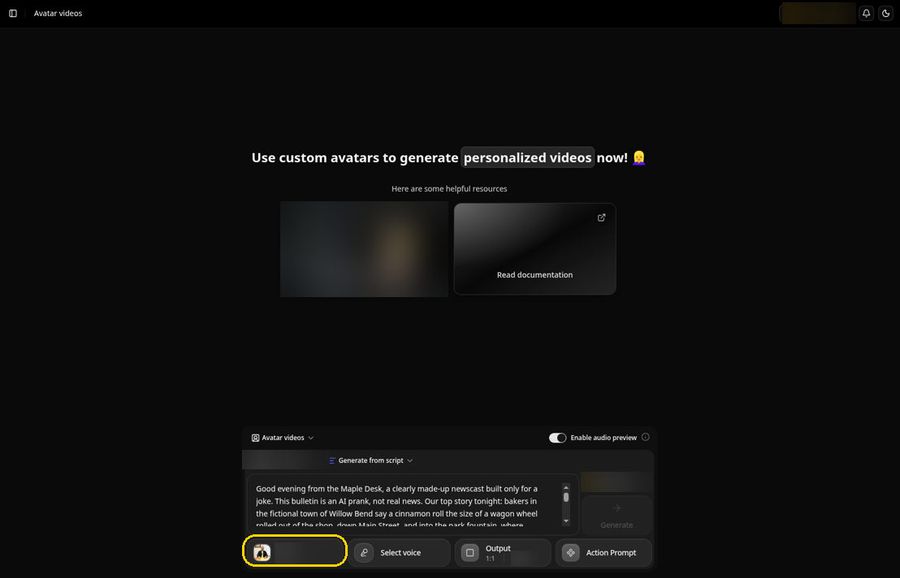
Zoice suits a creator who already has a fictional or stock anchor photo and a joke script that is clearly labeled as an AI prank. One still image becomes a Host, your script becomes the lines, and the mouth is lip synced to those words. Action prompts can direct a look toward the camera or a nod. Use only a photo you have the right to use, and never copy a real network brand or a real person's likeness.
Here is a sample harmless joke script you can paste into the composer. It is obviously made up and is labeled as a prank:
"Good evening from the Maple Desk, a clearly made-up newscast built only for a joke. This bulletin is an AI prank, not real news. Our top story tonight: bakers in the fictional town of Willow Bend say a cinnamon roll the size of a wagon wheel rolled out of the shop, down Main Street, and into the park fountain, where ducks held an emergency tasting. Town hall, which also does not exist, has issued a playful advisory: if you see a dessert on the move, please cheer, do not chase it, and do not call this a crisis. Thanks for watching this labeled prank, and please do not share it as if it were a real report."
A fitting action prompt for that bulletin is "looks at the camera and nods." Review the clip before you share it, and tell viewers that the presenter is an AI avatar.
Key Features
- One photo of a fictional or stock anchor becomes a Host that speaks your joke script
- Voice cloning from a short sample, with permission, for later videos
- 50+ voices and 170+ languages for a second-language version of the same bulletin
Best For
- Creators who want a clearly labeled joke newscast from one still photo
- Teams that want the same fictional or stock Host to return later
Pros of Zoice
- One photo is enough. You do not need a new studio shoot for every joke bulletin.
- You control the words, so you can keep the bulletin fictional and review every line.
- The same Host can return in a later clip, with a voice you choose.
- A free plan and a paid Starter plan at $7.99 per month let you try a clip first.
Cons of Zoice
- Needs an internet connection
- Smaller public avatar library
Rating
5.0/5 on Capterra (5 reviews).
Pricing
Zoice has a free plan. Paid plans start at $7.99 per month on the Starter plan. Confirm the current list on the Zoice pricing page.
When to Use It
- You have a fictional or stock anchor photo you have the right to use, and a labeled joke script
- Try Zoice
2. Vidnoz: Best for Template-Led News-Style Joke Clips
Vidnoz is a strong match when you want a text-to-video news-style clip with customizable news templates and AI anchors. Official pages describe lip-synced delivery and the option to upload a front-facing photo to make a talking avatar. Keep the presenter fictional or stock, and do not copy a real network brand.
Key Features
- AI news anchors and lip-synced delivery
- The option to upload a front-facing photo to make a talking avatar
Best For
- Creators who want a template-led news-style joke clip
Pros of Vidnoz
- News-style templates are a stated focus on official pages.
- A free plan is listed, so you can try the flow before you look at paid plans.
Cons of Vidnoz
- A simple photo-plus-script Host composer is not the only starting path on official pages
- A paid starting price in dollars was not clearly shown on the official plan cards
Rating
4.9/5 on G2 (16 reviews).
Pricing
Vidnoz lists a free plan at $0.00 on its official pricing page. Paid dollar amounts were not clearly visible, so we are not listing a paid starting price. Confirm the current figures there.
When to Use It
- You want a template-led news-style joke clip and can confirm plan details on the official site
3. Fotor: Best for Studio or Street-Report Joke Clips
Fotor is a strong match when you want to turn a script or headline into a studio or street-report style talking clip. Official pages say you can upload a face photo to make a talking news anchor, and use templates, headlines and lower thirds. Use only a fictional or stock face, invent your own channel name, and do not recreate a real network look.
Key Features
- A face photo can be uploaded to make a talking news anchor
- Templates, headlines and lower thirds are listed
Best For
- Creators who want a studio or street-report style joke bulletin
Pros of Fotor
- Studio and street-report styles are a stated focus on official pages.
- A talking anchor from a face photo is listed, which can suit a fictional or stock presenter.
Cons of Fotor
- A simple Host composer is not the only starting path on official pages
- A starting price in dollars was not clearly shown on the official pricing page
Rating
4.1/5 on G2 (342 reviews).
Pricing
Fotor's official pricing page did not show a clear dollar figure, so we are not listing a starting price. Confirm the current list there.
When to Use It
- You want a studio or street-report style joke clip and can confirm plan details on the official site
4. Fakenews.me: Best for a Scripted Joke Bulletin With Your Own Channel Name
Fakenews.me is a talking news-style video tool, not an article or newspaper generator. Official pages say a news anchor performs your script as a Breaking News or Late Night Show, with your channel name, headline, scrolling ticker and a photo on screen, plus matching lip movements. Their FAQ says the tool is for entertainment and parody, and not to pass a video off as real news. Still use a fictional or stock host, label the bulletin as a prank, and do not use a real person or a real network brand. Users pick a host rather than starting from a photo-only custom-anchor flow like Zoice.

Key Features
- Your channel name, headline, scrolling ticker and a photo can appear on screen
- A Late Night Show format is also listed, with matching lip movements
Best For
- Creators who want a scripted joke bulletin with a channel name they invent
Pros of Fakenews.me
- Scripted talking news is a stated focus on official pages.
- The official FAQ asks users not to pass a clip off as real news, and our tighter safety rules still apply.
Cons of Fakenews.me
- A photo-only custom Host, like the Zoice composer, is not the starting path on official pages
- A public G2 or Capterra rating was not available to list
Rating
Not listed.
Pricing
Paid packs start at $9, and larger packs are listed on the official site. Confirm the current list there.
When to Use It
- You want a scripted joke bulletin with a channel name you invent, and can start with a listed paid pack
5. Media.io: Best for a Photo-to-Broadcast-Style Prank Clip
Media.io's official AI Fake News Prank Generator page describes a photo-to-breaking-news-style prank clip, and it does not clearly document a scripted talking-anchor desk workflow. A separate official talking-avatar tool can lip sync a photo to a script or audio; do not treat those as one product. Do not use wanted-suspect templates or a real person's photo. Keep any bulletin clearly labeled as a prank, and do not present it as a real report.

Key Features
- A photo can become a broadcast-style prank clip
- A separate official talking-avatar tool is listed for lip syncing a photo to a script
Best For
- Creators who want a broadcast-style prank clip from a still they have the right to use
Pros of Media.io
- A photo-to-broadcast-style prank path is a stated focus on official pages.
- A separate talking-avatar tool is listed and should be judged as a different product.
Cons of Media.io
- A scripted talking-anchor desk is not clearly documented on the official prank page
- A public G2 or Capterra rating was not available to list
- A starting price in dollars was not clearly shown on the official pricing page
Rating
Not listed.
Pricing
Media.io's official pricing page varies by country and did not show one clear dollar figure, so we are not listing a starting price. Confirm the current list there.
When to Use It
- You want a broadcast-style prank clip from a photo you have the right to use
6. HeyGen: Best for a Produced Anchor-Led Joke Broadcast
HeyGen is a strong match when you want an anchor-led broadcast from a topic or script, with ready-made presenters and newsroom templates. Official pages list lower thirds, tickers, captions, multilingual voiceovers, and exports in 16:9, 9:16 or 1:1. Custom anchors are built from a short clip, not from a photo-only flow. Invent your own on-screen names, and do not copy a real network look.
Key Features
- Ready-made presenters, newsroom templates, lower thirds, tickers and captions are listed
- Exports in 16:9, 9:16 or 1:1 are listed on the official news page
Best For
- Creators who want a more produced joke newscast with ready-made presenters
Pros of HeyGen
- Anchor-led news-style video is a stated focus on official pages.
- A free plan is listed, so you can try the flow before you look at paid Creator tiers.
Cons of HeyGen
- A photo-only Host composer is not the starting path for custom anchors on official pages
- You still need to invent your own channel look and keep the bulletin clearly labeled as a prank
Rating
4.8/5 on G2 (1,978 reviews).
Pricing
HeyGen has a free plan. Paid plans start at $29 per month on the Creator plan. Confirm the current list on the official pricing page.
When to Use It
- You want a more produced anchor-led joke broadcast, and can start on a listed free plan
7. AI Studios by DeepBrain AI: Best for Script-to-Anchor News-Style Joke Videos
AI Studios by DeepBrain AI is a strong match when you want to turn a script, article or URL into an AI-anchor video, with news templates, dual-anchor scenes, multilingual delivery and custom anchors with consent. Do not name a real network or a real anchor, and do not spoof a real newscast. Invent your own channel name, and label the clip as an AI prank.
Key Features
- News templates, dual-anchor scenes and multilingual delivery are listed
- Custom anchors are listed with consent
Best For
- Creators who want a script-to-anchor news-style joke video
Pros of AI Studios
- Script-to-anchor news-style video is a stated focus on official pages.
- A free plan is listed, so you can try the flow before you look at paid Personal tiers.
Cons of AI Studios
- A photo-only Host composer is not the main starting path on official pages
- You still need to invent your own channel look and avoid any real network or real-anchor use
Rating
4.5/5 on Capterra (51 reviews).
Pricing
DeepBrain AI's official AI Studios pricing page lists a free plan. Paid Personal plans start at $29 per month, or $24 per month when billed annually. Confirm the current list there.
When to Use It
- You want a script-to-anchor news-style joke video and can start on a listed free plan
How to Choose an AI News Prank Generator
Start with the job. If you have a fictional or stock photo and a labeled joke script, Zoice is the most direct path, including when you want the same Host to return. For template-led news-style clips, look at Vidnoz. For a studio or street-report style joke, Fotor is the closer fit. For a scripted bulletin with a channel name and ticker you invent, use Fakenews.me. If the job is a photo-to-broadcast-style prank clip rather than a scripted desk, Media.io's prank page is the closer match. For a more produced anchor-led broadcast, HeyGen or AI Studios may suit, as long as you invent your own look and keep the clip clearly a prank.
In every case, use only a photo you have the right to use, keep the Host fictional or stock, and do not copy a real network brand, logo or anchor. Review every script, tell viewers that the presenter is an AI avatar, and never present a joke bulletin as a real report.
FAQ
Can I make a joke newscast from one photo?
Yes. In Zoice you start from one photo of a fictional or stock anchor and a script. The photo becomes a Host, and the mouth is lip synced to your joke lines. Keep the bulletin obviously fictional, label it as an AI prank, and review the clip before you share it.
Is this the same as your news anchor or breaking news posts?
No. This guide is for talking news-style joke newscasts and prank bulletins. Our news anchor, news video and breaking news guides cover news-style talking video that is not framed as a prank. Keep those posts separate, and use this one when the job is a clearly labeled joke.
Can I use a real person's photo or copy a real network look?
No. Do not use a real person's photo, and do not copy a real network brand, logo, set or anchor. Use a fictional or stock Host, invent your own channel name, keep the bulletin obviously a joke, and label it as AI or a prank. Never present the clip as real news.