Best AI News Video Generator: Top Bulletin Picks 2026

The best AI news video generator for a team that publishes full bulletins is Zoice, our top pick for putting one recognizable Host at the desk of every edition. Upload a photo of the person who fronts your show, paste the day's script, and Zoice delivers it to camera with the lips matched to each word. The same face opens Monday's rundown and Friday's round up, and nobody has to book a studio.
We judged four tools on what it takes to run a bulletin, not a single clip: where the story comes from, who is on screen, how much you can fix before anything renders, and what a month of editions costs. Zoice is first, and every tool below it fits a different kind of newsroom. If you only need a presenter for a one off segment, our guide to the best AI news anchor generator covers that narrower job.
What Is an AI News Video Generator?
An AI news video generator turns written reporting into a produced video. Depending on the tool, that means a presenter reading a script to camera, an article rewritten into a broadcast script, licensed footage cut around the words, or all of these in one workflow. The goal is to give a story that already exists in text a second life on screen.
A full bulletin asks more of a tool than a social clip does. It has a running order, a consistent presenter, a house style and a person who checks facts before anything goes out. That is why we compared tools on workflow and control, not only on how realistic a face looks. For a faster, shorter format, see our list of the best AI breaking news generator tools.
Four questions sort these tools quickly:
- Source: does it start from your script, an article link, a feed or licensed wire footage?
- Presenter: is the face your own Host, a stock anchor, or no face at all?
- Review: can an editor read and change the script before it is voiced?
- Cost: is the price published, and does it suit a daily or weekly schedule?
Quick Comparison: Best AI News Video Generators
| Tool | Best For | Starts from | Presenter on screen | Edit before render | Starting price | Rating |
|---|---|---|---|---|---|---|
| Zoice | A recurring bulletin fronted by one Host | One photo plus your script | Yes, your own Host | Yes, change the script and generate again | Free plan, avatar videos from $7.99/mo | 5.0/5 on Capterra (5 reviews) |
| Fliki | Turning published stories into presented clips | An article link or your own script | Yes, a stock AI presenter on paid plans | Yes, review the script before it is voiced | Free plan, then paid plans per user | 4.7/5 on Capterra (345 reviews) |
| Prism | Licensed wire footage cut into a finished package | Wire stories and footage you license | A voice read | Yes, you approve every step | Pro $199/mo | Not listed |
| VidGen | Publishers that convert articles in volume | Articles, RSS feeds and editorial assets | Not stated | Yes, editorial review is built in | Not published | Not listed |
Prices were read from each vendor's own site while we wrote this, and vendors revise them without notice.
The table shows the main split. Zoice and Fliki put a presenter on screen, Prism and VidGen are built around footage and editorial workflow, and only Zoice starts from a photo of your own Host.
1. Zoice: Best AI News Video Generator Overall
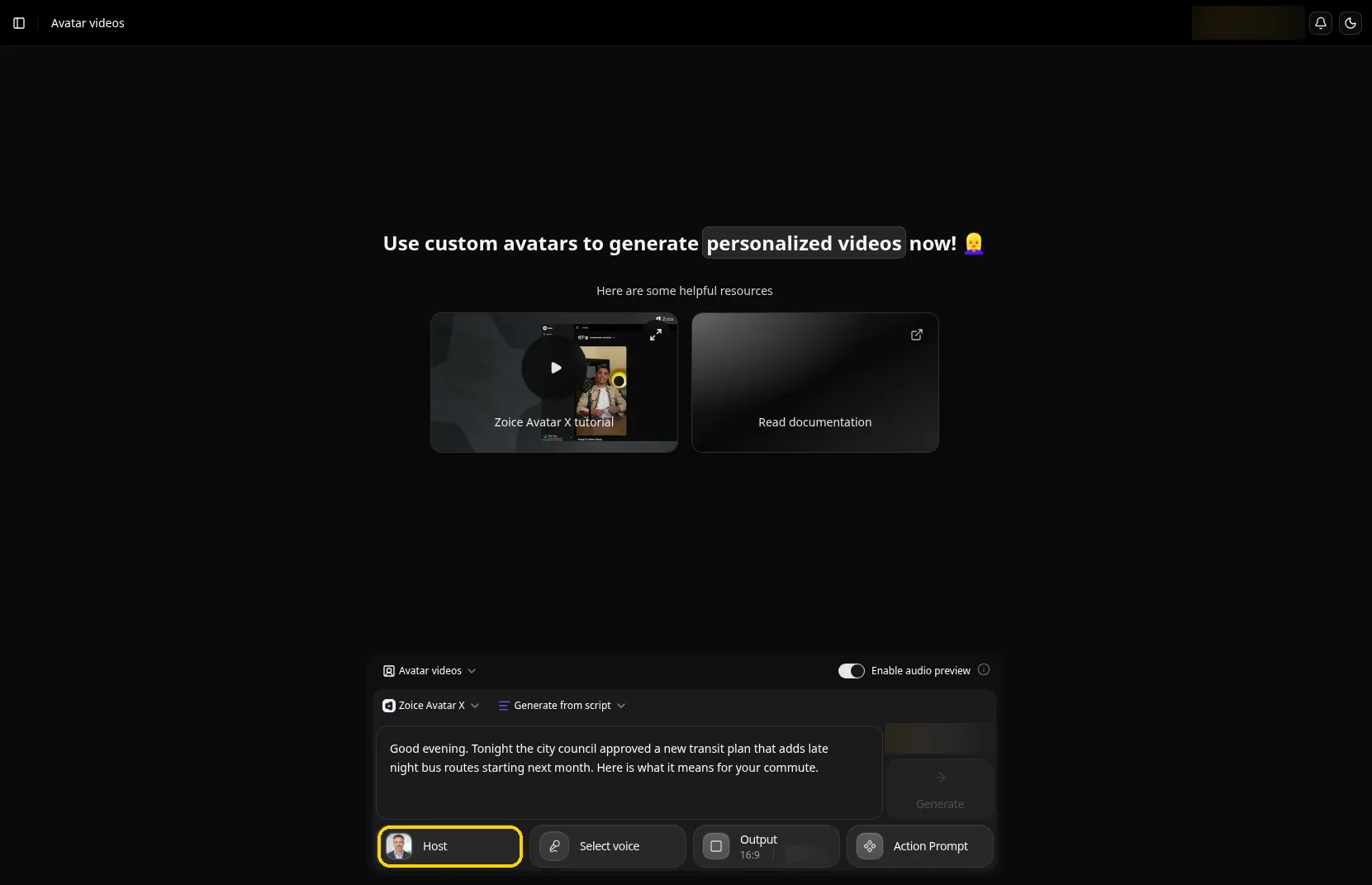
Zoice suits a team that wants its bulletin to feel like a show, with the same face every edition. Its Avatar X model builds the Host from a single portrait, and a cloned voice makes the delivery sound like your desk and not a generic reader. You write the running order, so the facts and the wording stay yours.
Key Features
- Upload one photo and your Host reads the day's script with lips matched to the words
- Action prompts let you direct a gesture or a change of expression, so the Host can look grave for a headline and lighter for the sign off
- Audio tags in the script shape tone, emotion and pacing without a separate audio edit
- Clone the voice of your usual reader, or bring in a voice made in ElevenLabs or LMNT
- Scripts written in 170+ languages and dialects, so one Host can serve several audiences
- Audio preview, so an editor can hear the read before the video is generated
- Aspect ratio and resolution settings for a site embed, a channel or a phone
Best For
- Local desks, niche channels and company newsrooms that publish on a schedule
- Teams that want one consistent Host and full control of the script
Pros of Zoice
- A face that belongs to you. Your Host comes from your own photo, so viewers learn one presenter instead of a stock anchor they have seen elsewhere.
- Fix a line without a reshoot. When a figure or a name changes, edit the script and generate again.
- Check the read first. Audio preview lets an editor catch a mispronounced name before the video is rendered.
- Low cost to trial. The free plan covers voice and images, and the first paid tier opens avatar videos, so a desk can pilot a full edition cheaply.
Cons of Zoice
- Writing comes first. Zoice does not read an article link or a wire feed, so someone has to turn the story into script copy before the Host can speak it.
- Presenter focus. Maps, archive clips and name captions come from the editor you already use for the rest of the edition.
- Few public reviews. Five Capterra reviews give a perfect score, but that is a thin sample next to larger platforms.
Overall Zoice Rating
5.0/5 on Capterra from 5 reviews. With so few reviews, the number tells you little yet.
Pricing
| Plan | Monthly Price | What you get |
|---|---|---|
| Free | $0/month | Daily free credits for AI voice, images, chat and transcriptions |
| Starter | $7.99/month | AI avatar videos and one voice profile |
| Basic | $29.99/month | A larger monthly credit allowance and three voice profiles |
| Creator | $49.99/month | More monthly credits and five voice profiles |
| Agency | $89.99/month | The largest allowance and ten voice profiles |
Paying yearly takes 20% off the monthly rates, and a voice you bring in from ElevenLabs or LMNT is not billed as audio. Enterprise plans are custom, so a larger desk should ask for a quote.
When to Use It
Zoice fits best when the bulletin is a series and the presenter is part of the brand. The AI talking head video generator page walks through the setup from photo to export.
- You publish a daily or weekly roundup and want the same Host on every edition
- You write your own copy and want to hear and fix it before the video renders
- You serve readers in more than one language and want one presenter for all of them
2. Fliki: Best for Turning Published Stories Into Presented Clips
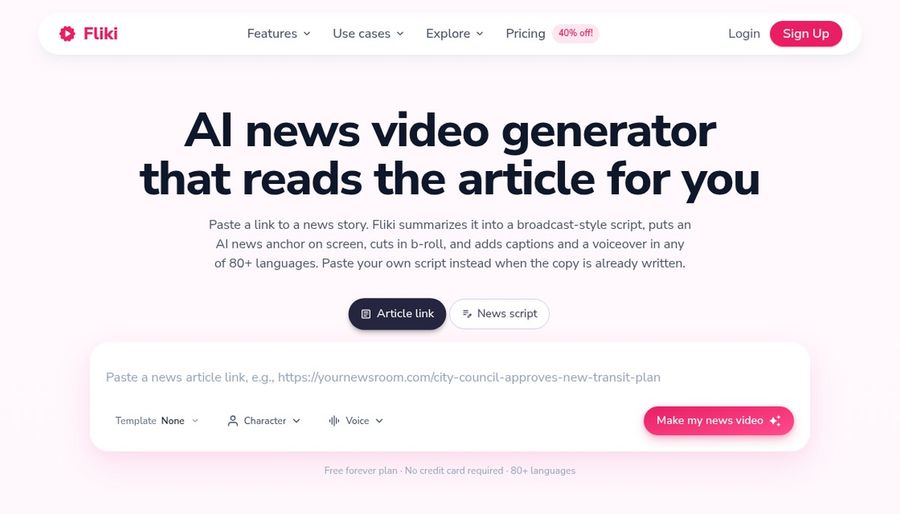
Fliki has a page built for newsrooms that starts from the article you already published. You paste the link, Fliki reads the page and writes a broadcast style script, and, on a paid plan, a stock AI presenter delivers it with stock footage or generated visuals cut in for each segment.
Key Features
- An article link becomes a script written for video, or you paste your own news script instead
- A stock AI news anchor on screen, on paid plans only, with visuals matched to each segment from stock libraries or AI generation
- Word timed captions added by default and open to restyling
- 80+ languages and 2,000+ voices, with the same story run in a second language
- A brand kit for your logo, colors and fonts, and exports for 16:9, 9:16 and 1:1
Best For
- Small newsrooms that want a video version of every story on the site
- Niche channels that run one presenter on a single beat each day
Pros of Fliki
- Starts from the article. The rewrite is done for you, which saves the slowest step for a team without a video desk.
- Script review before voicing. Fliki says the generated script is yours to check, so a name or a quote can be fixed first.
Cons of Fliki
- Stock presenters. The news page offers a stock AI presenter, available on paid plans only, and the Standard plan lists limited stock avatars, so the face is not your own photo.
- Watermark on the free plan. The free plan includes the Fliki watermark, so a published bulletin needs a paid tier.
Overall Fliki Rating
4.7/5 on Capterra from 345 reviews. It has the largest review base in this list.
Pricing
Fliki has a free forever plan with no card required, and it carries the Fliki watermark. AI avatars are on paid plans only: Standard lists limited stock avatars and Premium lists all AI avatars. Standard and Premium are billed per user per month, with a yearly option that carries a discount, and Enterprise is custom.
When to Use It
- You want each published story to have a presented video without a rewrite
- You need the same story in a second language for another audience
3. Prism: Best for Licensed Wire Footage
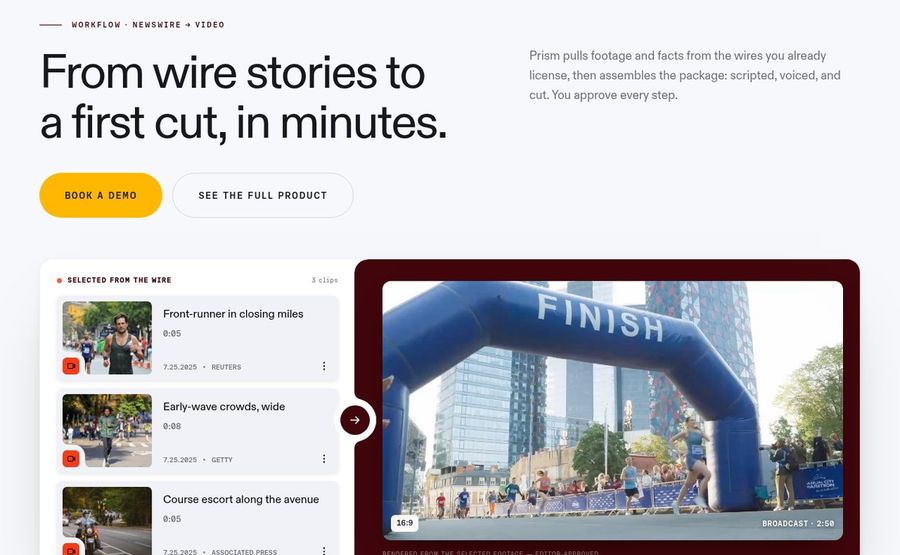
Prism is built for journalists who already hold wire licenses. It pulls footage and facts from sources such as AP, Reuters and Getty that your organization connects, then assembles a package that is scripted, voiced and cut. You approve every step before the next one starts.
Key Features
- One search across the wires and archives you license, with the source, shot and transcript shown on each clip
- An assignment step where you set length, tone, format and style before the script is drafted
- A broadcast script with every shot cued, yours to approve or edit
- Brand music, bumpers and graphic overlays added to the cut
- A voice only read of the script for packages that do not need a face
Best For
- Newsrooms with wire and archive licenses that want a first cut from the day's coverage
- Producers who want to approve each stage and keep sourcing visible
Pros of Prism
- Footage you can stand behind. Results come from sources your team already holds the rights to, with the origin on the clip.
- Editor in control. You approve every step, which fits a newsroom with a sign off process.
Cons of Prism
- Depends on your licenses. Prism says source availability depends on the feeds, archives and licenses your organization connects.
- Highest entry price here. The entry plan is the most expensive starting point in this list, and the product page leads with a demo booking.
Overall Prism Rating
Not listed on Capterra. We found no Prism review page for this product, so we do not give it a score.
Pricing
Prism lists Pro at $199 a month for individual journalists and small desks, and Team at $499 a month for newsrooms that produce every day, with shared projects, roles and priority support. Enterprise is custom, with integrations, API access and a dedicated success manager. Prices are in USD, and media licensing follows each provider's terms.
When to Use It
- Your desk already licenses wire video and wants it assembled into a package
- You need every clip to carry its source and every step to carry an approval
4. VidGen by Genna: Best for Publishers Working at Volume
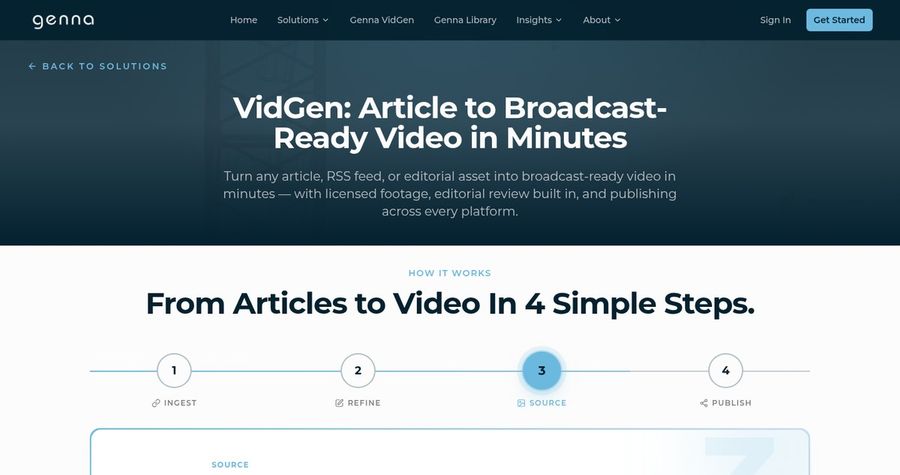
VidGen is the article to video product from Genna, and it is aimed at publishers and newsrooms that convert a lot of copy. It ingests an article, an RSS feed or another editorial asset, refines it, sources licensed media and publishes across platforms, with editorial review built into each step.
Key Features
- Ingest from an article, an RSS feed or another editorial asset
- A licensed media library with stills and video from Getty Images and other partners
- Editorial review built into the workflow, plus CMS integrations and multi language support
- One source can fan out into several formats and publish across platforms
Best For
- Publishers that want video from the archive and the daily feed without growing the video team
- Video first channels that care about rights cleared media
Pros of VidGen
- Rights handled. Licensed footage removes the sourcing and rights step from each story.
- Built for volume. Feeds and CMS integrations suit a publisher with a steady flow of articles.
Cons of VidGen
- No public price. The VidGen page directs you to get started and does not publish a plan or a cost.
- Presenter not described. The page does not say whether a presenter appears on screen, so ask before you assume one.
Overall VidGen Rating
Not listed on Capterra. We found no Capterra page for Genna VidGen, so there is no score to report.
Pricing
Genna does not publish VidGen pricing on the product page. Use the Get Started button to ask for a quote.
When to Use It
- You publish many articles a day and want each to leave the building as video
- Your legal team wants licensed footage and a review step on every item
Bulletin Formats to Try
Each of these runs on one Host and a script you write yourself.
- Morning briefing: the day's three biggest stories in one calm read
- Weekly round up: the week on one beat, from local council to league results
- Explainer desk: one developing story, what happened and what to watch next
- Regional edition: the same bulletin in a second language for a second audience
How to Make a News Bulletin Video From One Photo
The workflow is short. Write a running order first, with the lead story, two or three shorter items and a sign off. Keep sentences short and spell out numbers the way they should be spoken. Choose a Host and a voice, preview the audio, and read the names and figures against your source before you render.
Label the video as AI presented where your outlet or platform requires it. If a fact changes after export, revise the script and run it again.
How to Choose the Right Tool
First ask where your stories begin. If they begin as your own script and you want a branded presenter, choose a tool built around a portrait of your Host. If they begin as published articles, weigh a link to video tool. If they begin as wire footage, look at a tool that works with licensed sources.
- Run one real bulletin script through each shortlisted tool before you commit to a series
- Check who owns the final review step, and whether the tool lets that person change the script
- Confirm the rights to every photo, voice and clip you use
- Read the price page for the tier that matches your publishing schedule, not only the entry plan
If the goal is a recognizable Host fronting a full bulletin that you control end to end, start your trial with Zoice.
FAQ
What is the best AI news video generator?
For a bulletin fronted by one presenter you control, Zoice is the strongest fit, because a single photo becomes a Host who reads your script. For article links, Fliki is a strong fit, and for licensed wire footage, Prism is the closest match.
Can an AI news video generator work from an article link?
Yes, some can. Fliki starts from an article link and writes a script from the page, and VidGen ingests articles and RSS feeds. Zoice starts from your own script or audio, which keeps the wording fully in your hands.
Do I need to check the script before publishing?
Always. A tool that drafts a script can misread a figure or a name. Read the script against your source, preview the audio, and have an editor approve the video before it goes out.
Should I tell viewers a news video is AI generated?
Yes. Many platforms and outlets expect AI presented video to be labelled, and plain disclosure builds trust. Check the rules of each platform you publish on.