Best AI Breaking News Generator: Fast Alert Picks 2026

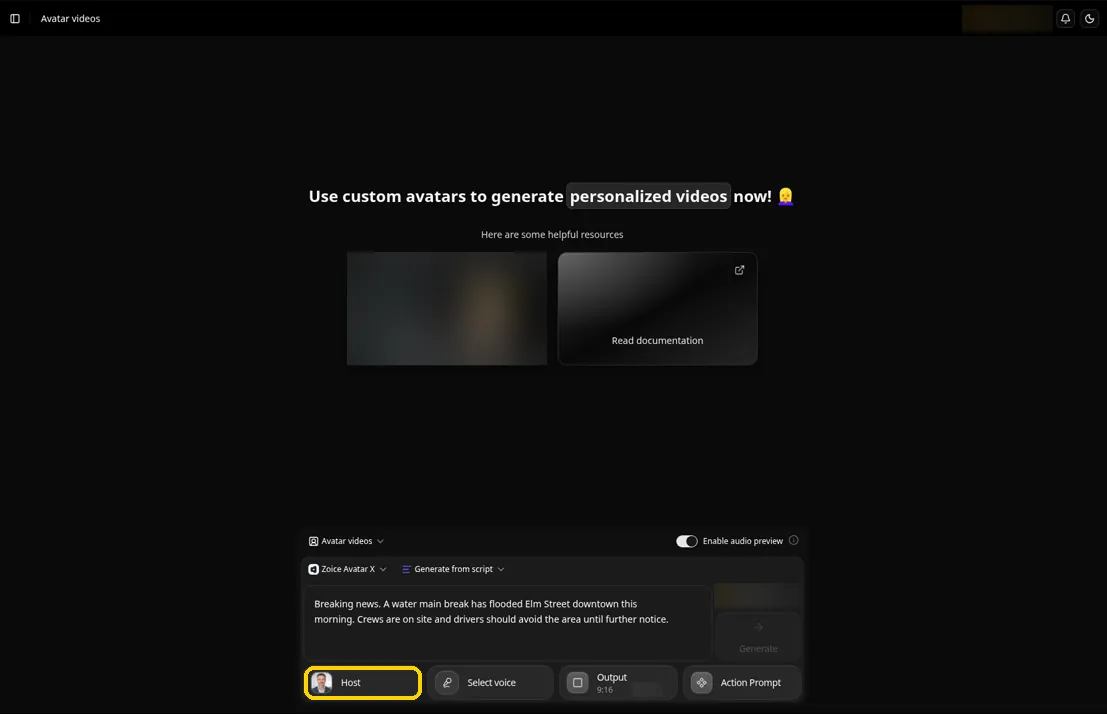
The best AI breaking news generator for a desk that has to publish first is Zoice, our top pick for getting a short, spoken update onto the screen the moment a story is confirmed. Keep one photo of your Host on file, paste three or four sentences of verified copy, and Zoice reads them to camera in your own voice or a stock one. When a number changes an hour later, you edit the line and generate again.
Speed is only useful if the update is right, so we judged four tools on the whole loop: how quickly a story gets in, how easily you can correct it, whether it fits a phone screen, and what it costs to do this many times a day. Zoice leads the ranking, and every tool below it fits a different kind of alert account. For longer, scheduled editions, see our guide to the best AI news video generator tools.
What Is an AI Breaking News Generator?
An AI breaking news generator turns a fresh piece of text into a short news video with very little setup. The input might be a link, a wire alert, a press release, a headline or a few lines you wrote yourself. The output is a vertical or widescreen clip with a voice, captions and sometimes an anchor on screen, ready to post while the story is still moving.
Breaking updates carry a different risk from a polished bulletin. A fast tool can also be fast to publish a mistake, so the best ones keep a person in the loop. That means a script you can read first, a way to fix one line and a clear note that the video was made with AI. If you cover news for a personal brand, our list of the best AI avatar generator for LinkedIn videos shows a calmer format.
Questions worth asking first:
- Input: can it start from a link, a wire alert or only from your own text?
- Correction: how fast can you change one fact and render again?
- Format: does it export a vertical video for Reels, TikTok and Shorts?
- Cost: does a busy news day stay affordable, and can you try it without a card?
Quick Comparison: Best AI Breaking News Generators
| Tool | Best For | Starts from | Anchor on screen | Vertical output | Starting price | Rating |
|---|---|---|---|---|---|---|
| Zoice | One steady Host reading short, verified alerts | A photo of your Host plus your script | Yes, your own Host | Yes, set in Output | Free plan, avatar videos from $7.99/mo | 5.0/5 on Capterra (5 reviews) |
| AINewsGenerator | Urgent format alerts from a link or wire copy | An article, URL, wire alert, topic or script | Yes, a presenter from the library | Yes, 9:16 | Free to start, annual plans from $10/mo | Not listed |
| Editory | Turning a link into a captioned vertical video | A link, a document or an idea | You on camera, or an AI voice | Yes, 9:16 | Free for 3 videos, Creator $20/mo | Not listed |
| ShortLoom | Faceless headline shorts posted on a schedule | A headline or topic | No, visuals are generated; avatars on higher plans | Yes, vertical | $1 trial, plans from $35/mo | Not listed |
Plans in this category move quickly, so confirm every figure on the vendor's own page before you subscribe.
The split is simple. Zoice and AINewsGenerator put an anchor on screen, Editory puts you on camera or lets an AI voice read, and ShortLoom skips the face entirely. Zoice is the one that builds its anchor from your own Host portrait.
1. Zoice: Best AI Breaking News Generator Overall
Zoice suits an account that wants every alert to come from the same trusted face. Its Avatar X model builds a Host from one portrait, so a confirmed headline can be a finished video as soon as the copy is written. Because you supply the words, nothing unchecked ever reaches the screen.
Key Features
- A single portrait is enough to create a Host who delivers your copy to camera
- Audio preview, so you hear the read and catch a wrong name before the video is generated
- Action prompts let you direct a change of expression or a gesture, so an alert can open with a grave look instead of a flat read
- Audio tags in the script set tone, emotion and pacing
- Aspect ratio settings for a vertical phone feed or a widescreen embed
- A cloned voice or one imported from ElevenLabs or LMNT, and scripts in 170+ languages
Best For
- Alert accounts and local desks that publish verified updates under one recognizable face
- Reporters who write their own copy and want a presenter without a camera
Pros of Zoice
- Your words, your Host. The script is yours, so the facts you confirmed are the facts on screen.
- Quick corrections. Change one line, generate again and replace the earlier post.
- Hear it before it renders. Audio preview is a cheap way to check pronunciation of a name or a place.
- Same face every time. A steady Host makes an alert feed look like one outlet, not a stream of unrelated clips.
Cons of Zoice
- Bring your own copy. There is no link or wire import, so confirmed facts go into the script box by hand before you generate.
- Presenter only. Tickers and headline bars have to be added in the editor you already use.
- Early days for reviews. The Capterra rating rests on five reviews.
Overall Zoice Rating
5.0/5 on Capterra from 5 reviews. That is a small sample, so read it as an early signal.
Pricing
| Plan | Monthly Price | What you get |
|---|---|---|
| Free | $0/month | Daily free credits for AI voice, images, chat and transcriptions |
| Starter | $7.99/month | AI avatar videos and one voice profile |
| Basic | $29.99/month | A larger monthly credit allowance and three voice profiles |
| Creator | $49.99/month | More monthly credits and five voice profiles |
| Agency | $89.99/month | The largest allowance and ten voice profiles |
Choosing yearly billing takes 20% off, which suits an alert account that posts every day of the year. Confirm any change on the pricing page before you subscribe.
When to Use It
Choose Zoice when the story is confirmed and you want it on screen fast, in a format your followers recognize. The AI avatar generator page explains how a photo becomes a reusable Host.
- You run an alert account and want every update delivered by the same face
- You write short copy yourself and need to fix a line quickly when facts change
- You publish for phone feeds and want a vertical video from the same script as a widescreen one
2. AINewsGenerator: Best for Urgent Format Alerts From a Link
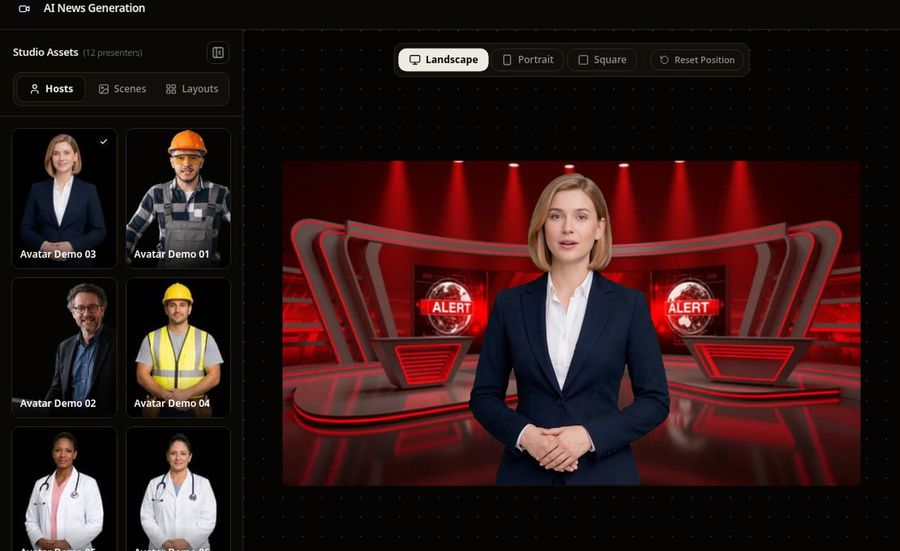
AINewsGenerator has a page named for breaking news, and it behaves like it. Its defaults are Article or URL input, an Urgent tone and a Breaking News format with a headline bar and a ticker, so most of the setup is already done when you arrive. You paste the story, check the script and render.
Key Features
- Input tabs for an article or URL, a wire alert or press release, a one line topic, or a finished script
- A presenter library, with delivery styles, speaking pace and accents to match the story
- News formats including Breaking News, Standard Bulletin, Financial Alert, Sports Flash and Social Clip
- Burned in captions, and 16:9, 9:16 and 1:1 output
- A brand kit that applies your logo, colors and a preset banner to each alert
Best For
- Local news channels, sports and finance alert accounts that work from wire copy
- Creators who run a daily news slot and want a repeatable format
Pros of AINewsGenerator
- Tuned for speed. The page opens on the settings an urgent alert needs, so there is little to configure.
- Several ways in. A link, a wire alert, a topic or a script can all start a segment.
Cons of AINewsGenerator
- Link import costs more. Pasting an article starts on the Professional plan, and URL import and RSS sit on Growth.
- Library anchors. Presenters come from a library, and a custom anchor is part of the top plan.
- Check the facts yourself. The page reminds you to verify the story against your source before you publish.
Overall AINewsGenerator Rating
Not listed on Capterra. No Capterra page turned up for AINewsGenerator, so there is no score to report.
Pricing
AINewsGenerator is free to start with no card. Annual plans start at $10 a month for Starter, then $20 for Professional, $39 for Growth and $59 for Studio on the current pricing page, each billed once a year. One time credit packs are also offered.
When to Use It
- Your alerts start as links or wire copy and you want a ticker and headline bar added for you
- You want a repeatable format that looks the same on every alert
3. Editory: Best for Link to Vertical Video
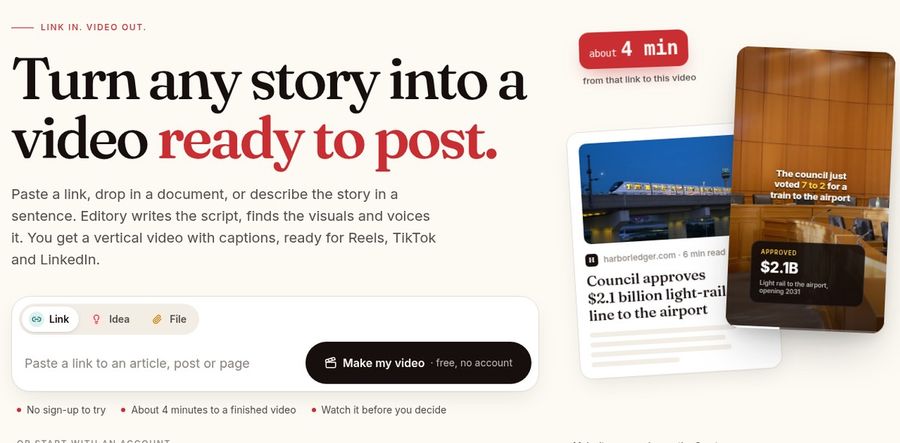
Editory starts with a link and ends with a vertical video with captions, ready for Reels, TikTok and LinkedIn. Paste a link, drop in a document or describe the story in a sentence, and it writes the script, finds visuals and voices it.
Key Features
- Link, file or idea as input, with a script written from the whole story and not only the headline
- Stock footage and the page's own photos, with captions burned in and a caption written for the post
- A web teleprompter, so a reporter can record one take on camera or use an AI voice instead
- Five layouts, plus brand presets for a consistent look
- A Newsroom product that schedules who is on each day and posts to Instagram, TikTok and YouTube
Best For
- Reporters and creators who cover a story from a link and post to social
- Small newsroom teams that want one edit applied to every video
Pros of Editory
- Low barrier to try. The free plan includes three videos, so you can test it on a real story first.
- Keeps the details. The site says numbers, names and quotes stay in the video.
Cons of Editory
- Social first. The output is built for vertical feeds, so a widescreen bulletin needs another tool.
- Mobile app in beta. The Creator app is listed as beta on iPhone and Android.
- Team plan costs more. Newsroom is the step up for a group of up to five people.
Overall Editory Rating
Not listed on Capterra. Editory has no Capterra page that we could open, so we leave the score out.
Pricing
Editory is free for three videos. The Creator plan is $20 a month, and Newsroom is $199 a month for a team of up to five members. The Creator app is in beta.
When to Use It
- You want a story from a link to turn into a captioned vertical post fast
- You want to appear on camera yourself with a teleprompter, or hand the read to an AI voice
4. ShortLoom: Best for Faceless Headline Shorts
ShortLoom turns a headline into a captioned news short. Give it a topic and it builds the whole vertical report, with script, visuals, voiceover and captions, and no footage or photos are needed from you. Series mode handles scheduled posts, daily from Pro, which suits an account that covers one beat.

Key Features
- A headline or topic becomes a script, generated visuals, an AI voiceover and captions
- A news style visual look, voice, language and caption style to choose from
- Series mode for scheduled posts, daily from Pro
- Talking avatars, or a video avatar trained from your own clip, on higher plans
- Voice cloning on higher plans, plus API access for connecting your own tools on higher plans
Best For
- Accounts that post a daily news recap and do not want to appear on screen
- Creators who want to schedule coverage of a niche in advance
Pros of ShortLoom
- Nothing to supply. A headline is enough to get a finished short.
- Scheduling built in. Series mode and a content calendar help an account keep a steady posting rhythm.
Cons of ShortLoom
- Generated visuals. Scenes are created from your headline, so check that nothing on screen suggests real footage of the event.
- Avatars cost more. Talking avatars are on the Growth and Pro plans, not the entry plan.
- Credit based. Plans work from a monthly credit allowance, so heavy use means planning ahead.
Overall ShortLoom Rating
Not listed on Capterra. ShortLoom is absent from Capterra as far as we could find, so no score is shown.
Pricing
ShortLoom offers a $1 trial for eligible new customers. Plans are Starter at $35 a month, Growth at $79 a month and Pro at $199 a month when billed monthly, and the annual toggle on its pricing page is marked Save 10%. A one time credit pack is also available without a subscription.
When to Use It
- You cover a niche daily and want a scheduled stream of short recaps
- You prefer a faceless format and do not need a presenter on screen
Breaking Update Formats to Try
These formats suit one Host and a script you verify yourself.
- Just confirmed: one fact, who confirmed it and what happens next
- Correction card: a short update that replaces an earlier post when a number changes
- Market flash: a rate decision or earnings headline in plain words
- Score and trade alert: a result or a deal, posted before the next update lands
How to Make a Breaking News Video in Minutes
The workflow is short. Write the update in short sentences that answer who, what and where, and keep anything unconfirmed out of it. Pick the vertical aspect ratio for phone feeds, choose a Host and a voice, and preview the audio before you render.
Read every name and figure against your source one more time, then post with a note that the video is AI generated. If the story moves, edit the line and generate again so the corrected version replaces the old one.
How to Choose the Right Tool
First ask how your updates begin. If you write them yourself and want one trusted face, pick a tool that builds the anchor from your Host's portrait. If they begin as links or wire alerts, weigh a tool with article and wire input. If you never want to appear on screen, a faceless headline tool may be enough.
- Test each shortlisted tool on a real alert, then time how long a correction takes
- Check which plan unlocks the input you need, since link and feed import can sit on higher tiers
- Confirm you hold the rights to the source copy, photos and voices you use
- Keep a person responsible for the final check before every post
If you want a trusted Host delivering short, verified updates that you can correct quickly, open a free Zoice account first.
FAQ
What is the best AI breaking news generator?
For short updates read by one steady presenter, Zoice is the strongest fit, since one photo becomes a Host who reads your verified script. AINewsGenerator suits alerts that start as links or wire copy, and Editory suits link to vertical video.
Can I make a breaking news video from a link?
Yes, with some tools. AINewsGenerator and Editory both start from a link, though AINewsGenerator places link import on its higher plans. Zoice starts from your own script, which keeps the wording under your control.
How do I correct a video after I post it?
Edit the script and generate the video again, then replace the earlier post. This is quicker than a reshoot, and it is why a short script is the best format for a story that keeps changing.
Should breaking news videos be labeled as AI generated?
Yes. Add a plain note that the video was made with AI, and check each platform's rules on synthetic media. Verify every fact against a source you trust before posting.