Best AI Pet Podcast Generator

The best AI pet podcast generator is Zoice, our top pick for turning a pet photo into a podcast Host. Upload a clear photo, add a script or your own audio, pick a voice, and Zoice makes a video where your pet presents the episode.
This guide compares Zoice with JoggAI, DreamFace, HitPaw, CapCut, Wondercraft AI, Podcastle, and HeyGen. It also walks through the exact steps in Zoice and answers common questions about AI dog, cat, and talking pet podcasts.
What to Look for in an AI Pet Podcast Generator
If the pet never appears, an audio tool is enough. If the pet hosts the show, you need a tool that turns a pet photo into a speaking Host and exports a video.
- A pet photo you can use as the Host
- A script you type or an audio track you upload
- A choice of voices that suit your pet
- Simple sizes for TikTok, Reels, Shorts, and YouTube
- A preview step so you can check the words before the video is made
1. Zoice: Best AI Pet Podcast Generator Overall
Zoice is the pet podcast generator to use when your pet has to be seen hosting the show. You save your pet once as an avatar called Host, then reuse it for every episode.
Key Features
- Turn a clear pet photo into a reusable Host
- Write the episode script or upload your own recording
- Pick a voice profile or use a voice you cloned
- Add audio tags such as excited, whispers, or laughs to shape the delivery
- Preview the audio before the video is made
- Choose 9:16 for Shorts and Reels or 16:9 for YouTube
Best For
Zoice fits a pet show people watch: a weekly joke, a training tip, a toy review, or a short Host intro before your real pet footage.
Pros
- The pet photo, the script, and the voice live in one project
- Your Host is saved and reused across episodes
- Runs in your browser with no editing skills needed
- Audio preview lets you fix the script before you generate
Cons
- Needs an internet connection
- Smaller public avatar library than some rivals
When to Use It
When your pet photo and episode script are ready, Try Zoice and make your first episode with your own Host.
How to Make an AI Pet Podcast with Zoice
These steps follow our pet talking guide and our dog talking guide. The screenshots come from that walkthrough, which used a bunny as the demo pet.
Step 1: Sign In to Zoice
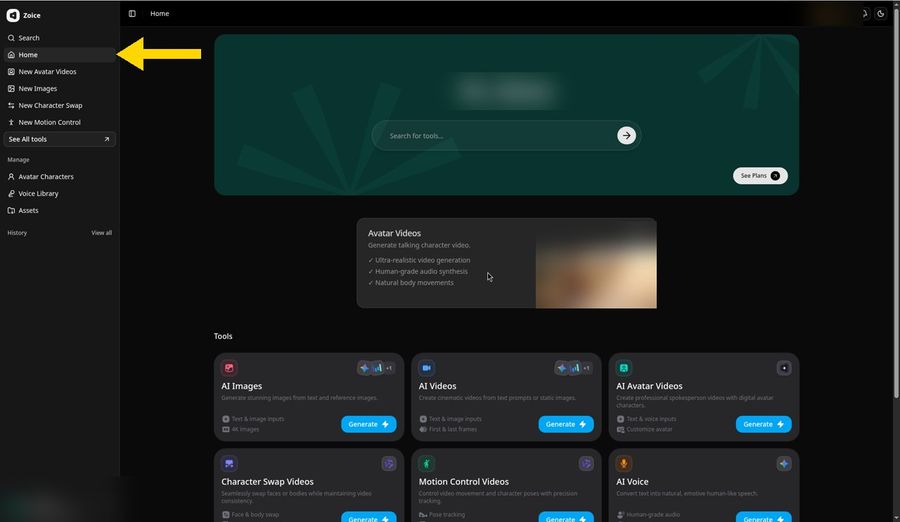
Go to app.zoice.com and sign in with your email and password, or with Google. New to Zoice? Click Sign up on the login form to create a free account. The Zoice home page opens with Home selected in the left sidebar.
Step 2: Open New Avatar Videos and Click Create New
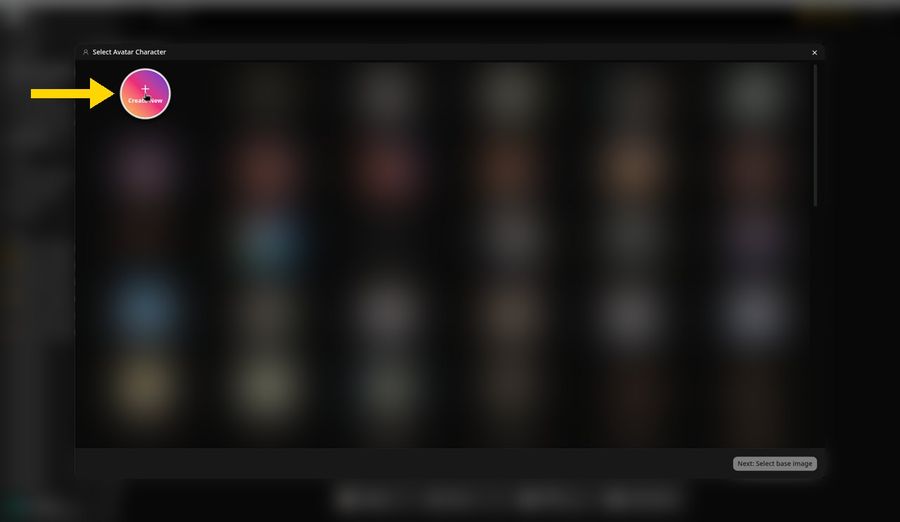
In the left sidebar, click New Avatar Videos. In the composer at the bottom, click Avatar Character, then click Create New to add your pet.
Step 3: Choose Upload Image
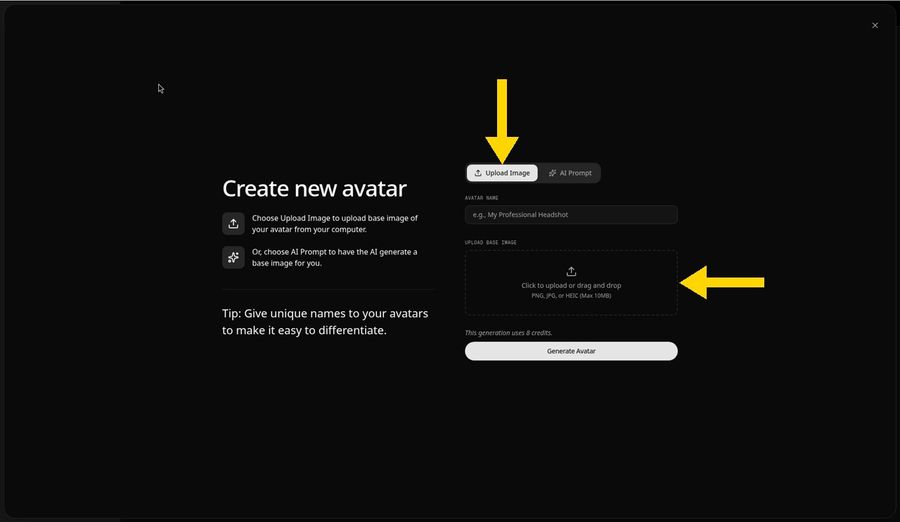
The Create new avatar panel opens. Keep the Upload Image tab selected, then click the upload area or drag your file onto it. Zoice accepts PNG, JPG, and HEIC files up to 10 MB.
Step 4: Upload Your Pet Photo and Name It Host
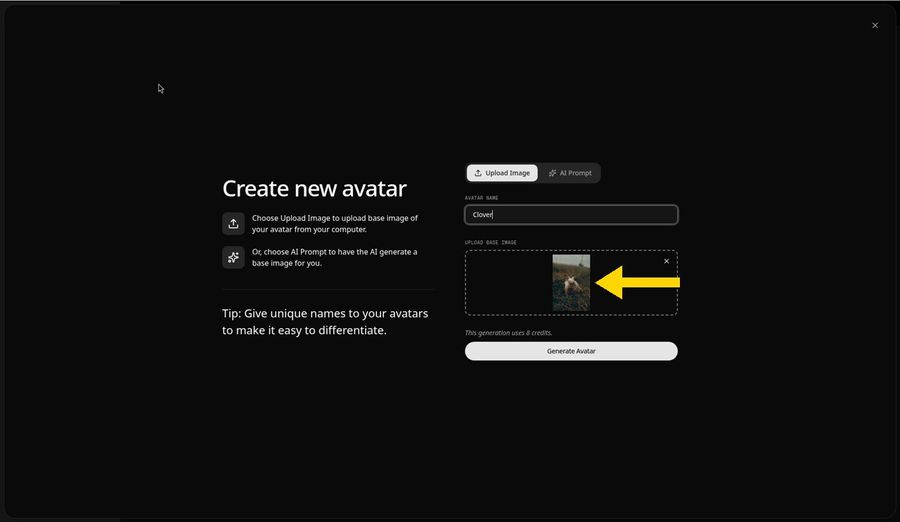
Pick a clear, front facing photo of your pet with the eyes open and soft, even light. A preview appears in the upload area. Type Host in the Avatar Name field so your podcast avatar is easy to find later.
Step 5: Click Generate Avatar
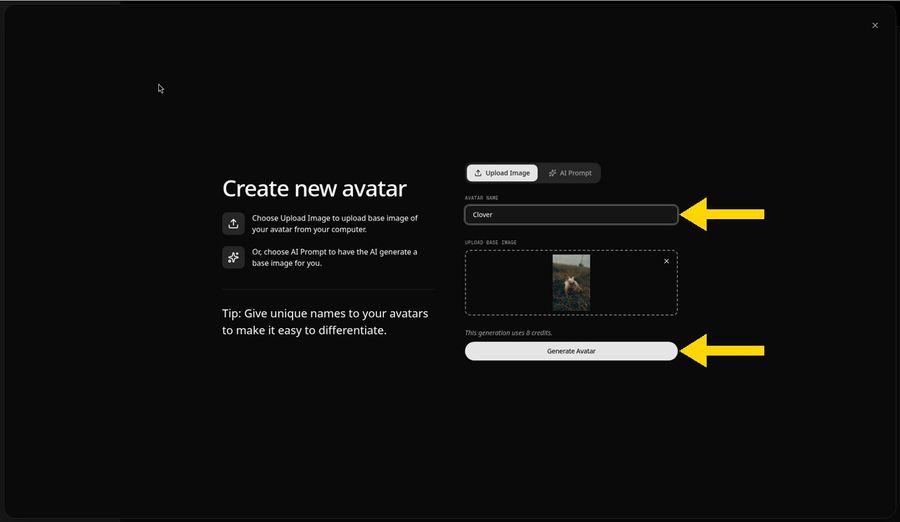
Click Generate Avatar. Zoice saves your pet to Avatar Characters, so you can reuse Host in every episode.
Step 6: Open the Add Script Panel
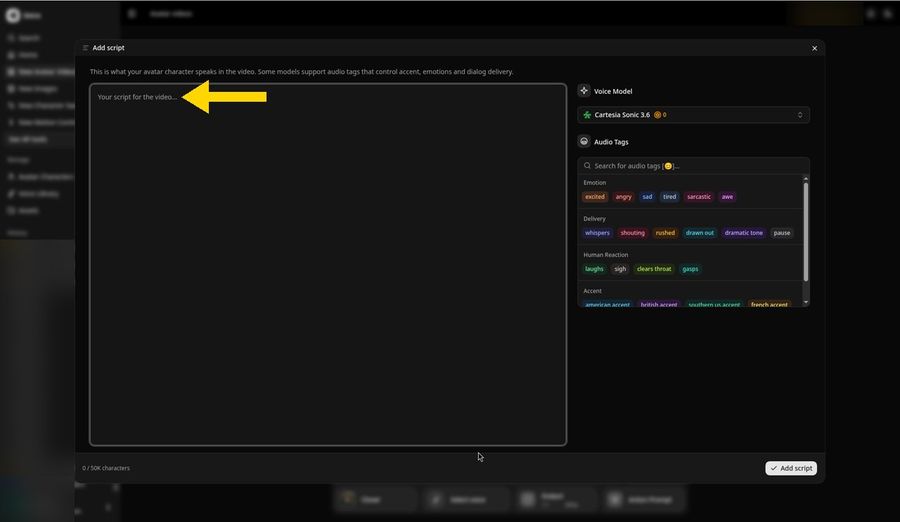
Back in the composer, click the script box to open the Add script panel. This is where you write what your Host will say.
Step 7: Paste Your Episode Script and Click Add Script
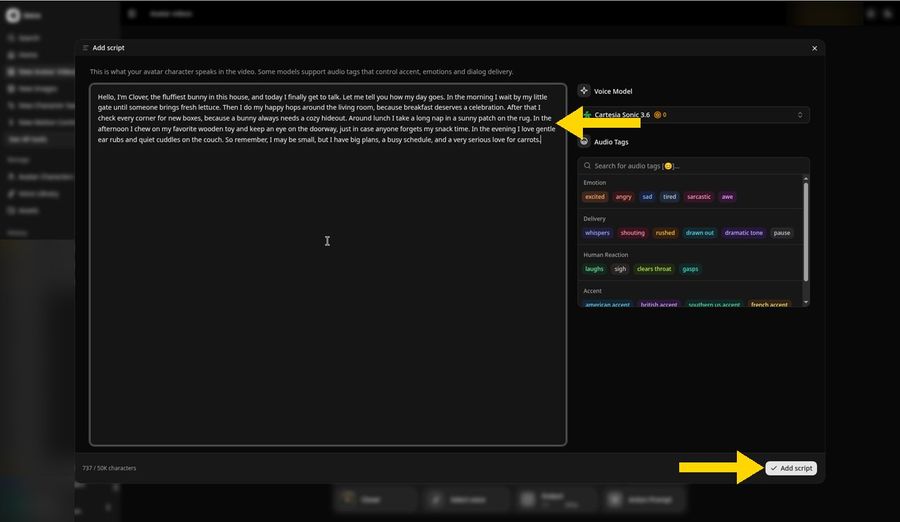
Type or paste the episode script. Keep a first episode short with one topic, such as a training tip or a toy review. Audio tags like excited, whispers, or laughs shape how each line is delivered. Then click Add script.
Step 8: Pick a Voice
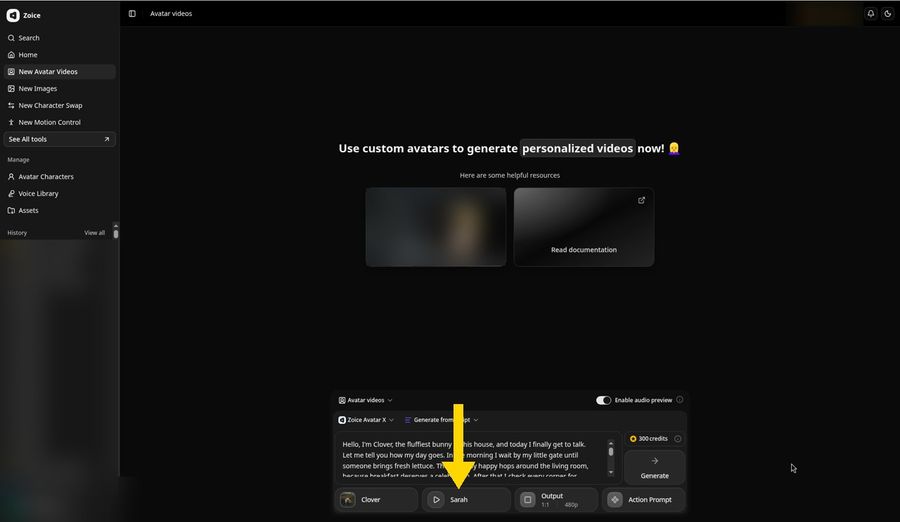
Click the voice button in the composer and pick a voice profile, or use a voice you cloned. A soft, friendly voice suits a small pet. A big, warm voice suits a large dog.
Step 9: Click Generate and Check the Audio Preview
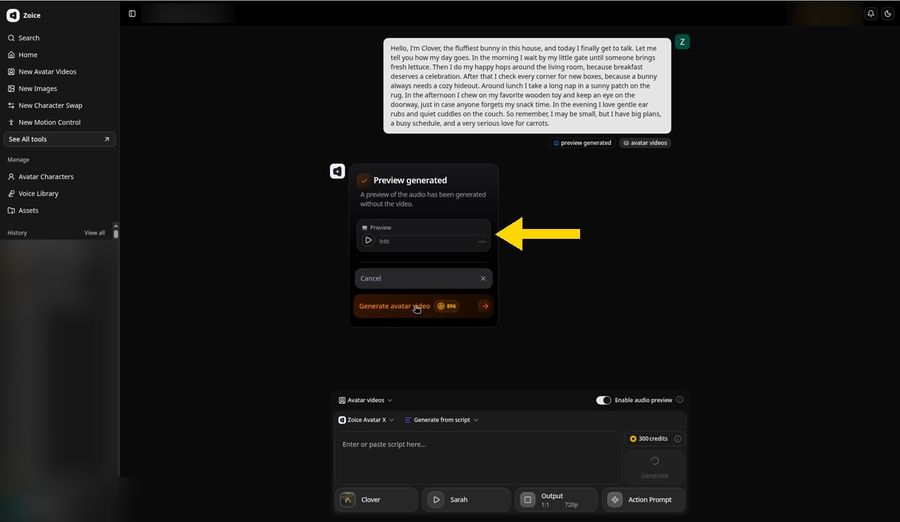
Click Output to pick the aspect ratio, such as 9:16 for TikTok, Reels, and Shorts or 16:9 for YouTube. Then click Generate. With Enable audio preview switched on, Zoice first makes an audio preview. Press play to check the words and timing, then click Generate avatar video.
Step 10: Download Your Episode
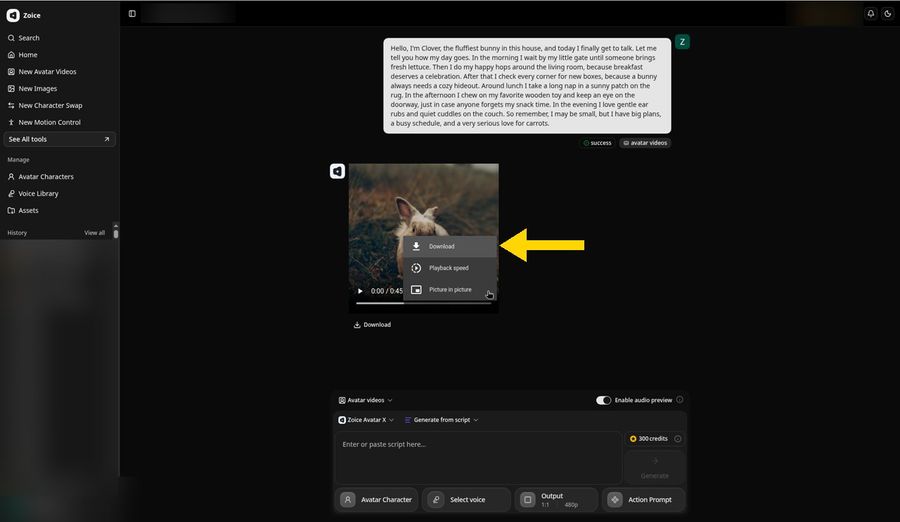
When the status changes to success, press play to check the voice. To save the episode, open the three dot menu in the player and choose Download, or click the Download link below the player.
Step 11: Share Your Pet Podcast
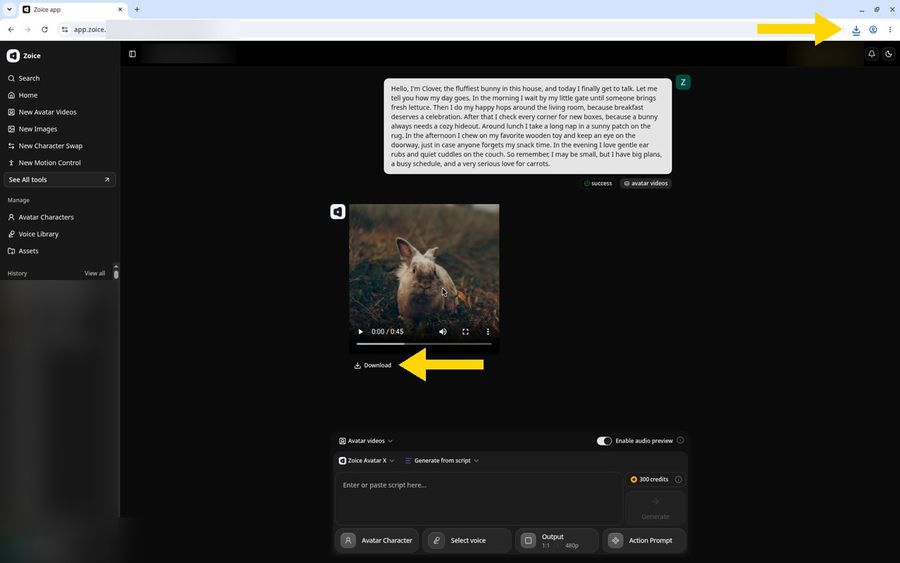
Your browser saves the video. Post it to TikTok, Instagram Reels, or YouTube Shorts. Only use photos you own and audio you have the rights to use.
Want a single funny line instead of a full episode? Compare the best AI talking pet generators. Turning a human podcast into video? See the best AI podcast video generators.
2. JoggAI: Two Pet Hosts in One Video
JoggAI has a talking animal tool where you upload a pet photo, then type text or upload a recording. Its page says the pet podcast mode can show two talking pets at the same time, and pets can also sing or rap to a track you pick.
Use JoggAI if you want two animal hosts in the same frame. Use Zoice when you want your own pet saved as a reusable Host with an audio preview before each episode.
3. DreamFace: AI Dog Podcast Templates
DreamFace offers an AI dog podcast tool and a general AI podcast generator. You upload a dog photo or choose from animal avatars such as cats, dogs, pandas, and gorillas, then add a recorded voice, a preset voice, or text overlays.
DreamFace fits creators who like ready made animal characters and templates. Zoice fits creators who want their real pet as the Host.
4. HitPaw: Pet Photo to Video
HitPaw Online Video Generator offers text to video and image to video, so you can animate a pet photo or describe an animal scene. It includes pet templates and exports in ratios for TikTok and Reels.
HitPaw suits short animal clips and greetings. It is not built around a scripted podcast Host, so pair it with a voice tool or use Zoice for the full episode.
5. CapCut: AI Voice for Pet Videos
CapCut has a free online AI voice generator. You type text, pick a voice, accent, tone, and language, then adjust speed, pitch, and volume inside the same video editor.
CapCut is useful for voicing pet clips you already filmed. For a pet Host that presents the episode from a photo, Zoice is the simpler route.
6. Wondercraft AI: Audio Pet Podcasts
Wondercraft AI is an audio podcast generator. Use it for a pet show that is only sound, and do not expect a pet Host on screen.
7. Podcastle: Audio Production
Podcastle is built for recording and editing podcast audio. It fits polishing the soundtrack, while the on screen pet still has to be made elsewhere.
8. HeyGen: Human Video Hosts
HeyGen is an AI avatar video tool, and some creators have used it to turn a dog photo into a podcast host. Its focus is human presenters, so Zoice is the more direct choice for a pet Host.
Pet Podcast Ideas
Let your Host carry one idea per episode.
- A weekly training tip in one sentence
- A pet review of a toy you show next
- A Host intro, then a cut to real pet footage
- Your dog interviewing your cat about the humans
- A listener question answered by your Host
How We Compared
We compared each tool on whether it can turn a pet photo into a speaking host, how the episode is driven, and how easy the workflow is. Features for other tools come from their own public product pages. Zoice steps come from our own tested guides.
How to Choose
- Choose Zoice for your own pet as a reusable podcast Host
- Choose JoggAI for two animal hosts in one frame
- Choose DreamFace for ready made animal podcast templates
- Choose HitPaw for short animated pet clips
- Choose CapCut to voice pet footage you already filmed
- Choose Wondercraft AI or Podcastle for audio only shows
FAQ
What is the best AI pet podcast generator?
Zoice is our top pick. You upload a pet photo, save it as Host, add a script or audio, preview the voice, and download the episode.
How do I make an AI dog podcast?
Upload a clear, front facing photo of your dog to Zoice, name the avatar Host, add your episode script, pick a big, warm voice, and click Generate. Our dog talking guide shows every screen.
Can I make an AI cat podcast?
Yes. The same steps work for cats. Use a calm photo with the eyes open and even light, keep the cat alone in the frame, and choose a voice that suits its personality.
What is a talking pet podcast?
A talking pet podcast is a short video show where a pet appears as the host and speaks a script. Creators post them on TikTok, Reels, and Shorts as weekly episodes, reviews, or interviews.
Do I need editing skills?
No. Zoice runs in your browser. You upload a photo, add a script, pick a voice, and download the finished episode.