Best AI Character Swap Tools: Our Top Picks for 2026
Swapping a character used to mean a reshoot or frame by frame editing. Now you can upload a clip, add one image of the new character and let AI handle the replacement. Zoice is our top pick: you upload the video of the person to replace, add an image of the new character and click Generate, with no prompt to write.
This guide compares Zoice with Viggle, Magic Hour and DomoAI so you can pick the right tool for your clip. Each entry covers key features, who it suits, pros, cons, the G2 rating where one exists and how pricing works.
What Is AI Character Swap?
AI character swap replaces the person in an existing video with a new character taken from an image. The movement, timing and scene come from your clip, and the look of the character comes from the picture you add.
It suits creators who already have a clip they like and want a different character in it: a meme, a social post, a mascot in a trend video or a quick test of a new look. Some tools swap only the face, others replace the whole body, so check which one you need.
Quick Comparison: Best AI Character Swap Tools
| Tool | Best For | Your own video | Character image | Face or body | Starting price | Rating |
|---|---|---|---|---|---|---|
| Zoice | Replacing the person in your own video | Yes | Yes, one image | Faces or bodies | Free plan; paid from $7.99 per month | Not listed |
| Viggle | Trend and template swaps | Template or your own clip | One photo | Face and body | See tool site | Not listed |
| Magic Hour | Choosing Replace or Animate | Yes | Reference image | Whole character in Replace mode | See tool site | 4.9/5 on G2 |
| DomoAI | Whole body and outfit changes | Reference motion video | Character image | Whole body and outfit | See tool site | Not listed |
1. Zoice: Best Overall
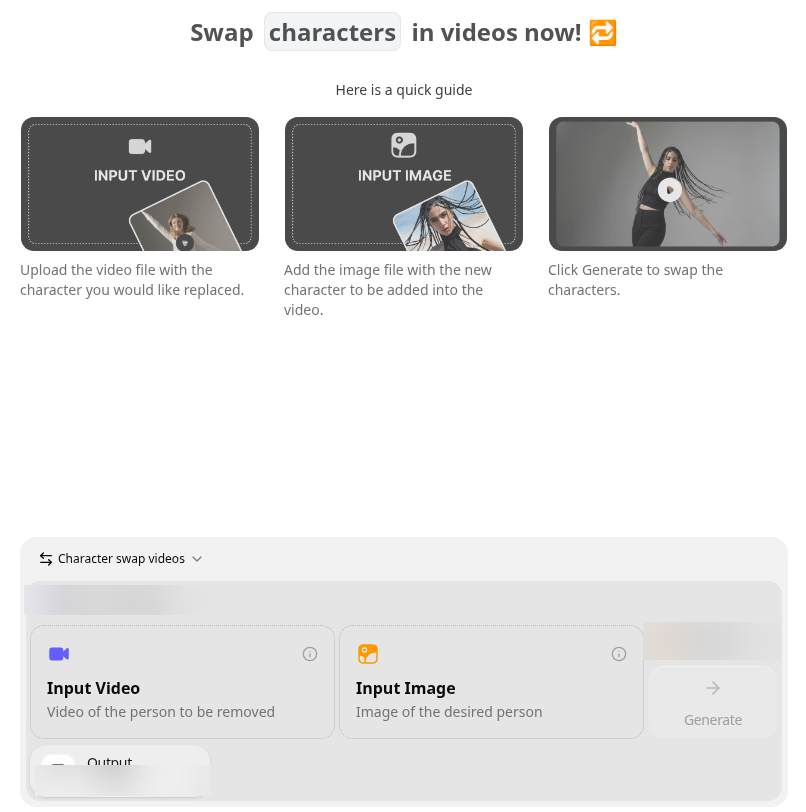
Zoice Character Swap lives in the same workspace as avatar videos, images, motion control and voice. You add two files, a video and an image, and click Generate. There is no prompt field, so the result depends on the clip and the picture you choose.
Key Features
- Input Video: upload the video with the character you would like replaced
- Input Image: add the image of the new character to place in the video
- Click Generate to swap the characters
- Swap faces or bodies
- No prompt to write
Best For
Replacing the person in a video you already have with one new character image.
Pros of Zoice
- Same workspace as avatar videos, images and voice
- No prompt needed
- Free plan available
Cons of Zoice
- Needs an internet connection
- Smaller public avatar library
Overall Zoice Rating
Not listed. Zoice does not yet have a G2 rating for this use.
Pricing
Zoice has a free plan, and paid plans start at $7.99 per month. Yearly billing saves 20%.
When to Use It
- You have a clip and want a different character in it
- You would rather upload two files than write a prompt
- You also make avatar videos, images or voiceovers in the same place Try Zoice
For more ideas, see our guides to the best AI meme video generator and the best AI influencer video generator.
2. Viggle: Best for Trend and Template Swaps
Viggle swaps the face and body in a video from one photo. You can start from its library of video templates or use your own clip, and Multi-Track lets you swap more than one character. If you are weighing it up, our Viggle alternative page compares it with Zoice in more depth.
Key Features
- Face and body swap from one photo
- A library of video templates, or your own clip
- Multi-Track for more than one character
- Motion control and dance tools on the same site
Best For
Trend and template style swaps for social clips.
Pros of Viggle
- Templates make a quick start easy
- Can swap several characters in one video
Cons of Viggle
- The free plan adds a watermark
Overall Viggle Rating
Not listed.
Pricing
Viggle has a free plan, and paid plans remove the watermark. See tool site for current prices.
When to Use It
Pick Viggle when you want a trend template or need to swap several characters at once.
3. Magic Hour: Best for Choosing Replace or Animate
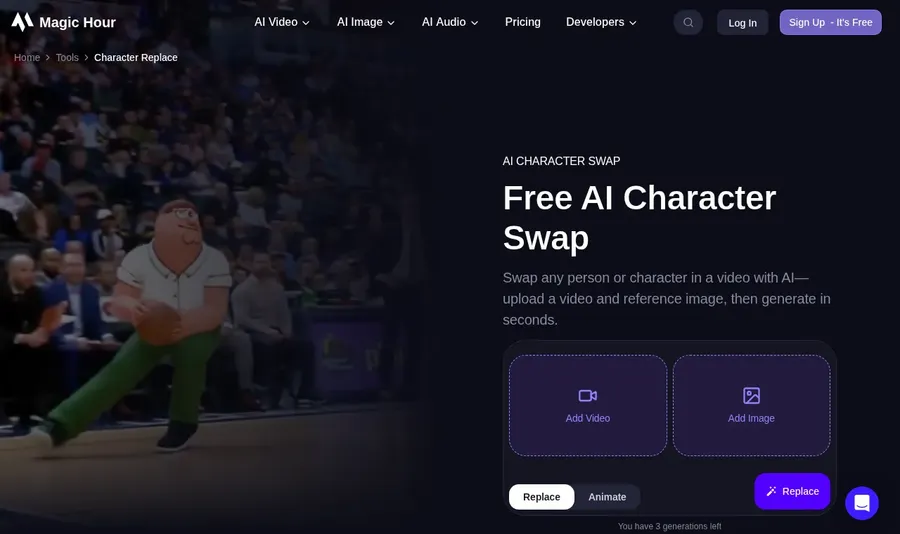
Magic Hour's Character Replace takes a source video and a reference image and offers two modes. Replace puts the new character into the video, and Animate moves the image with the video's motion.
Key Features
- Character Replace with Replace and Animate modes
- A separate Face Swap Video tool
- A Body Swap tool for still images
- Free tries without sign up
Best For
Choosing between replacing the person and animating the image with the video's motion.
Pros of Magic Hour
- Two modes in one tool
- You can try it before signing up
Cons of Magic Hour
- The free option adds a watermark
Overall Magic Hour Rating
4.9/5 on G2 from 4 reviews.
Pricing
Magic Hour has a free option, and paid plans remove the watermark. See tool site for current prices.
When to Use It
Pick Magic Hour when you are not sure yet whether to replace the person or animate your image.
4. DomoAI: Best for Whole Body and Outfit Changes
DomoAI's Character to Video swaps the whole body and outfit while following the reference motion. A Subject Only mode keeps the original background.
Key Features
- Character to Video swaps the whole body and outfit
- Follows the motion of the reference video
- Subject Only mode keeps the original background
- Accepts MP4, MOV or AVI video plus a JPEG, PNG or JPG image
Best For
Whole body and outfit changes that follow a reference clip.
Pros of DomoAI
- Changes the outfit, not only the face
- Option to keep the original background
Cons of DomoAI
- Image uploads are capped at 10 MB
Overall DomoAI Rating
Not listed.
Pricing
See tool site.
When to Use It
Pick DomoAI when the outfit and full body should change along with the character.
How to Choose the Right AI Character Swap Tool
- Choose Zoice if you have your own clip and want a prompt free swap of faces or bodies.
- Choose Viggle if you want templates or several characters in one video.
- Choose Magic Hour if you want to switch between Replace and Animate.
- Choose DomoAI if the outfit and whole body should change.
Want a presenter instead of a swap? Try the Zoice AI avatar generator or read our best AI avatar generator for social media guide.
FAQ
What do I need to swap a character in a video?
Two files: a video of the person you want to replace and an image of the new character. In Zoice you upload both in Character Swap, with no prompt.
Is a character swap the same as a face swap?
Not always. A face swap changes only the face, while some tools replace the whole character. Zoice can swap faces or bodies.
Do I need to write a prompt?
Not in Zoice. Character Swap works from your video and your image alone.