Best AI Avatar Generator for Coaches: Top Picks for 2026
The best AI avatar generator for coaches is Zoice, our top pick, because it turns a single photo of you into course lessons, cohort check ins, and social promos that speak in your own cloned voice. You paste a lesson script, choose one of 170+ languages, and export anything from a quick 9:16 promo to a 4K module. When a program changes, you rewrite a few lines and generate again rather than booking a filming day.
We judged four tools by one coaching question: would clients believe it is really their coach on screen? We looked at your likeness, your voice, how fast a lesson can be refreshed, how long one take can run, and whether the price works for a solo practice. Zoice came out first, and the other three each win for a narrower coaching use.
What Is an AI Avatar Generator for Coaches?
It is a tool that reads your written lesson and returns a video of you delivering it. Coaching programs repeat themselves on purpose: every new cohort hears the same welcome, works through the same modules, and gets a nudge each week. Because the video starts as text, one edit refreshes the lesson for every future client, still in your face and voice.
We focus here on coaches running their own business, so think online courses, cohort programs, and promos on Instagram or YouTube. Classroom teachers and corporate trainers have different needs and separate guides.
Before you choose, test each tool against this coaching list:
- Likeness: one photo of you becomes the presenter
- Voice: a clone that sounds like you in lesson one and lesson twenty
- Mouth accuracy: every spoken word lines up with the lips
- Refresh speed: a module edit takes minutes, not a reshoot
- Take length: a full lesson fits in a single generation
- Budget: pricing that a solo coach can carry month to month
Words you will meet while shopping:
- AI avatar for coaches: your talking double, built from a photo
- Coaching video avatar: whoever presents your lesson script on screen
- Online course avatar: one presenter reused through every module of a course
- Client check in video: a quick personal message between live sessions
Quick Comparison: Best AI Avatar Generators for Coaches
| Tool | Best For | Photo only input | Lip sync | Gestures and expressions | Max resolution | Starting price* | Rating |
|---|---|---|---|---|---|---|---|
| Zoice | Course lessons, cohort check ins, and promos in your own face and voice | Yes, a single photo or a character | Yes, lip synced to your script | Yes, directed by action prompts | 4K | $7.99/mo for avatar videos | Capterra 5.0/5 (5 reviews) |
| HeyGen | Coaches who also want stock presenters and cohort quizzes | Yes, unlimited photo avatars on paid plans | Yes | Motion / Gesture Control turns a still into a 5 to 10 second clip | 4K on Pro | $29/mo after a free tier | G2 4.8/5 |
| Synthesia | Coaches selling programs into companies | Yes, a personal avatar from one photo | Yes | Stock avatars gesture and can be prompted to act | 1080p Full HD | $29/mo after a free tier | G2 4.6/5 |
| Hedra | One long take from a portrait plus your recording | Yes, photos and drawn characters | Yes, driven by the audio | Prompts guide the delivery | 1080p | Studio plans from $20/mo | Not listed |
*Coaching budgets matter, so confirm current prices on each vendor's own site before buying. Every rating names its source, either G2 or Capterra.
Each of these can put a talking presenter in front of your clients. Zoice is built around your own photo and voice at up to 4K, HeyGen leans on its stock library and cohort tools, Synthesia on corporate templates, and Hedra on long audio driven takes.
1. Zoice: Best AI Avatar Generator for Coaches Overall
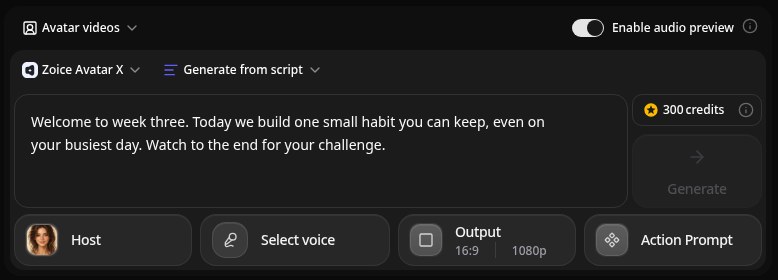
Zoice fits a coach who wants to appear in every module without setting up a camera. Its Avatar X model turns your photo into a talking lesson from a typed script or your own audio, lip synced to your script, while action prompts direct gestures, body motion, and expressions so encouragement feels warm. A short voice sample is enough to clone your voice, scripts work in 170+ languages, output runs from 480p to 4K in any aspect ratio, and a single generation can last up to 10 minutes, long enough for most course lessons.
Key Features
- One photo or character image becomes your course presenter
- Lessons lip synced to your script, or to audio you record
- Clone your voice from a short sample, or pick from 50+ voices
- Bring voices over from ElevenLabs or LMNT
- Write lessons in 170+ languages and dialects
- Action prompts that direct gestures, body motion, and expressions
- Vertical promos, square posts, or wide lessons from 480p to 4K
Best For
- Life, business, and fitness coaches with a paid course
- Coaches running cohorts who check in with every member weekly
- Coaches who promote programs on Instagram, TikTok, or YouTube
Pros of Zoice
- Your face in every module
Save one presenter and reuse it from the first lesson to the last.
- Clients hear you
A cloned voice keeps the tone your clients signed up for.
- Crisp on any screen
Lessons export up to 4K for laptops, TVs, and phones.
- Warmth you can direct
Action prompts tell the avatar how to gesture and emote on a key line.
- Refresh a lesson fast
Swap a sentence in the script and generate the module again.
- Know the cost first
Credits depend on resolution and length and show before you render.
Cons of Zoice
- No course hosting
Zoice gives you the video file, while your course platform still handles payments, logins, and progress.
- Starter plan required
Free accounts get voice, images, chat, and transcription, and avatar video begins on Starter.
Overall Zoice Rating
Capterra rating: 5.0/5 (5 reviews)
Pricing
| Plan | Monthly Price | Good for coaches who |
|---|---|---|
| Free | $0/month | want to try voice, images, chat, and transcription with 50 daily credits |
| Starter | $7.99/month | are making their first course lessons, with 4K credits and 1 voice profile |
| Basic | $29.99/month | publish weekly, with 17K credits and 3 voice profiles |
| Creator | $49.99/month | run several cohorts, with 30K credits and 5 voice profiles |
| Agency | $89.99/month | coach as a team, with 50K credits and 10 voice profiles |
Paying yearly takes 20% off. Each avatar video costs credits based on its length and resolution, so a short vertical promo uses far fewer than a long 4K lesson.
When to Use It
Pick Zoice when you want to be the face of the whole course, your modules keep evolving, and clients expect your real voice.
- Turn a written module into a lesson without a camera.
- Send each cohort member a short Monday check in.
- Cut a vertical promo that explains who the program is for. Try Zoice
2. HeyGen: Best for Stock Presenters and Cohort Quizzes
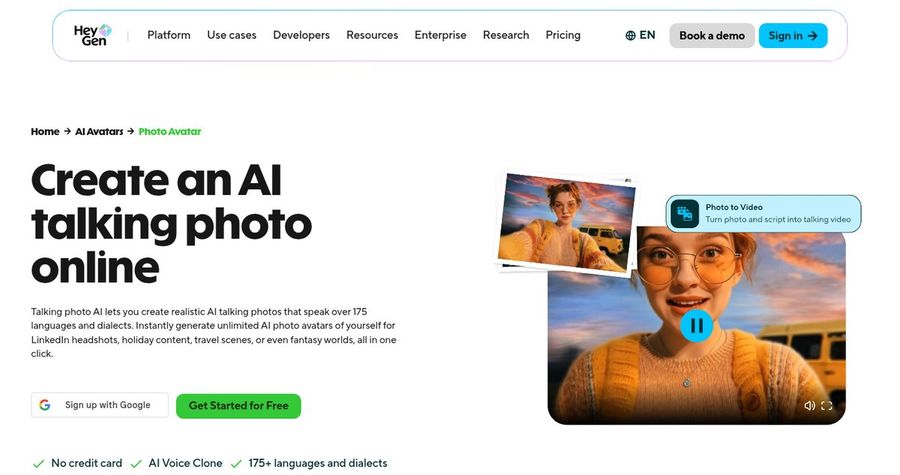
HeyGen suits coaches who want a large bench of stock presenters next to their own photo avatar. Paid plans list 700+ stock video avatars, unlimited photo avatars, voice cloning, and 175+ languages and dialects, and the pricing table names Motion / Gesture Control, which turns a still image into a 5 to 10 second clip with full background and body motion.
Key Features
- Over 700 stock avatars once you upgrade
- Photo avatars without a cap on paid tiers
- Voice cloning, with more usage as plans grow
- Narration in 175+ languages and dialects
- Motion / Gesture Control and Custom Voice Emotion listed in the plan table
- Exports at 1080p on Creator and 4K on Pro
Best For
- Coaches who mix their own avatar with stock presenters
- Cohort programs that want quizzes inside the video
Pros of HeyGen
- Plenty of presenters
Guest experts and role play characters can come from the stock library.
- Quizzes for cohorts
Business adds interactive video with quizzes, plus an export that course platforms use to track who finished a lesson.
Cons of HeyGen
- Costs more to start
Creator is $29 a month, against $7.99 for avatar video on Zoice.
- Cohort tools sit high
Quizzes and course platform export need Business at $149 a month.
Overall HeyGen Rating
G2 rating: 4.8/5. Best for Stock Presenters and Cohort Quizzes
Pricing
You get 3 free videos a month at up to a minute each. Creator runs $29 monthly or $24 on a yearly plan and exports 1080p, Pro begins at $49 with 4K, and Business is $149 a month with extra seats at $20. HeyGen's own pricing page has the latest numbers.
When to Use It
Reach for HeyGen if your course needs quizzes inside the video. Stay with Zoice if you want your own face at 4K for less money.
3. Synthesia: Best for Coaching Programs Sold to Companies
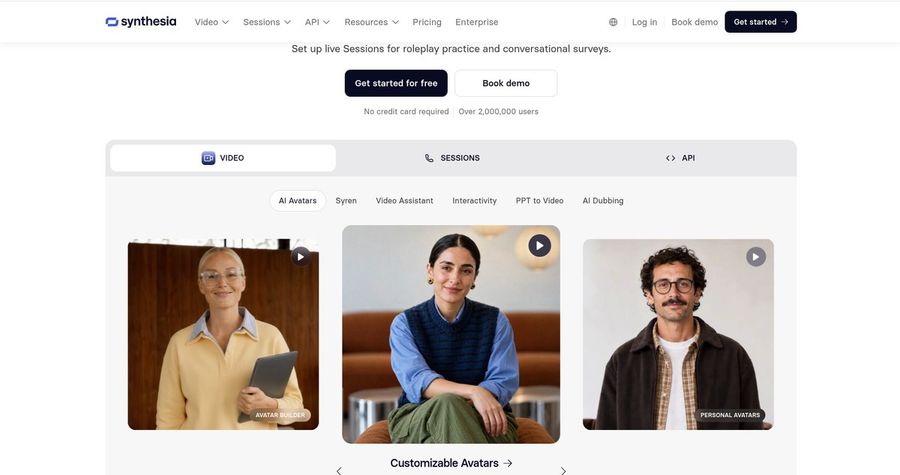
Synthesia is a good match when you sell coaching into companies and need a corporate polish. Its business platform lists 125+ to 240+ stock avatars by tier, personal avatars from one photo or a short clip, 60+ templates, voice cloning, and 140+ languages and voices, with downloads delivered as Full HD MP4.
Key Features
- Between 125 and 240 stock avatars, rising with the plan
- Personal avatar from a single photo or a short recording
- A cloned voice paired with your personal avatar
- 140+ languages and voices
- 60+ templates and PowerPoint import for workshop decks
- MP4 downloads in Full HD
Best For
- Executive and team coaches who deliver programs to HR teams
- Coaches who already teach from slide decks
Pros of Synthesia
- Looks corporate
Templates and brand settings match what company buyers expect to see.
- Wide language range
140+ languages help when a client company spans countries.
Cons of Synthesia
- Lower ceiling on quality
Downloads stop at Full HD, while Zoice goes to 4K.
- Higher entry fee
Starter is $29 a month on monthly billing, compared with $7.99 on Zoice.
Overall Synthesia Rating
G2 rating: 4.6/5. Best for Coaching Programs Sold to Companies
Pricing
Basic costs nothing and allows 10 minutes of watermarked video monthly. Starter is $29 a month, or $18 a month paid yearly, and Pro is $89 a month, or $64 paid yearly. See Synthesia's pricing page before you commit.
When to Use It
Go with Synthesia when the client is a company that wants templated, branded lessons. Go with Zoice when you want a sharper file in your own voice at a smaller monthly cost.
4. Hedra: Best for Long Takes From One Portrait
Hedra works best for a coach who has already recorded the audio and wants one portrait to perform it. Its native Hedra Character 3 model turns a still image plus an audio track into a talking video of up to 10 minutes per generation at 540p, 720p, or 1080p, with the voice coming from a typed script, a clone of a sample you own, or your own recording.
Key Features
- A talking video from a photo, drawing, or 3D character
- Hedra Character 3 as its native avatar model
- Up to 10 minutes in one generation, driven by your audio
- Output at 540p, 720p, or 1080p in square, vertical, or wide frames
- Voice cloning plus ElevenLabs voices in the same studio
- Text prompts that guide the delivery
Best For
- Coaches who record a podcast or audio lesson first
- Coaches whose brand is an illustrated character
Pros of Hedra
- One take for a whole lesson
A ten minute recording becomes one video instead of several stitched clips.
- Any kind of face
Photos, drawings, and 3D mascots can all act as the portrait.
Cons of Hedra
- Stops at 1080p
Hedra Character 3 tops out at 1080p, where Zoice reaches 4K.
- A wider creative studio
The avatar model lives inside a larger studio full of image, video, and audio models, which adds choices a coach may not need.
Overall Hedra Rating
Rating: Not listed on G2 or Capterra. Best for Long Takes From One Portrait
Pricing
Studio plans start at $20 a month, and paid plans come with commercial rights and output without a watermark. Hedra's pricing page lists the current tiers.
When to Use It
Try Hedra if your lesson already exists as a long recording. Choose Zoice if you begin with a script and want a 4K file.
Coaching Video Ideas That Work
Clients stay engaged between calls when they get short, personal videos. Formats that fit most coaching programs:
- Program welcome: who you are, how the weeks run, and the first task.
- Course lesson: one idea, one example, and one action to try this week.
- Cohort check in: a two minute nudge before the next group call.
- Social promo: a vertical clip that says who the program helps.
Teaching a class as well? See AI avatars for teachers. Building a full course? Read about avatar tools for online courses, or host live sessions with AI avatars for webinars. You can also clone yourself into a video from one photo.
How We Compared AI Avatar Generators for Coaches
Our scoring followed a coach's priorities, based on what each vendor publishes about features, limits, and prices, along with G2 or Capterra ratings wherever a listing exists.
The criteria were likeness from a photo, voice cloning, lip sync, export quality, lesson length, refresh speed, and cost. Zoice ranked as the best AI avatar generator for coaches overall, HeyGen won on stock presenters and cohort quizzes, Synthesia on programs sold to companies, and Hedra on long takes from one portrait.
How to Choose an AI Avatar Generator for Coaches
Begin with how clients will meet you on screen and how often your course material shifts.
- Presenter: your own face, or a character that stands for your brand.
- Voice: clone it, then run one real lesson through before you pay for a year.
- Lesson length: make sure a complete module fits inside one generation.
- Refresh: time how long it takes to edit a script and render again.
- Format: vertical for social promos, wide for course lessons.
- Spend: price a whole course, not just the cheapest plan.
For one tool that turns your photo and a lesson script into a clear, sharp video in your own voice, Zoice is the strongest choice for coaches, and your first coaching video takes only a few minutes.
FAQ
Can I make coaching videos from one photo?
Yes. Upload one clear photo of yourself to Zoice, save it as your presenter, and type the lesson. The video comes out lip synced to your script, so no filming is needed. Only use a photo you own.
Can it use my own voice for client updates?
Yes. A short recording lets Zoice clone your voice, so every weekly update sounds like you. Voices from ElevenLabs or LMNT can be imported too. Stick to a voice you own or have written permission to use.
Can I reuse the same avatar for every course module?
Yes. Pick your saved presenter for each new module. When a lesson needs a change, edit its script and generate that video again, and the presenter stays consistent across the course.