Best AI Motion Control Tools: Our Top Picks for 2026
Motion control lets you decide how a character moves by showing the AI a reference video. Zoice is our top pick: upload the video with the motion you want copied, add the image to animate and click Generate, with no prompt to write.
This guide compares Zoice with Kling, Viggle and Monet and explains how each one treats motion, so you can choose the tool that fits your clip. Each entry covers key features, who it suits, pros, cons, the G2 rating where one exists and how pricing works.
What Is AI Motion Control?
AI motion control copies movement from a reference video onto a still image. You supply a clip of someone moving and a picture of a character, and the tool animates the picture with that movement.
It suits creators who already have a movement clip and a character image: an illustrator bringing a drawing to life, a brand animating a mascot or a creator putting a portrait into a gesture. Some tools use the name for text driven camera moves instead, so check how each one works.
Quick Comparison: Best AI Motion Control Tools
| Tool | Best For | Motion reference video | Character image | Face control | Starting price | Rating |
|---|---|---|---|---|---|---|
| Zoice | Copying motion from your video | Yes | Yes, one image | Not stated | Free plan; paid from $7.99 per month | Not listed |
| Kling | Reference clip plus face binding | Yes | Yes | Bind Face Subject option | See tool site | 4.7/5 on G2 |
| Viggle | Templates and trends | Template or your clip | Yes | Not stated | See tool site | Not listed |
| Monet | Motion, expressions and gestures | Yes | Yes | Not stated | See tool site | Not listed |
1. Zoice: Best Overall
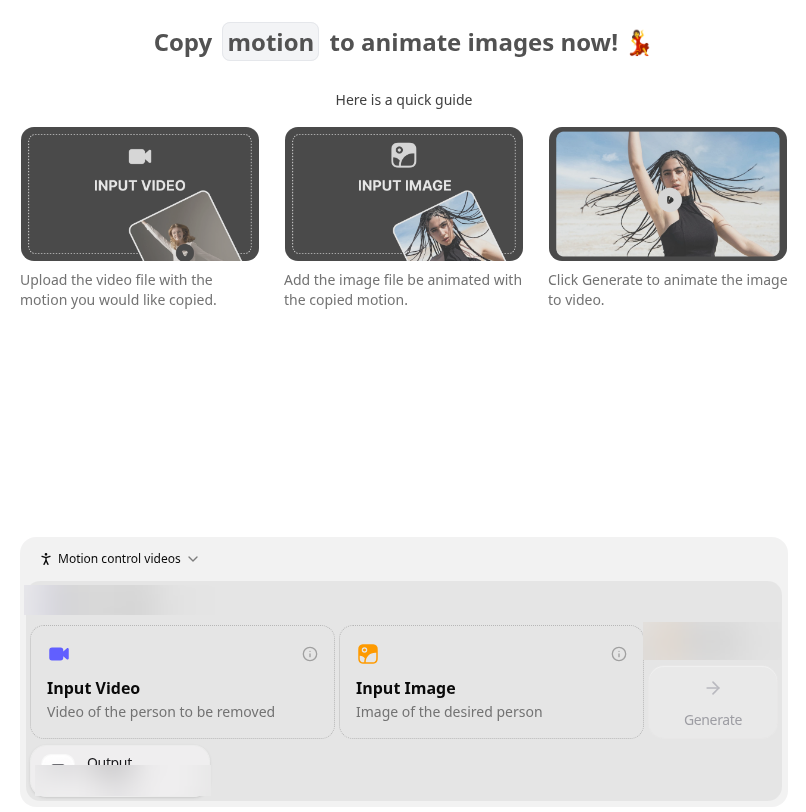
Zoice Motion Control sits beside avatar videos, images, character swap and voice in one workspace. You add a video with the movement and an image to animate, then click Generate. There is no prompt field.
Key Features
- Input Video: upload the video with the motion you would like copied
- Input Image: add the image to be animated with the copied motion
- Click Generate to animate the image into a video
- No prompt to write
Best For
Copying the movement from a video onto a character image with no prompt.
Pros of Zoice
- Same workspace as avatar videos, images and voice
- No prompt needed
- Free plan available
Cons of Zoice
- Needs an internet connection
- Smaller public avatar library
Overall Zoice Rating
Not listed. Zoice does not yet have a G2 rating for this use.
Pricing
Zoice has a free plan, and paid plans start at $7.99 per month. Yearly billing saves 20%.
When to Use It
- You have a motion video and an image to animate
- You would rather upload two files than write a prompt
- You want one workspace for avatars, images and voice too Try Zoice
For still images that need to move, see our guides to the best AI tool to animate static portraits and how to make a drawing come to life.
2. Kling: Best for Face Binding
Kling's Motion Control takes a character image and a motion reference video and copies the movement and facial expressions. A Bind Face Subject option helps keep the face consistent.

Key Features
- Character image plus a motion reference video
- Copies movement and facial expressions
- Bind Face Subject option for a consistent face
- Works with human, anime and 3D characters
Best For
A character image plus a reference clip, with an option to bind the face.
Pros of Kling
- Face binding for consistency
- Handles human, anime and 3D characters
Cons of Kling
- Supports one primary subject
Overall Kling Rating
4.7/5 on G2 from 5 reviews.
Pricing
See tool site.
When to Use It
Pick Kling when the face must stay consistent while the body copies a clip.
3. Viggle: Best for Templates
Viggle animates a character from an image and a motion video, and it has a template library for trend clips. Our Viggle alternative page compares it with Zoice in more depth.
Key Features
- Character animation from an image plus a motion video
- A template library
- Dance and swap tools
- Multi-Track for several characters
Best For
Template and trend clips.
Pros of Viggle
- Templates for a fast start
- Several characters in one video
Cons of Viggle
- The free plan adds a watermark
Overall Viggle Rating
Not listed.
Pricing
Viggle has a free plan, and paid plans remove the watermark. See tool site for current prices.
When to Use It
Pick Viggle when you want to follow a trend template rather than your own clip.
4. Monet: Best for Motion Plus Swaps
Monet's Motion Control transfers motion, expressions and gestures from a reference video onto a still image. The same platform also has a Video Swap tool and an AI Dance page.
Key Features
- Motion Control from a reference video onto a still image
- Transfers motion, expressions and gestures
- Video Swap tool
- AI Dance page
Best For
One platform with motion transfer, swaps and dance.
Pros of Monet
- Copies gestures and expressions as well as body motion
- Swap and dance tools on the same site
Cons of Monet
- A broad platform, so motion control is one tool among many
Overall Monet Rating
Not listed.
Pricing
See tool site.
When to Use It
Pick Monet when you want motion transfer and video swaps on one platform.
How to Choose the Right AI Motion Control Tool
- Choose Zoice if you have a motion clip and an image and want no prompt.
- Choose Kling if face consistency matters most.
- Choose Viggle if you want templates and trends.
- Choose Monet if you also want swaps and dance in the same place.
For gestures on a presenter, read our best AI avatar generator with gestures guide or try the Zoice AI avatar generator.
FAQ
What is AI motion control?
You supply a reference video with the movement and an image of the character, and the tool animates the image with that movement.
What do I need to use motion control?
A motion video and an image to animate. In Zoice you upload both in Motion Control, with no prompt.
Is motion control the same as a prompt for camera moves?
No. Motion control copies movement from a video. Some tools use the name for text driven camera direction, so read each tool's page.