How to Create AI Finance Expert Videos
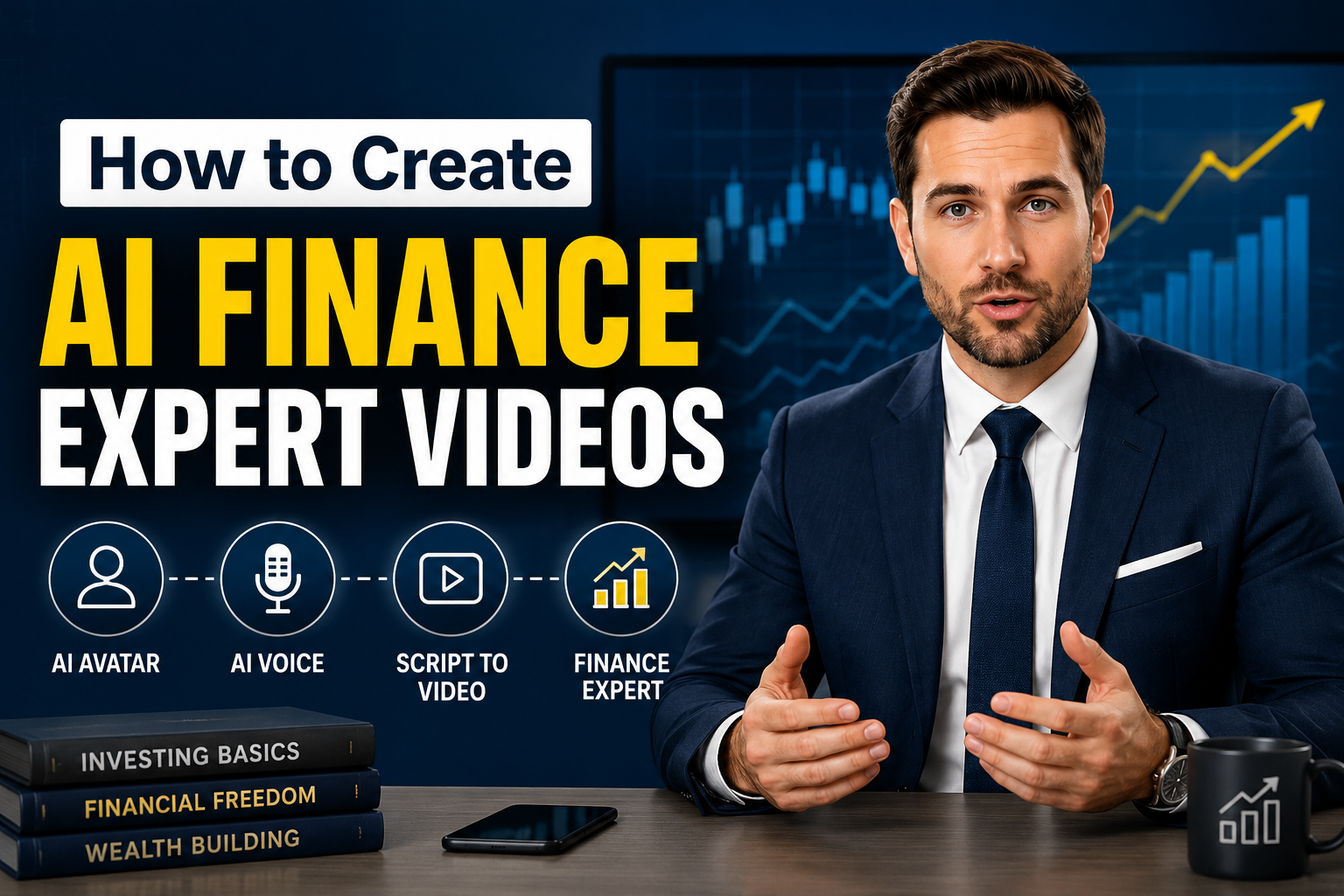
Financial content has become one of the fastest growing categories on YouTube, LinkedIn, Instagram, and TikTok. Financial advisors, investment educators, accountants, fintech companies, and finance influencers use videos to explain complex topics in a simple way.
The challenge is that recording professional finance videos takes time. You need a good camera, lighting, microphone, editing software, and confidence in front of the camera.
AI avatar generators solve this problem by letting you create professional finance videos using only a script. Your AI presenter speaks naturally while maintaining eye contact, making it ideal for educational and business content.
In this article, you'll learn how to create AI finance expert videos using Zoice.
What Are AI Finance Expert Videos?
AI finance expert videos are professional videos created using AI avatars that present financial information in a clear and engaging way. Instead of appearing on camera yourself, an AI generated presenter speaks your script with natural lip sync, realistic facial expressions, and human like voice delivery.
These videos make it easy to explain financial topics while maintaining a polished and trustworthy appearance. Whether you're a financial advisor, accountant, fintech company, educator, or content creator, AI finance videos help you create high quality content without spending hours recording or editing.
The process is simple:
- Write your finance script.
- Choose or create an AI avatar.
- Select an AI or cloned voice.
- Generate your video in just a few minutes.
AI finance expert videos can be used for:
- Personal finance education
- Investment and stock market tutorials
- Cryptocurrency updates
- Banking and loan explainers
- Insurance education
- Tax planning guides
- Retirement planning
- Wealth management advice
- Financial product promotions
- Corporate finance and employee training
Why Use AI for Finance Videos?
Creating traditional finance videos often requires a camera, lighting, microphone, recording space, and video editing skills. AI eliminates these requirements by allowing you to produce professional quality finance videos from a simple script.
With AI, you can create educational and marketing content much faster while maintaining a consistent and professional presentation across every video.
Benefits of Using AI for Finance Videos
- No camera, microphone, or studio setup required.
- Turn scripts into professional videos within minutes.
- Create realistic AI finance presenters that build trust with viewers.
- Clone your own voice or choose from multiple AI voices.
- Produce videos in multiple languages for global audiences.
- Maintain consistent branding across all your finance content.
- Easily update videos when financial regulations or market conditions change.
- Reduce production costs compared to traditional video creation.
- Export videos in different formats for YouTube, LinkedIn, Instagram, TikTok, websites, and online courses.
- Scale your content creation by producing multiple finance videos quickly without additional recording sessions.
How to Create AI Finance Expert Videos
Creating professional finance videos no longer requires expensive recording equipment or on camera presentations. With Zoice, you can create a realistic AI finance expert, add your financial script, choose a natural sounding voice, and generate high quality videos in just a few minutes. Follow the steps below to create engaging AI finance videos for YouTube, LinkedIn, TikTok, Instagram, and other platforms.
Step 1: Visit Zoice
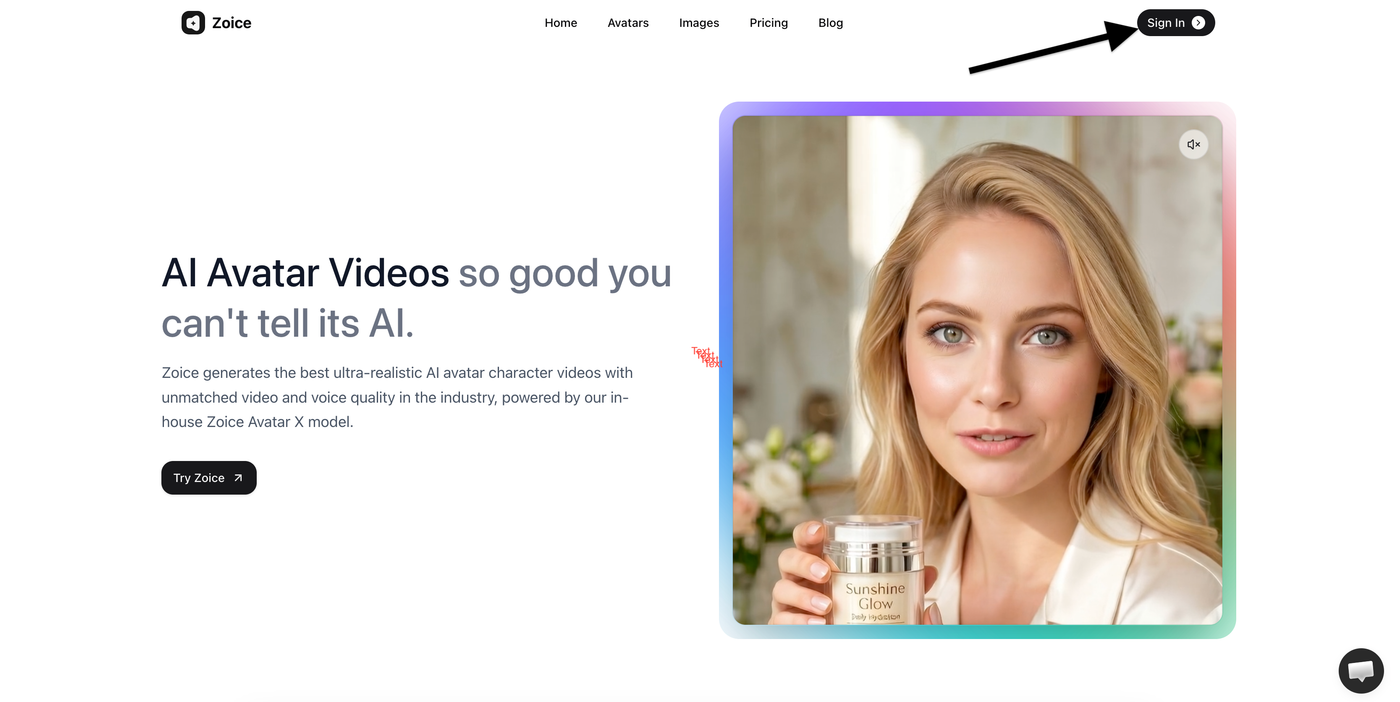
Open your preferred browser and visit Zoice.com.
On the homepage:
- Click Sign In
This will take you to the login page where you can access your account or create a new one.
Step 2: Sign In to Your Account
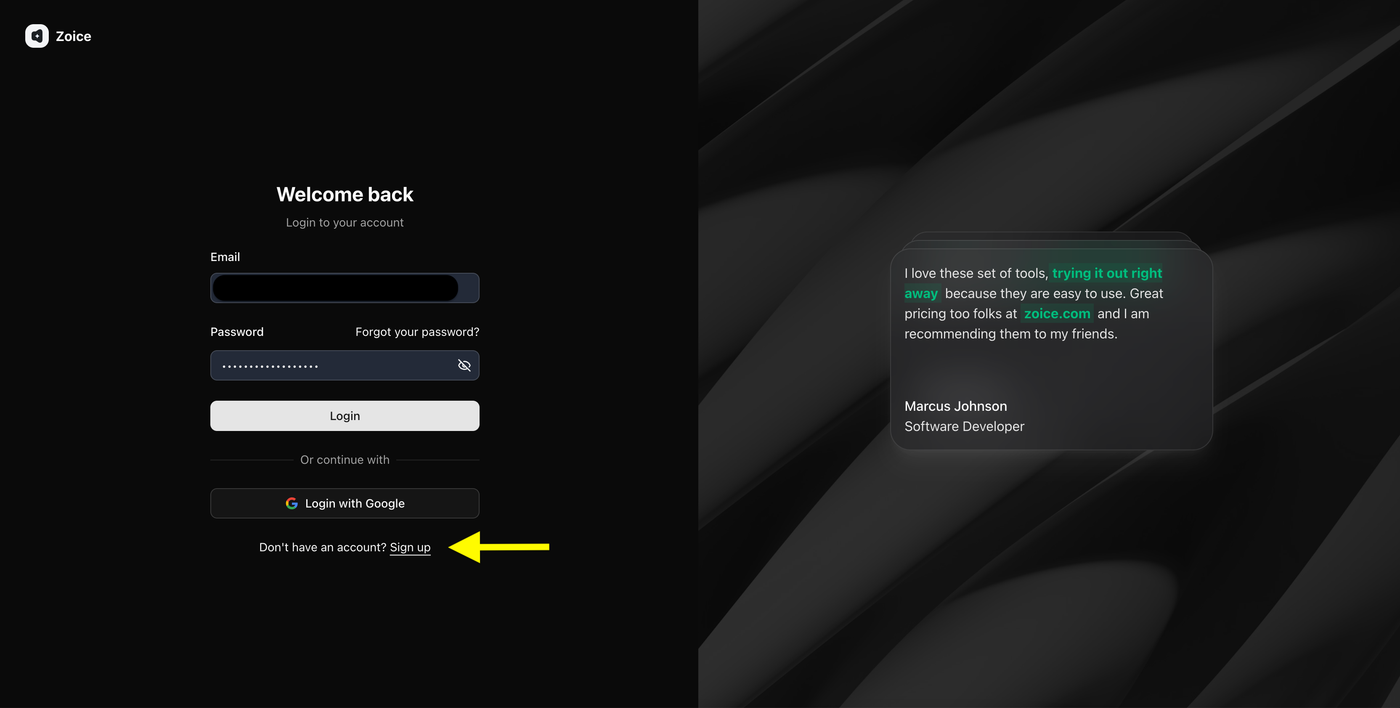
Enter your login credentials to access your Zoice dashboard.
- Enter your email address
- Enter your password
- Click Login
If you don't have an account, click Sign Up to create one.
Step 3: Create a Zoice Account (New Users)
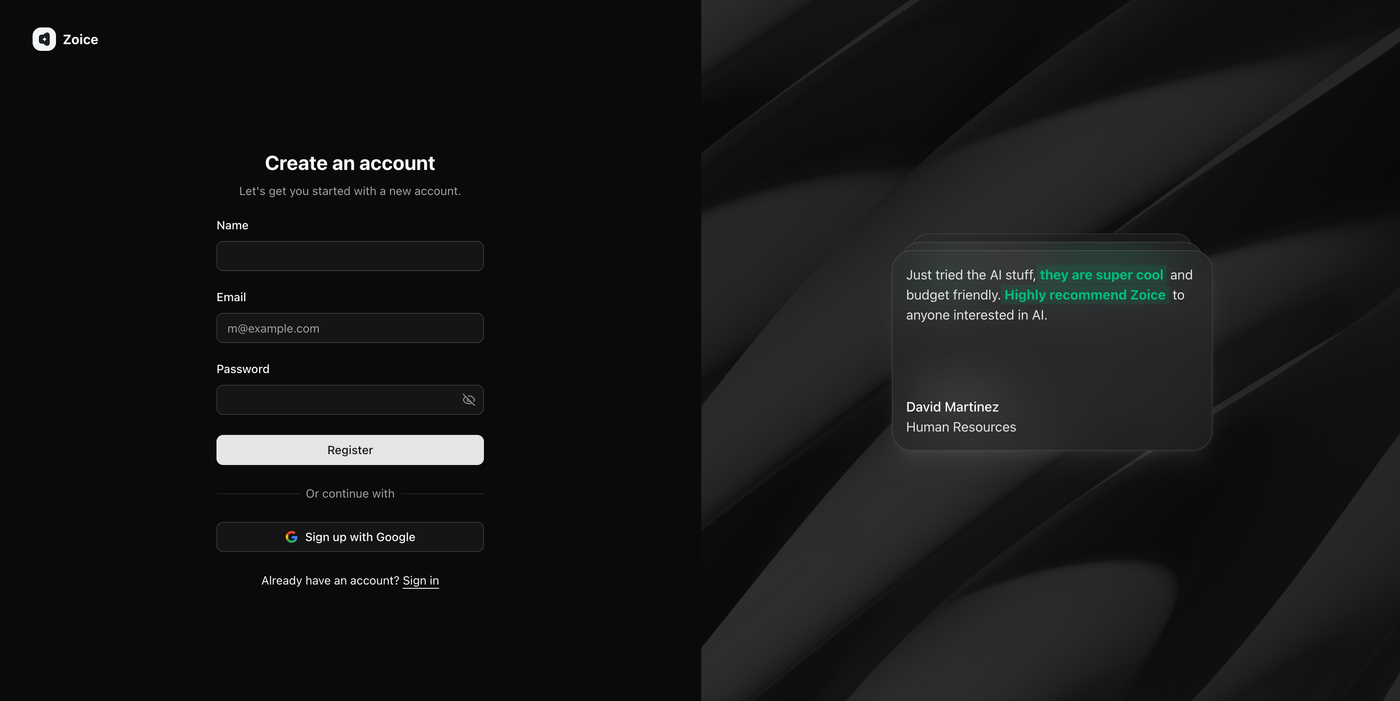
If you're new to Zoice, create your account by entering the required details.
Enter:
- Name
- Email address
- Password
Then click Register.
You can also choose Sign up with Google for a faster registration process.
Step 4: Open Avatar Characters
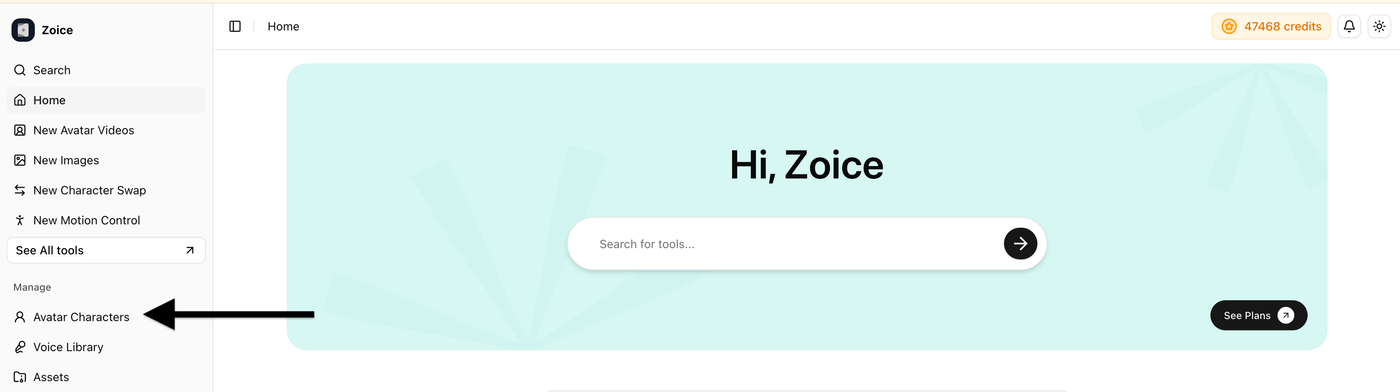
After logging in, navigate to the left sidebar of your dashboard.
Click Avatar Characters to access the section where you can create, manage, and customize your AI avatars.
Step 5: Create a New Avatar

Inside the Avatar Characters section, click Create New to start building your AI avatar.
You can create your avatar in two ways:
- Upload your own image
- Generate an avatar using an AI prompt
Choose the option that best fits your needs.
Step 6: Create Your AI Avatar
Option A: Upload Your Own Image
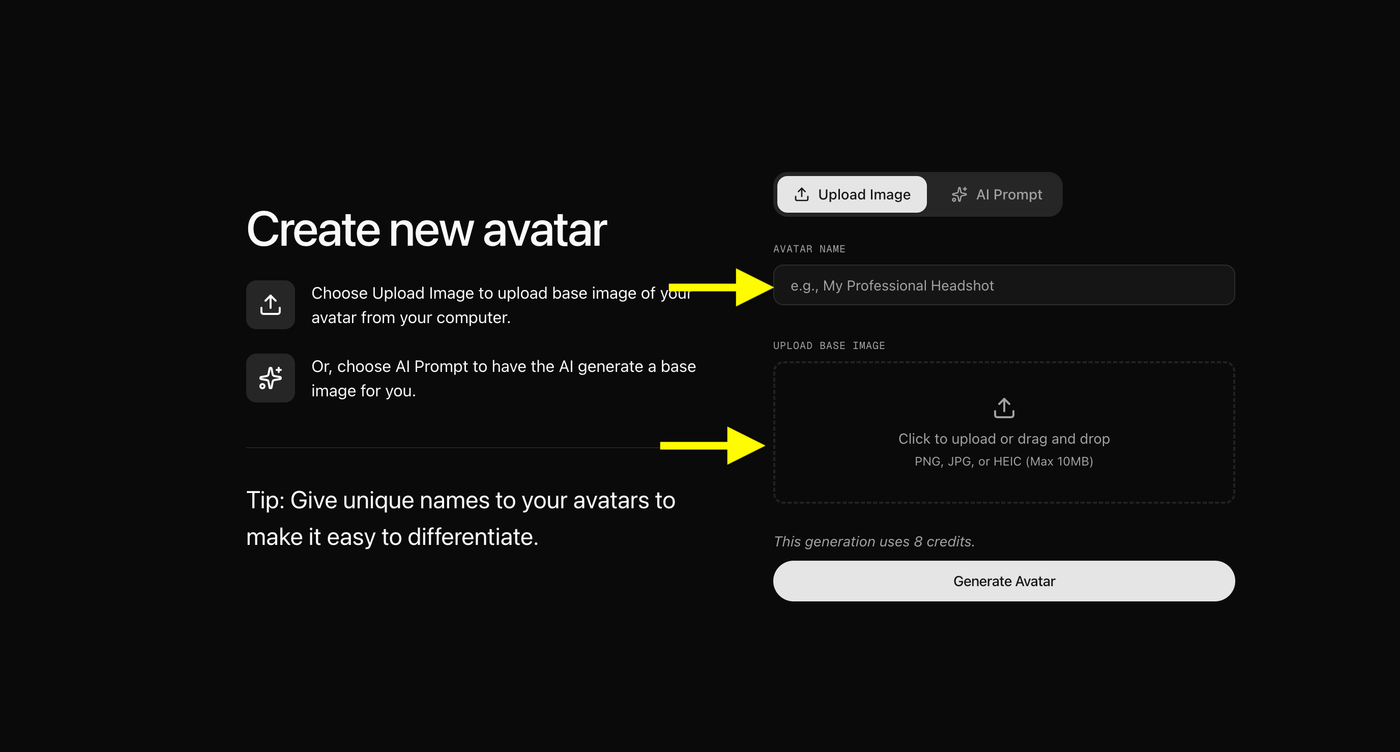
If you already have an image, upload a clear front facing photo and enter a unique name for your avatar.
For the best results:
- Use a high resolution image
- Ensure your face is clearly visible
- Use good lighting
- Avoid blurry or heavily filtered photos
Note: If you upload your own image, skip the AI Prompt option and continue to the next step.
Option B: Generate an Avatar Using AI Prompt
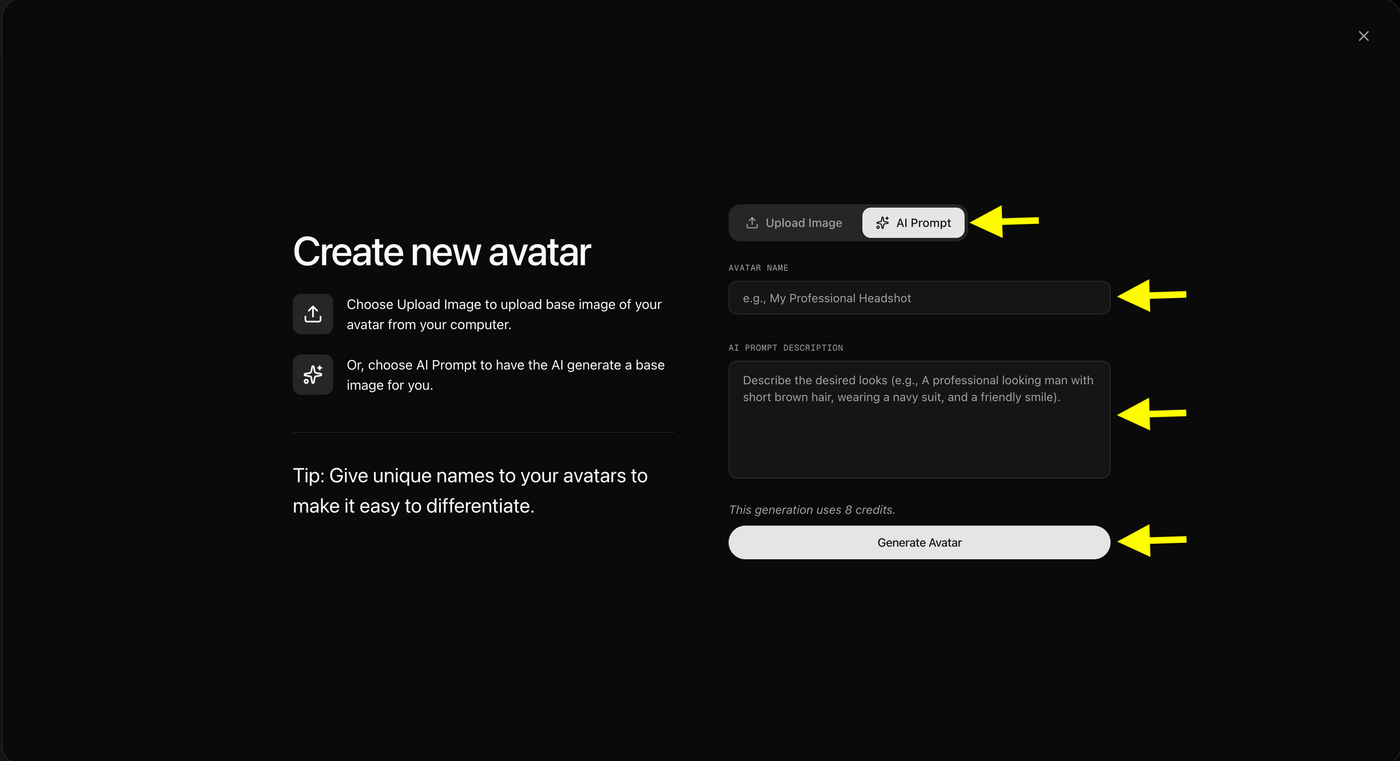
If you don't have an image, click AI Prompt and describe the avatar you want to create.
Include details such as:
- Appearance
- Clothing
- Profession
- Style
- Background
After entering your prompt:
- Enter an avatar name
- Click Generate Avatar
Zoice will create a custom AI avatar based on your description.
Step 7: Generate Your AI Finance Expert Avatar
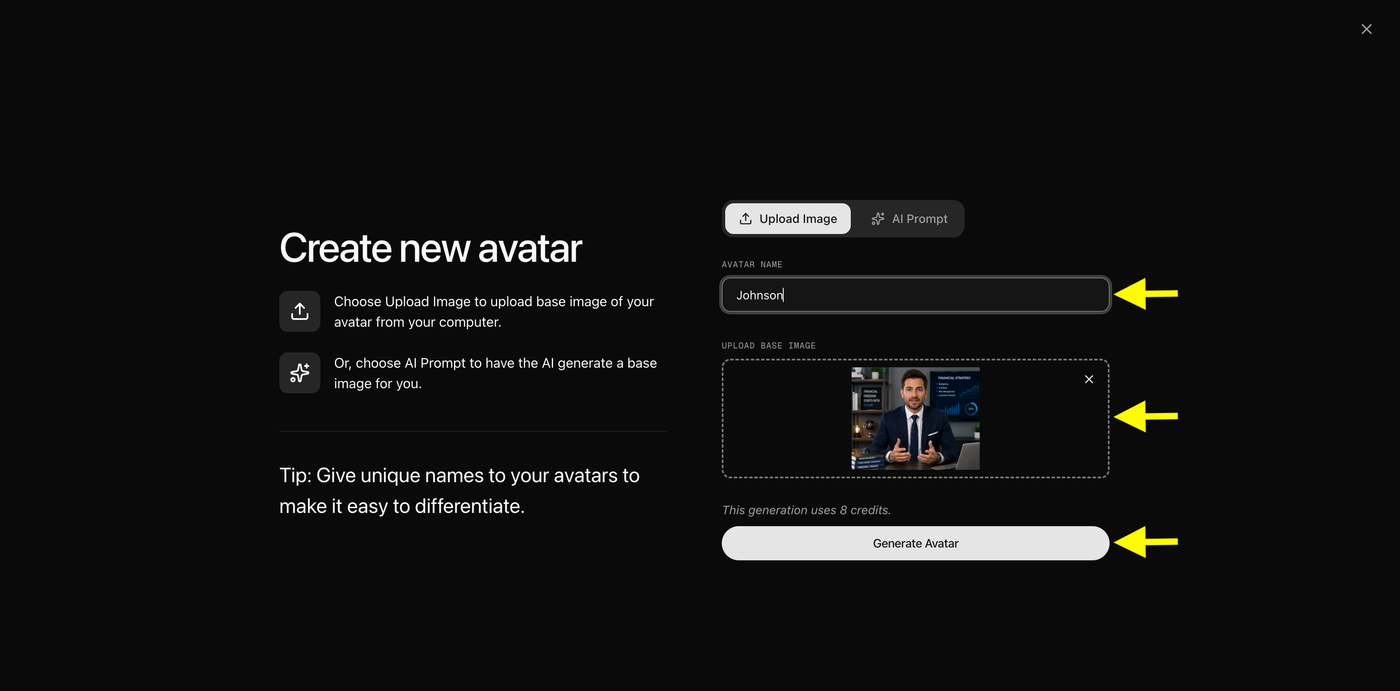
After uploading your image and entering an avatar name, you're ready to create your custom finance expert avatar.
Review the following details before generating:
- Avatar Name: Make sure you've entered a unique and recognizable name.
- Base Image: Confirm that the uploaded image is clear, front facing, and well lit for the best results.
Once everything looks correct, click Generate Avatar.
Tip: Using a high quality image with good lighting and a neutral expression helps create more natural facial movements and realistic video output.
Step 8: Select Your AI Finance Expert Avatar
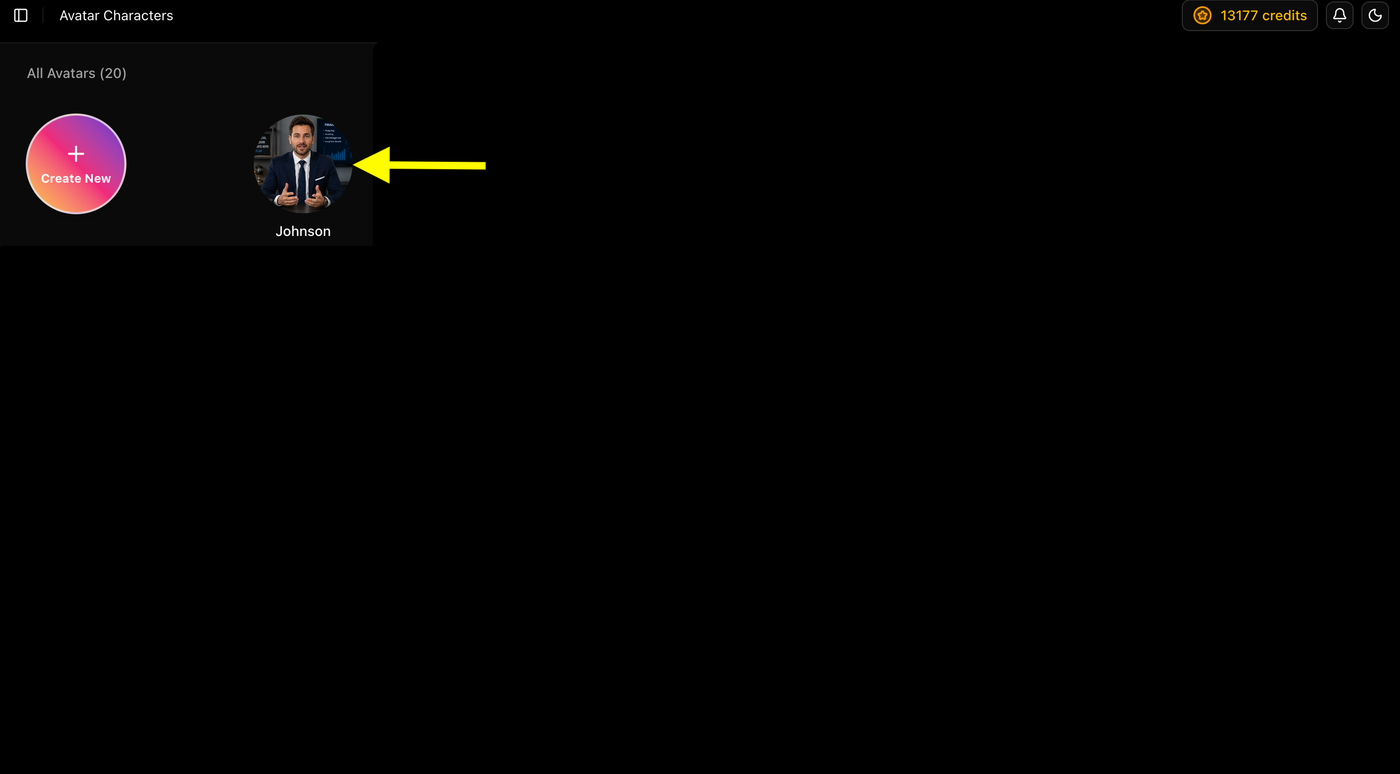
Once your avatar has been created, it will appear in the Avatar Characters library.
Click on your newly created finance expert avatar to open it and continue to the video creation screen.
From there, you'll be able to add your script, choose a voice, configure the video settings, and generate your AI finance expert video.
Tip: If you have multiple avatars, give each one a unique name so you can easily identify the right presenter for different types of finance content.
Step 9: Click on Generate Video
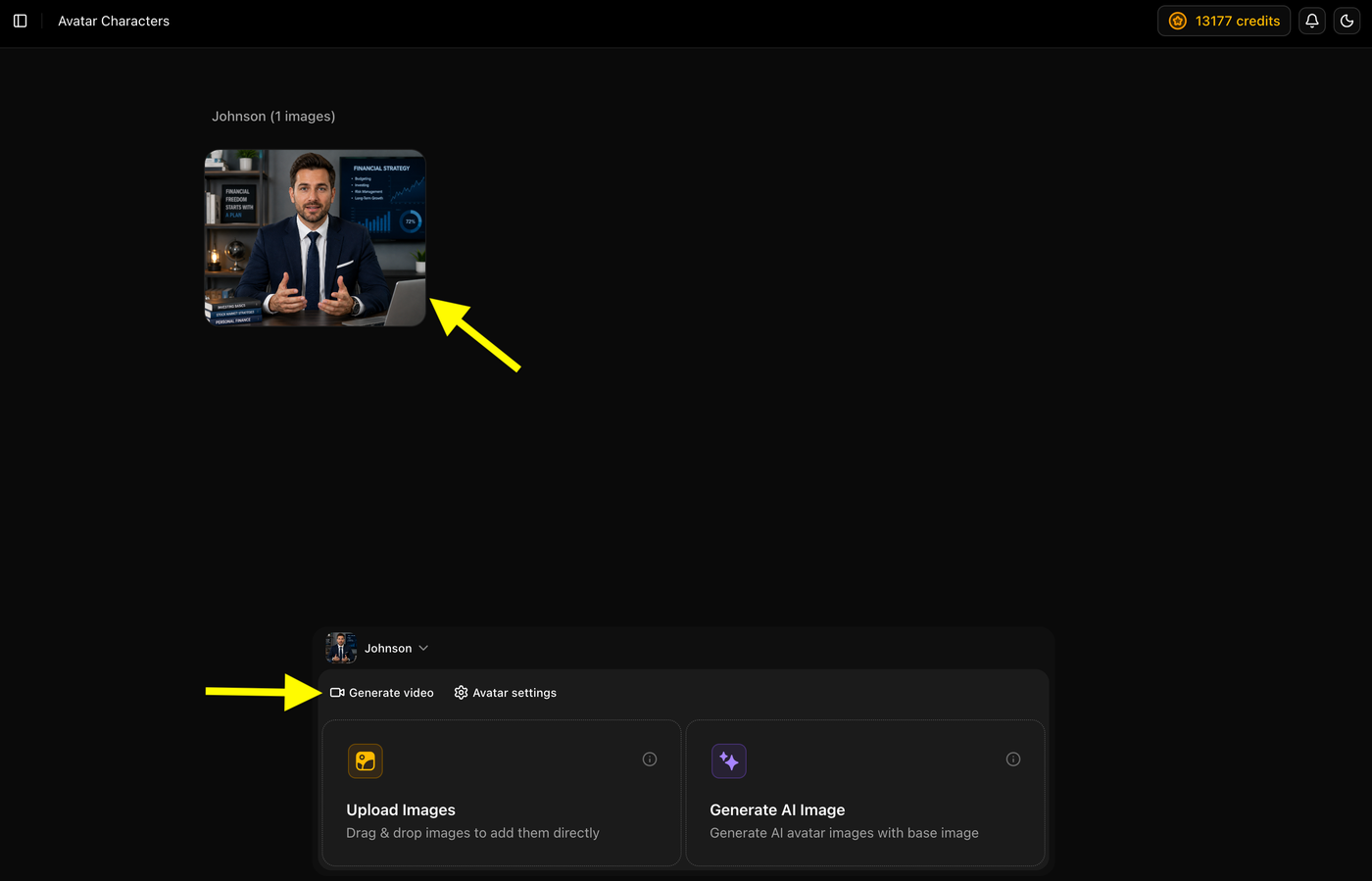
After selecting your avatar, click the Generate video tab to open the AI video editor.
This is where you'll create your finance expert video by adding a script, selecting a voice, choosing the output settings, and generating the final video.
Tip: Keep your script ready before moving to the next step to make the video creation process faster and more efficient.
Step 10: Add Your Video Script
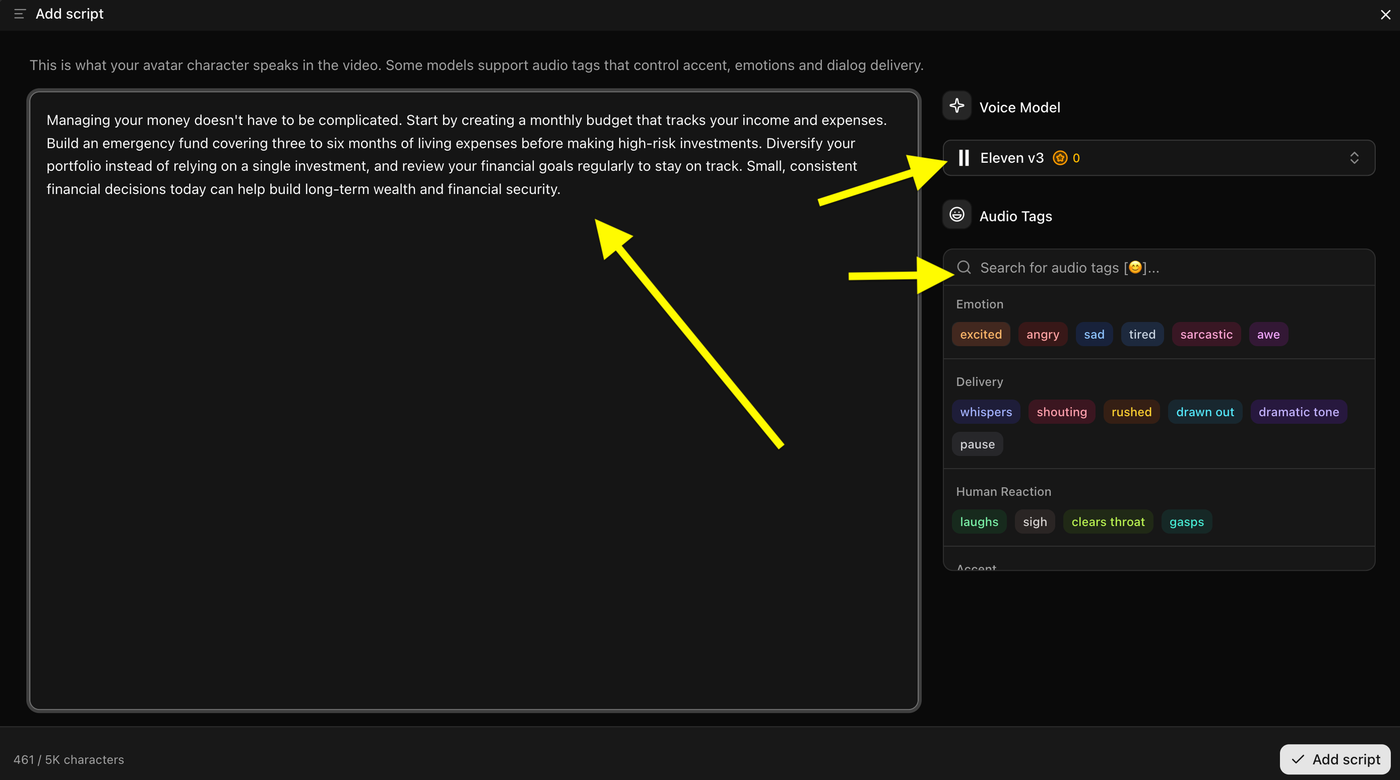
Enter or paste the script your AI avatar will speak. If your selected voice model supports it, you can use Audio Tags to adjust the tone and delivery.
Click Add Script to save your script and continue.
Tip: Keep your script short, clear, and conversational for the best results.
Step 11: Select a Voice
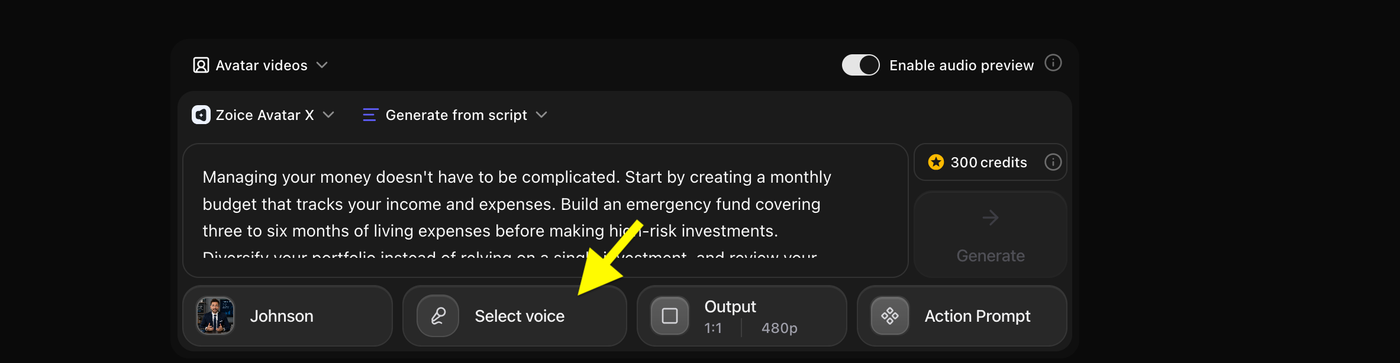
Click Select Voice and choose the voice you want your AI finance expert to use. You can select a custom voice, imported voice, or a public voice based on your preference.
Step 12: Choose a Voice
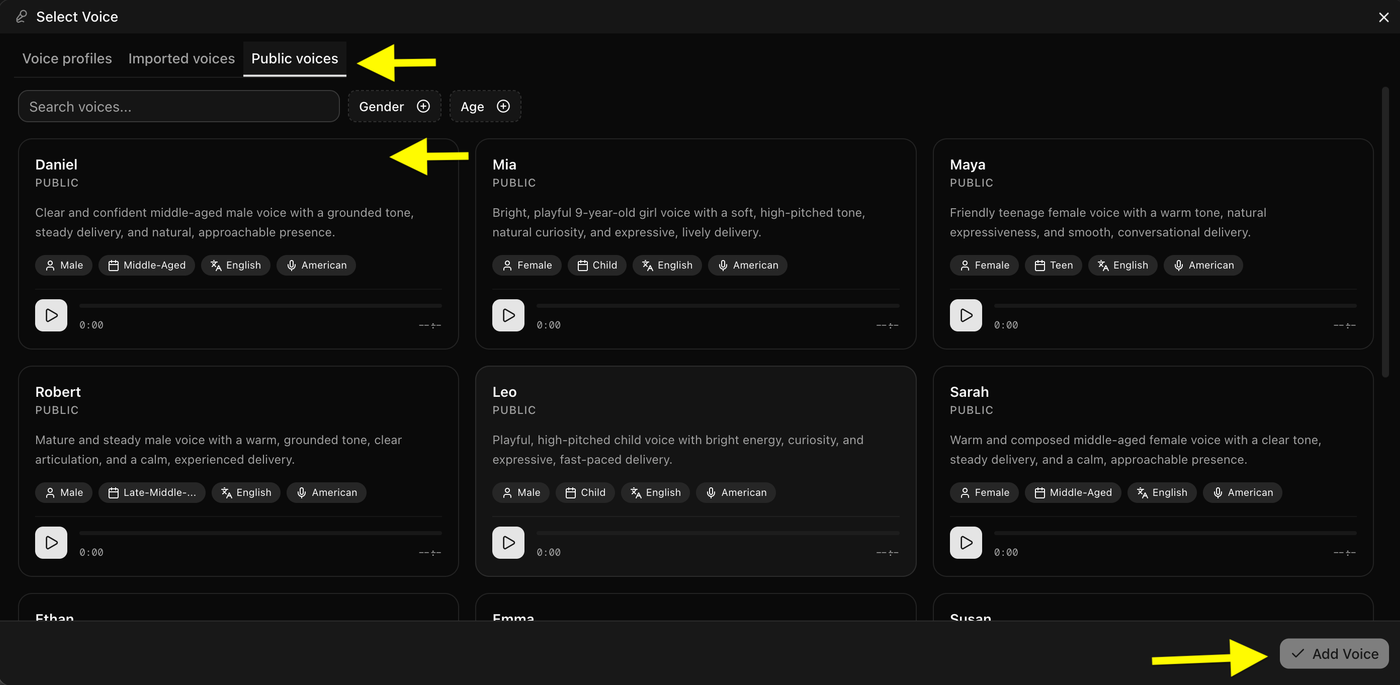
Browse the available voice profiles and select the one that best fits your finance videos. You can use Voice Profiles, Imported Voices, or Public Voices, and filter voices by gender, age, or language.
After selecting your preferred voice, click Add Voice to continue.
Tip: Choose a clear, confident, and professional voice to make your finance content more engaging and trustworthy.
Step 13: Open Output Settings
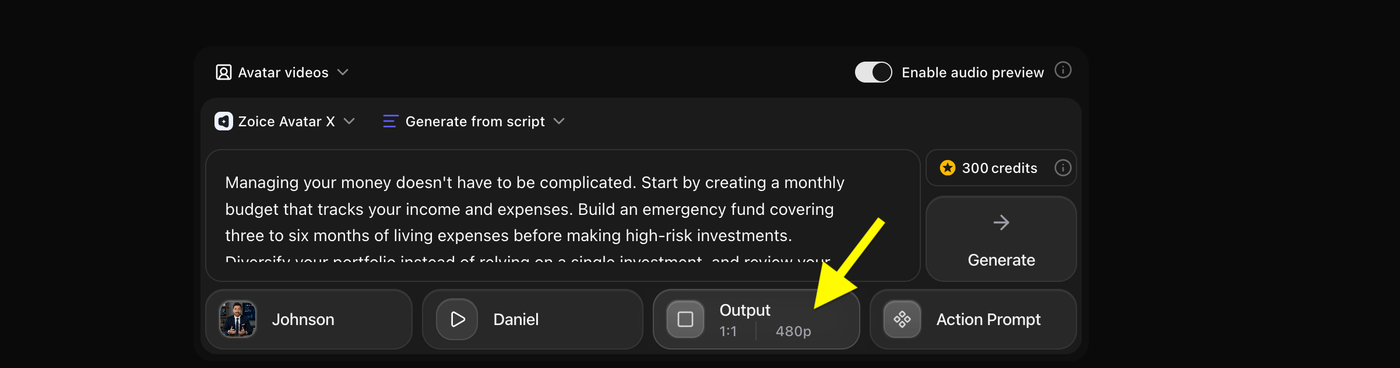
Click Output to configure your video's aspect ratio and resolution for the final export.
Step 14: Select the Output Settings
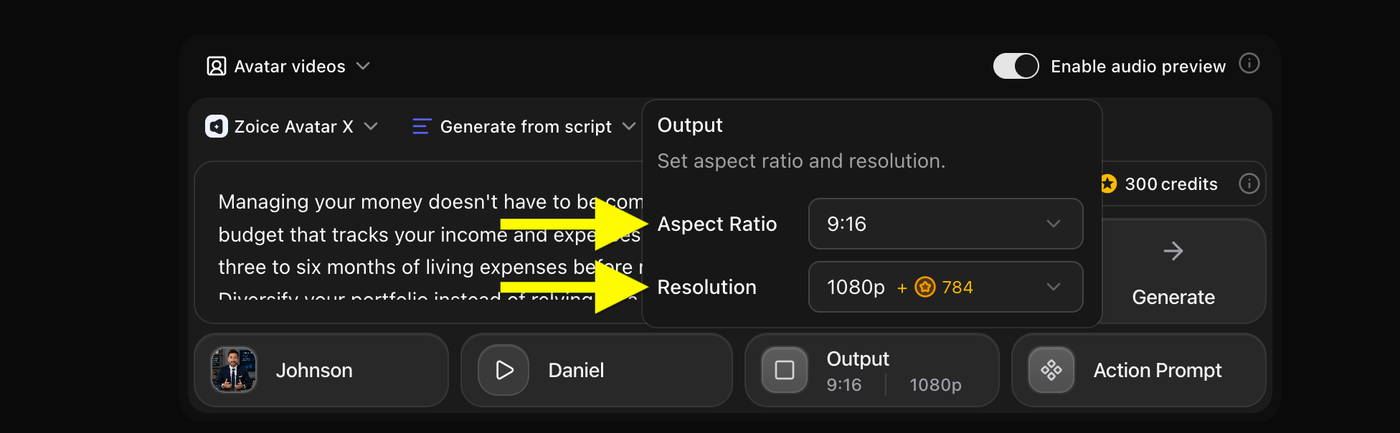
Choose your preferred Aspect Ratio and Resolution for the video. Once you've selected the settings, you're ready to continue to the next step.
Step 15: Open Action Prompt
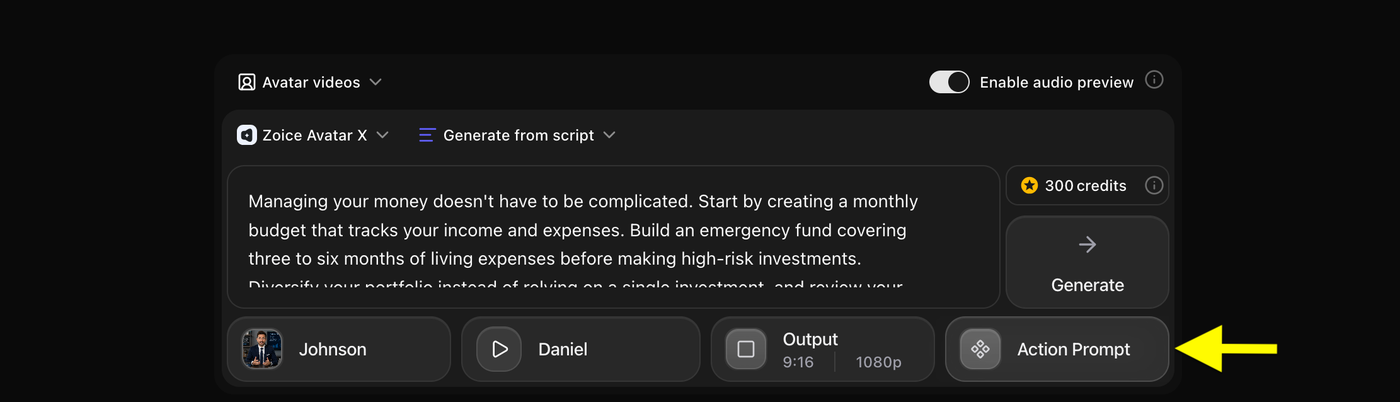
Click Action Prompt to open the action prompt settings for your avatar.
Step 16: Select an Action Prompt
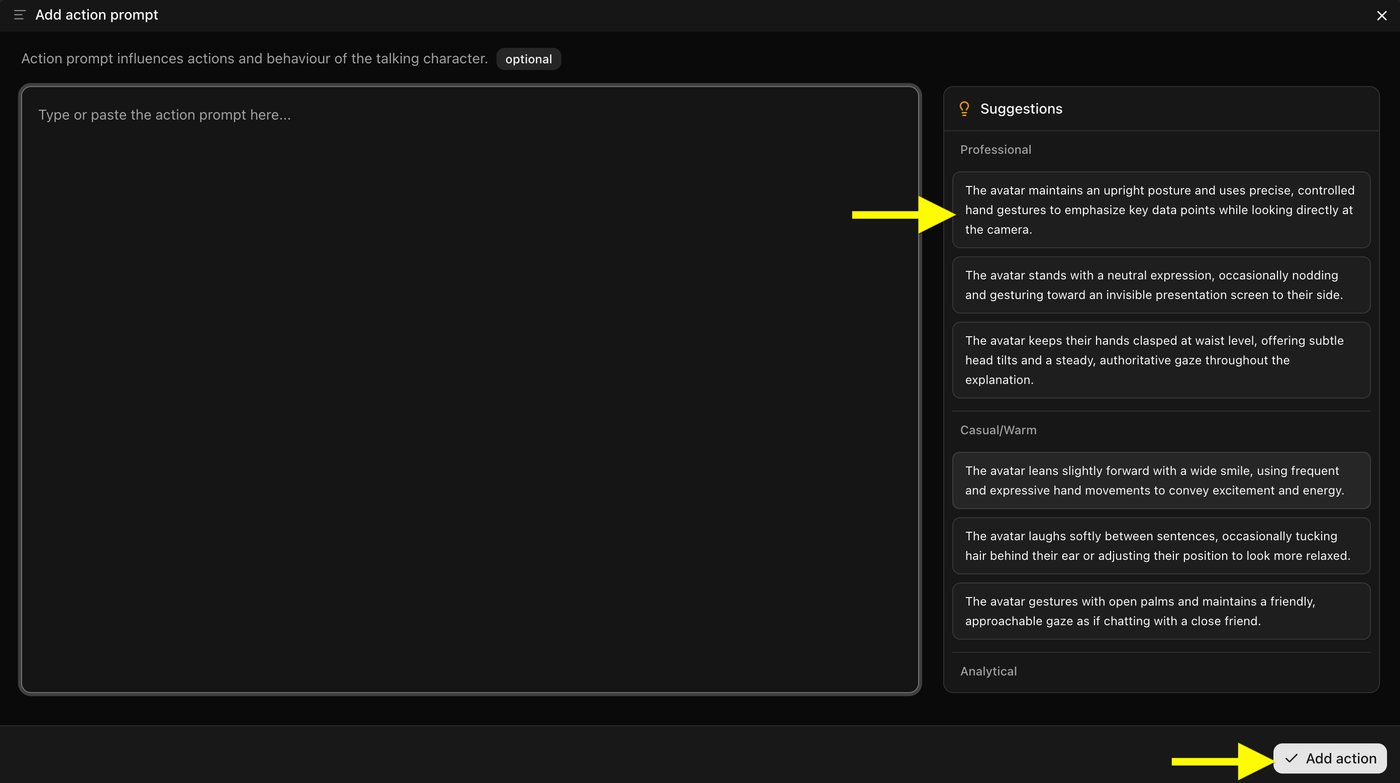
Choose one of the suggested action prompts (or enter your own custom prompt), then click Add action to apply it to the video.
Step 17: Click Generate
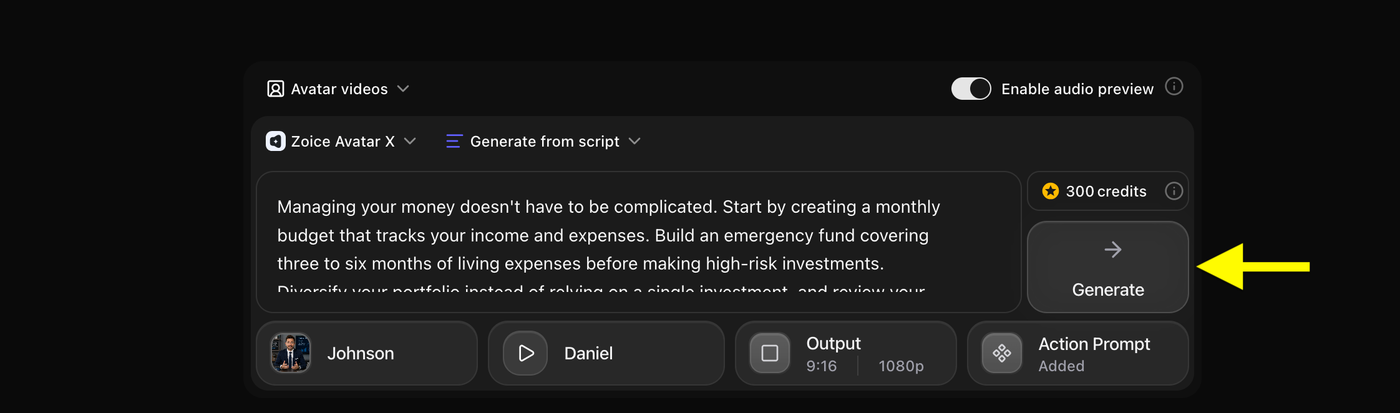
Click Generate to start creating your AI finance expert video. Zoice will process your script, voice, avatar, output settings, and action prompt to generate the final video.
Step 18: Preview Audio and Generate the Video
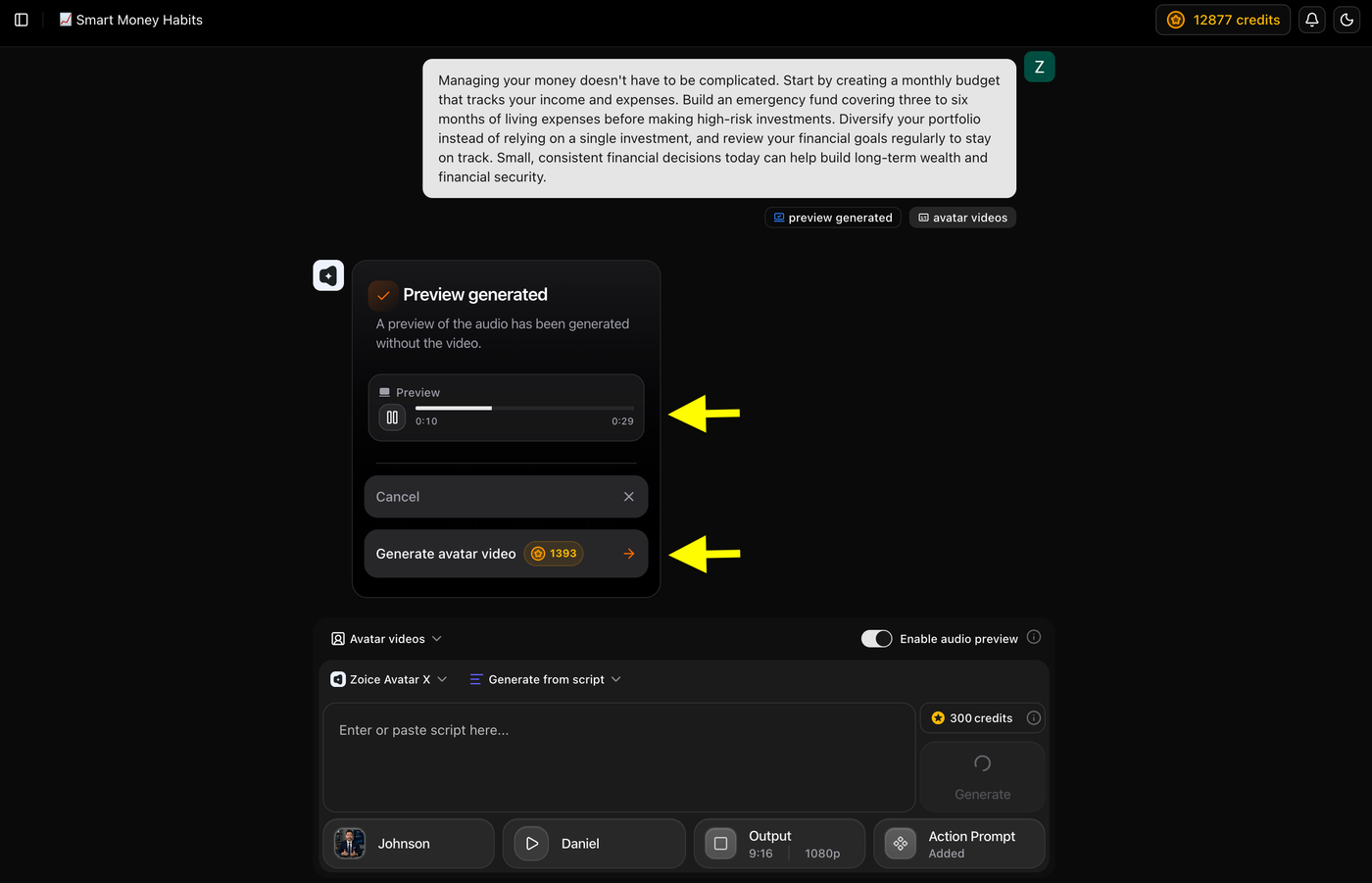
Play the audio preview to check the voice and pronunciation. If everything sounds good, click Generate avatar video to start creating your final AI finance expert video.
Step 19: Wait for Video Generation
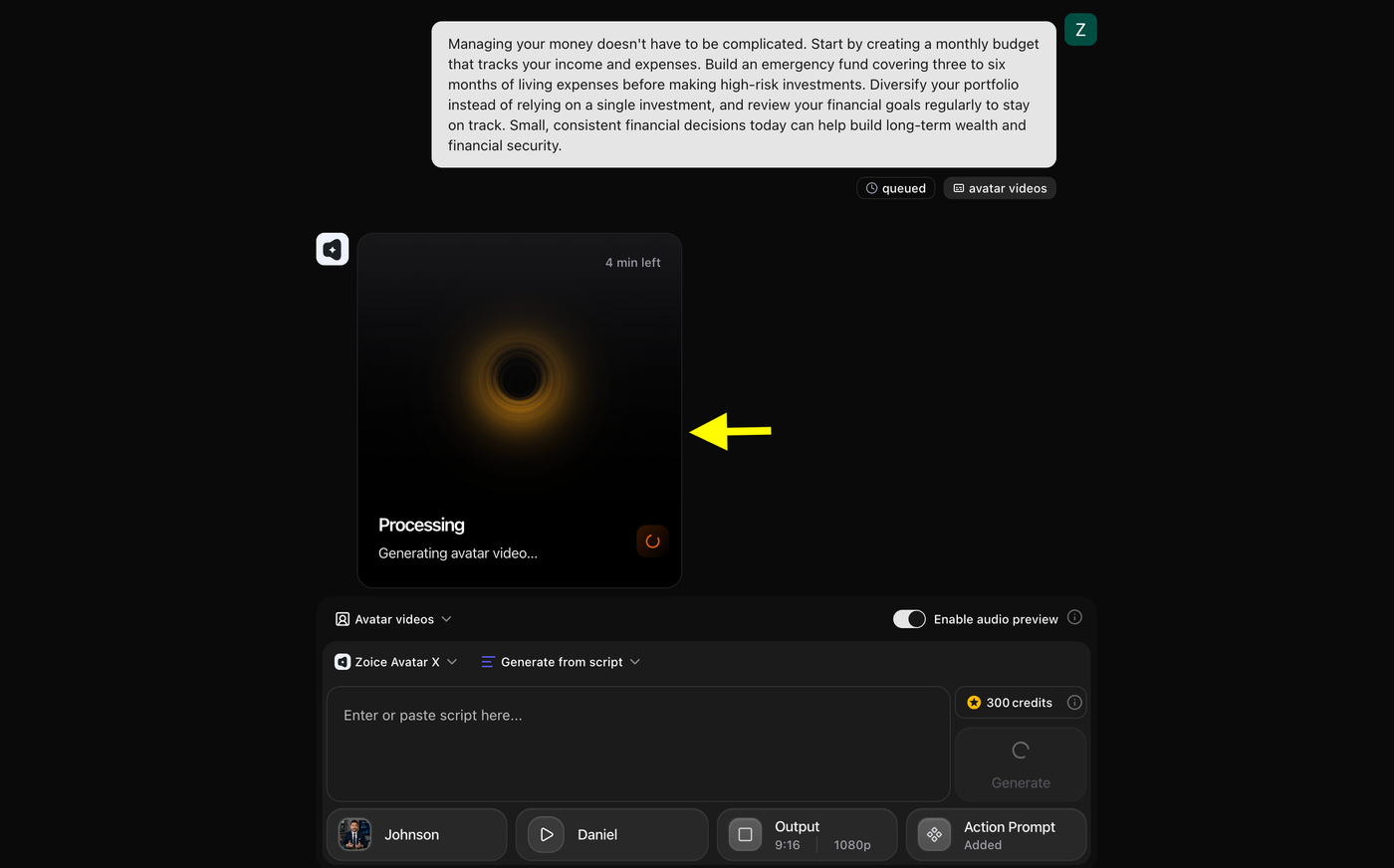
Your video is now being processed. Wait for Zoice to finish generating the AI finance expert video. The estimated processing time will be displayed on the screen.
Step 20: Download the Video
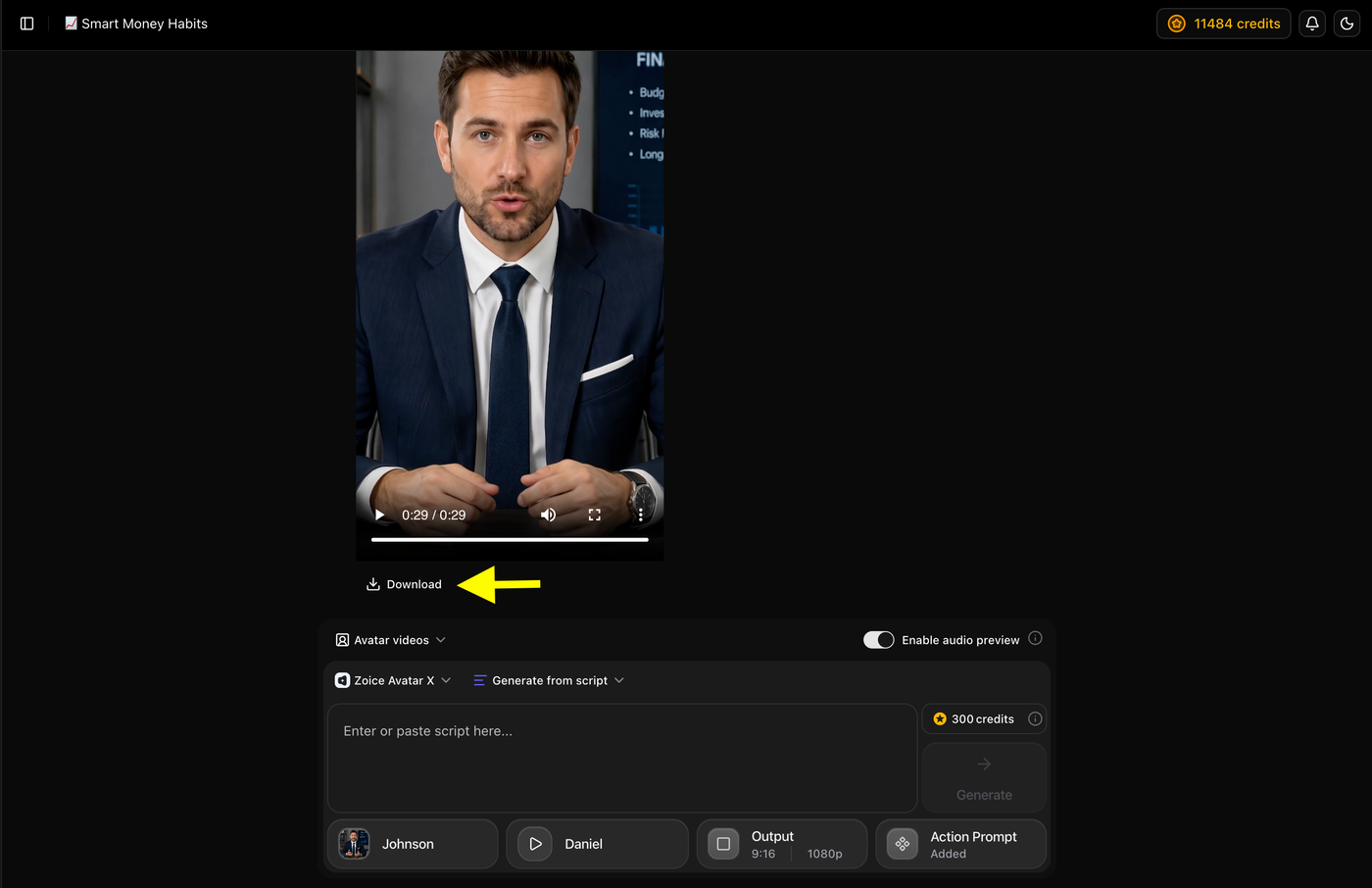
Once the video generation is complete, preview the final video to ensure everything looks correct. Then, click Download to save the video to your device.
Example Script and Generated AI Finance Expert Video
To demonstrate the final result, we created an AI finance video using Zoice. We created a custom AI avatar, added a finance script, selected a professional AI voice, configured the video settings, and generated a realistic talking avatar video.
Script Used
Below is the script used to generate the AI finance expert video.
Example:
"Welcome to today's finance tip. One of the smartest ways to build long term wealth is by investing consistently instead of trying to time the market. Start by setting a monthly budget, building an emergency fund, and investing regularly in a diversified portfolio that matches your financial goals. Review your investments periodically and avoid making emotional decisions during market fluctuations. Small, consistent financial habits today can help you achieve greater financial security in the future. Follow us for more practical finance tips and investment insights."
Generated AI Finance Expert Video
Below is the final AI finance expert video created with Zoice using the above script, AI avatar, and selected voice.
Example:
Final Output Video
Best Types of AI Finance Videos You Can Create
AI finance avatars can be used to create a wide variety of educational and promotional videos. Whether you're a financial advisor, fintech company, educator, or content creator, AI makes it easy to produce professional finance videos without recording yourself.
Personal Finance Tips
Share practical advice on budgeting, saving money, managing debt, building emergency funds, and improving financial habits to help viewers make better financial decisions.
Investment Education
Explain investment concepts such as stocks, mutual funds, ETFs, bonds, diversification, and portfolio management in a simple and engaging way.
Stock Market Analysis
Create videos covering daily market updates, company earnings, stock performance, and investment trends to keep your audience informed.
Cryptocurrency Updates
Produce videos about Bitcoin, Ethereum, blockchain technology, crypto market trends, and digital asset education for beginner and experienced investors.
Retirement Planning
Help viewers understand retirement savings, pension plans, long term investing, and strategies for building financial security after retirement.
Tax Planning and Saving Tips
Create educational videos explaining tax deductions, tax saving strategies, filing deadlines, and financial planning throughout the year.
Insurance Explainers
Simplify complex insurance topics by explaining health, life, vehicle, travel, and business insurance in an easy to understand format.
Banking and Credit Education
Teach viewers about credit scores, loans, mortgages, banking services, credit cards, and financial management using clear and engaging AI presentations.
Tips for Creating Better AI Finance Videos
Creating an AI finance video is more than simply adding a script to an AI avatar. Follow these best practices to produce professional and trustworthy financial content.
Keep Financial Information Simple
Avoid complicated financial terminology whenever possible. Explain concepts using simple language, real life examples, and short sentences so viewers can easily understand your message.
Use a Professional AI Presenter
Choose a realistic AI avatar with professional clothing, confident body language, and a natural voice. A credible presenter helps build trust with your audience.
Focus on One Topic at a Time
Instead of covering multiple financial concepts in one video, create separate videos for each topic. Focused content is easier to follow and usually performs better.
Support Your Explanation with Visuals
Use charts, graphs, percentages, icons, or financial illustrations during editing to make complex financial information easier to understand.
Verify Every Financial Detail
Always review your script before publishing. Check figures, interest rates, regulations, and investment information to ensure your content is accurate and reliable.
End with a Clear Call to Action
Encourage viewers to subscribe, visit your website, book a consultation, or watch another finance video to increase engagement.
Common Mistakes to Avoid
Avoid these common mistakes to create more professional AI finance videos.
Using Outdated Financial Information
Financial markets, tax rules, and regulations change frequently. Always verify your information before publishing.
Covering Too Many Topics
Trying to explain several financial concepts in one video can confuse viewers. Keep each video focused on a single topic.
Writing Complex Scripts
Avoid using unnecessary financial jargon. A simple, conversational script keeps viewers engaged and makes difficult topics easier to understand.
Choosing an Unprofessional Avatar or Voice
Your AI presenter represents your brand. Select a realistic avatar and a clear, professional voice that builds credibility.
Ignoring Visual Presentation
Finance videos become more engaging when you include charts, graphs, numbers, and supporting visuals instead of only showing the presenter.
Skipping the Final Review
Always preview your video before publishing to check for pronunciation errors, incorrect information, or synchronization issues.
Why Use Zoice Instead of Other AI Video Tools?
Zoice provides everything you need to create professional AI finance videos from one platform. Instead of using separate tools for avatars, voice generation, and video editing, Zoice combines the complete workflow into a simple and efficient experience.
Realistic AI Finance Avatars
Create lifelike AI presenters with natural facial expressions, accurate lip synchronization, and professional appearances that help build trust with your audience.
Create Videos Faster
Convert a written finance script into a professional AI video within minutes, allowing you to publish more content without recording or editing manually.
Custom AI Presenters
Upload your own photo or generate a custom finance expert avatar that matches your personal brand or company's identity.
Voice Cloning and AI Voices
Use your own cloned voice for a personalized presentation or choose from a library of natural AI voices available in multiple languages.
Flexible Video Export
Generate videos in different aspect ratios and resolutions optimized for YouTube, LinkedIn, TikTok, Instagram Reels, websites, presentations, and online courses.
How We Tested Zoice
To evaluate Zoice for creating AI finance expert videos, we tested the platform using real finance content such as investment tips, budgeting guides, and financial education videos. We focused on the features that matter most to finance professionals and content creators.
Finance Avatar Realism
We evaluated how realistic the AI avatars looked by testing facial expressions, eye contact, lip synchronization, and overall presentation. A professional looking avatar helps build trust with viewers.
Voice Quality and Lip Sync
We tested both AI voices and cloned voices to check pronunciation, speaking style, and lip sync accuracy. Clear and natural speech is essential for explaining financial topics effectively.
Presenter Customization
We tested avatar creation, custom voice profiles, public voices, and action prompts to see how easily users can create finance presenters that match their brand.
Video Quality and Export
We reviewed the final video quality, supported resolutions, and aspect ratios to ensure the videos are suitable for YouTube, LinkedIn, TikTok, Instagram, and other platforms.
Ease of Use
We tested the complete workflow from avatar creation to video generation to determine how quickly beginners can create professional finance videos.
Pricing and Value
Finally, we compared Zoice's features, customization options, and pricing plans to evaluate the overall value it offers for creating AI finance expert videos.
FAQs About Creating AI Finance Expert Videos
1. What are AI finance expert videos?
AI finance expert videos are videos created using AI avatars that present financial information through realistic speech, facial expressions, and lip sync. They can be used to explain topics such as budgeting, investing, taxes, insurance, and financial planning without recording yourself on camera.
2. Do I need video editing skills to create AI finance videos?
No. Most AI avatar platforms let you create videos by simply adding a script, selecting an avatar, choosing a voice, and generating the video. No professional editing experience is required.
3. Can I use my own voice in AI finance videos?
Yes. Many AI video generators support voice cloning or custom voice profiles, allowing you to use your own voice. You can also choose from built in AI voices if you prefer.
4. What types of finance videos can I create with AI?
AI can be used to create a wide range of finance videos, including personal finance tips, investment tutorials, stock market updates, cryptocurrency explainers, retirement planning guides, tax education, insurance videos, and financial product promotions.
5. Which platforms are best for publishing AI finance videos?
AI finance videos can be published on YouTube, LinkedIn, TikTok, Instagram Reels, Facebook, business websites, online courses, and other digital platforms depending on your target audience.
6. Why should I use an AI avatar for finance videos?
AI avatars help you create professional finance videos without appearing on camera. They save time, reduce production costs, maintain consistent branding, and allow you to publish educational or marketing content more frequently.
7. Why should I use Zoice for finance videos?
Zoice combines AI avatars, voice cloning, public AI voices, action prompts, and high quality video generation in one platform, making it easy to create professional finance videos without advanced editing skills.
Conclusion
Creating AI finance expert videos is an effective way to share financial knowledge, educate your audience, and promote financial services without spending hours recording and editing videos. With AI avatars, natural sounding voices, and script to video technology, you can produce professional finance content quickly while maintaining a consistent and trustworthy presentation.
Using Zoice, you can create a custom AI finance expert, add your own voice or choose an AI voice, customize the video settings, and generate high quality videos for YouTube, LinkedIn, TikTok, Instagram, and other platforms. Whether you're a financial advisor, accountant, fintech company, educator, or content creator, AI makes it easier to create engaging finance videos that help build credibility, reach a wider audience, and simplify complex financial topics.