ElevenLabs Audio Tags: Emotion Lists and Custom Tags
ElevenLabs audio tags are square-bracket instructions that guide how Eleven v3 delivers a line. They can suggest emotions, whispers, reactions and pauses. Eleven Flash v2.5 and Eleven Multilingual v2 use a different approach, including documented pause syntax rather than v3-style audio tags.
This guide covers ElevenLabs models offered in Zoice. Tag support is based on upstream ElevenLabs documentation and published examples, not runtime tests in Zoice. Entering an instruction in the composer does not establish that the integration passes it through or that a voice will follow it.
Make Your Own Eleven v3 Tags
Eleven v3 tags are open-ended plain-language directions, not a finite command menu. Put a short description in square brackets before the line it should affect. Name the emotion, voice quality or action you want. These copyable custom prompts are starting points, not guaranteed commands:
[whispering, fearful] Don't move. It's right behind you.
[out of breath after running up the stairs] I... made it.
[a tired detective who has heard it all before] Sure. Tell me another one.
[starting calm, then losing patience] I asked you nicely. Twice.
ElevenLabs Model Support and Syntax
| ElevenLabs model | Audio tags and custom directions | Pause guidance |
|---|---|---|
| Eleven v3 | Square brackets such as [whispers] and [laughs]. Free-form instructions can be tried; arbitrary tags are not guaranteed. | [pause], [short pause], [long pause], punctuation and text structure. SSML break tags are not supported. |
| Eleven Flash v2.5 | No documented v3-style audio tag support. Unsupported text may be spoken aloud or handled inconsistently. | ElevenLabs documents <break time="1.5s" />. Use sparingly; Zoice pass-through has not been tested here. |
| Eleven Multilingual v2 | No documented v3-style audio tag support. Use context and narrative cues rather than invented audio tags. | ElevenLabs documents <break time="1.5s" />. This is upstream guidance, not an integration test. |
Eleven v3 Audio Tag Reference
ElevenLabs documentation and its audio-tag examples describe emotions, delivery, pauses, reactions, sound effects, accents and character directions. The reference below preserves the documented examples gathered for this guide alongside additional plain-language prompt suggestions. It is not a list of all possible tags or a claim that every item is a documented token. Eleven v3 is open-ended; none of these examples is a Zoice runtime test.
Emotion tags
[sarcastic], [curious], [excited], [crying], [mischievously], [happy], [sad], [angry], [annoyed], [appalled], [thoughtful], [surprised], [dismissive], [sympathetic], [reassuring], [impressed], [delighted], [amazed], [nervously], [alarmed], [sheepishly], [desperately], [deadpan], [panicking], [cautiously], [frustrated], [ecstatic], [casual], [warmly], [dramatically], [playful], [proud], [optimistic], [startled], [mad], [bitter], [anxious], [stressed], [scared], [vulnerable], [confused], [tired], [bored], [distant], [peaceful], [content], [worried], [nervous], [cheeky], [hesitant], [regretful], [cheerfully], [flatly], [exasperated], [hopeful], [triumphant], [smug], [puzzled], [disgusted], [happily], [excitedly], [curiously], [questioning], [quizzically], [indecisive], [elated], [cute], [sorrowful], [upset], [awe], [sarcastically], [playfully], [calm]
Delivery tags
[whispers], [shouting], [softly], [quietly], [hushed], [barely audible], [booming], [loudly], [low gravelly voice], [low, gravelly voice], [robotic voice], [muttering], [under his breath], [shouts], [professional], [whisper], [whispering], [measured]
Forms such as [shouts] and [shouting], or [whisper], [whispers] and [whispering], illustrate natural-language variation rather than guaranteed interchangeable commands.
Pacing and pause tags
[slowly], [rushed], [drawn out], [pause], [short pause], [long pause], [stammers], [Brief pause], [stuttering], [starting to speak], [beginning to speak], [hesitates], [jumping in], [interrupting, then stopping abruptly], [overlapping]
ElevenLabs recommends punctuation and text structure as pacing cues. Ellipses can suggest hesitation, and capital letters can suggest emphasis. Eleven v3 does not support SSML break tags.
Reaction tags
[laughs], [laughs harder], [giggles], [chuckles], [laughing hysterically], [stifling laughter], [wheezing], [snorts], [sighs], [sigh of relief], [exhales], [inhales deeply], [gasps], [gulps], [swallows], [clears throat], [coughing], [starts crying], [interrupting], [overlapping], [starts laughing], [laughing], [big laugh], [with genuine belly laugh], [cracking up], [giggling], [giggle], [soft chuckle], [sigh], [sighing], [frustrated sigh], [exhales sharply], [happy gasp], [groaning]
Sound effect tags: less predictable
[applause], [clapping], [explosion], [gunshot], [thunder rumbling], [footsteps], [door creaking], [dog barking], [gentle footsteps], [leaves rustling], [swallows], [binary beeping]
Treat sound-effect directions as experiments, not a sound-effects library. A written cue does not guarantee that the requested sound will be produced.
Accent tags: experimental
The documented pattern is [strong X accent], including [strong French accent] and [strong Russian accent]. Additional accent prompt ideas are British, American, Australian, Irish, Scottish, German, Italian, Spanish, New York, Southern US and Indian English. These are experimental directions, not promises of accent fidelity.
Character and performance tags
[pirate voice], [sings], [singing], [singing quickly], [woo], [fart], [football], [wrestling match], [auctioneer]
Some of these are overall performance directions rather than emotions. Try them only as prompts; a tag does not reliably turn any voice into a different character.
Long tag examples
[Low, steady voice, restrained urgency]
[Warm, conversational tone, faint amusement]
[Quietly, with controlled fear]
[Quiet, reflective narration]
[Gentle laugh, then sincere]
Custom tags: open-ended, not guaranteed
Describe a voice quality, emotion or action in plain language and keep the instruction focused. For example, [out of breath after running up the stairs] is a custom prompt to try. There is no guarantee that an arbitrary tag will be followed, or that it will behave the same way across voices.
Eleven v3 example script
The following is an illustrative script, not a tested Zoice output:
[excited] I can't believe it worked! [laughs] Okay, okay, let me tell you what happened this morning. [whispers] I opened the old box in the attic, and I wasn't sure what I would find. [pause] Inside was a tiny brass key. [curious] Why would anyone hide a key like this? [nervously] I tried it on the front door of the garden shed. [gasps] It turned! [sighs] Inside, there were letters from my grandmother, tied with a green ribbon. [sad] I read the first one twice. [softly] She wrote that she was proud of me. [pause] [happy] And then I found a map. [shouting] A TREASURE MAP! [chuckles] Fine, it was only a map of her vegetable garden. [reassuring] But it made me smile, and that is enough for today. [thoughtful] I think I will keep the key somewhere safe, right next to the letters, so I never forget how this morning felt. This has been your Host, signing off.
Match the direction to the voice and sentence. Try one change at a time. Combinations such as [nervously] [whispers] are prompt ideas, not stronger guarantees. If a cue is spoken aloud or ignored, revise it or use a different delivery approach.
Eleven Flash v2.5 and Eleven Multilingual v2
These models do not have documented support for Eleven v3-style audio tags. Do not rely on [whispers] or invented square-bracket cues to control delivery. Unsupported text may be read aloud or handled inconsistently; it is not accurate to say every unsupported tag is always spoken.
Use context and documented pauses
Write the intended mood into the sentence and use punctuation. ElevenLabs documents <break time="1.5s" /> for pauses on these models and cautions against excessive break tags. This is upstream guidance, not a Zoice integration test.
Welcome back to the show. <break time="1.5s" /> Today we have a gentle story about a lighthouse keeper who found a message in a bottle. She read it slowly, with a small smile, and then she laughed out loud. <break time="1.5s" /> It was a recipe for soup.
How to Enter Eleven v3 Tags in Zoice
These screenshots illustrate the composer and voice-selection steps, not a completed tag-support test. Some use yellow rings to highlight controls; others are close-up crops. Private profile names are blurred. The example stops at Generate and does not demonstrate a generated result or download interface.
Step 1: Open Zoice and Sign In

Open app.zoice.com and sign in to reach Home. The screenshot shows the Home greeting and Search for tools box.
Step 2: Open AI Voice
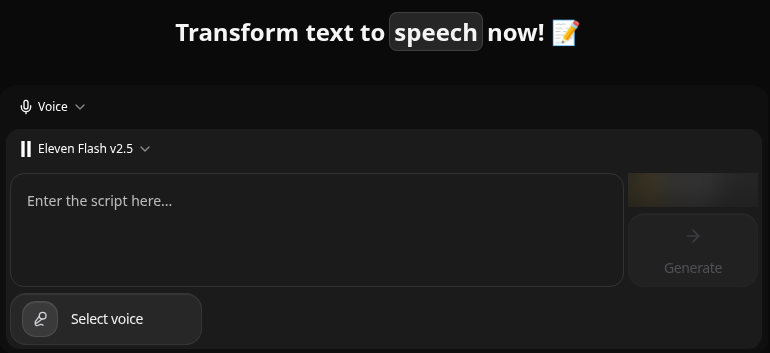
Open app.zoice.com/voice. The captured AI Voice page has the heading Transform text to speech now, a model selector, script box, Select voice button and Generate control.
Step 3: Find the Model Selector

Use the model selector above the script box to choose your model. This close-up shows the closed selector with Eleven Flash v2.5 selected; it does not show the expanded menu.
Step 4: Select Eleven v3
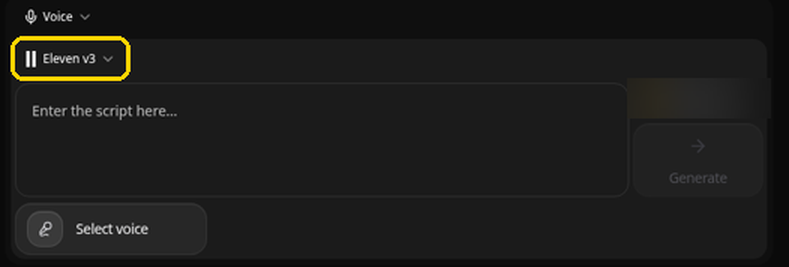
Choose Eleven v3 for this square-bracket example. The screenshot shows Eleven v3 selected. Do not assume the same tag behavior on Eleven Flash v2.5 or Eleven Multilingual v2.
Step 5: Click the Script Box

Click the box labelled Enter the script here.
Step 6: Enter Your Tagged Script
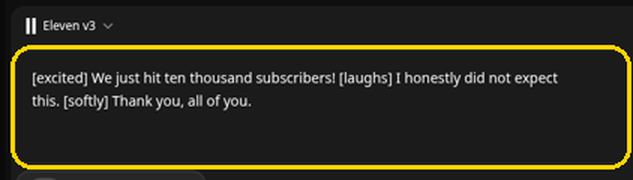
The screenshot shows this illustrative Eleven v3 script: [excited] We just hit ten thousand subscribers! [laughs] I honestly did not expect this. [softly] Thank you, all of you. Entering a tag in the box is not evidence that it will be followed in the output.
Step 7: Click Select Voice

Click Select voice below the script box to open the voice picker.
Step 8: Find the Voice Tabs
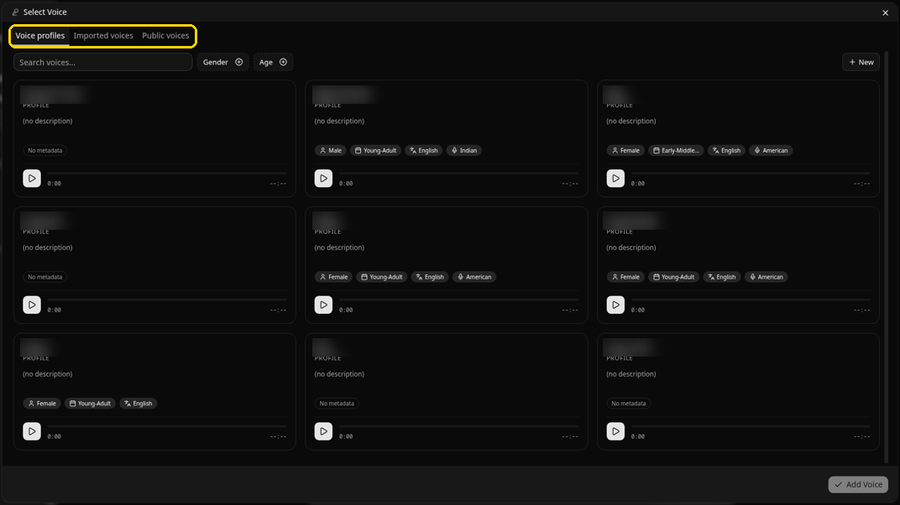
The captured dialog shows Voice profiles, Imported voices and Public voices, with search, Gender and Age filters. It is shown on Voice profiles; private profile names are blurred.
Step 9: Open Public Voices
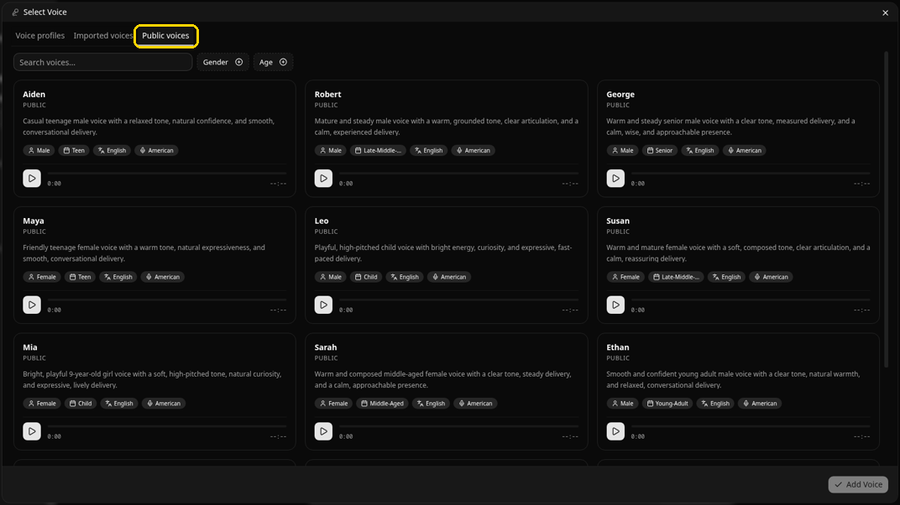
Open Public voices to browse the ready-made voice cards. The screenshot shows play controls on those cards.
Step 10: Choose Aiden and Click Add Voice
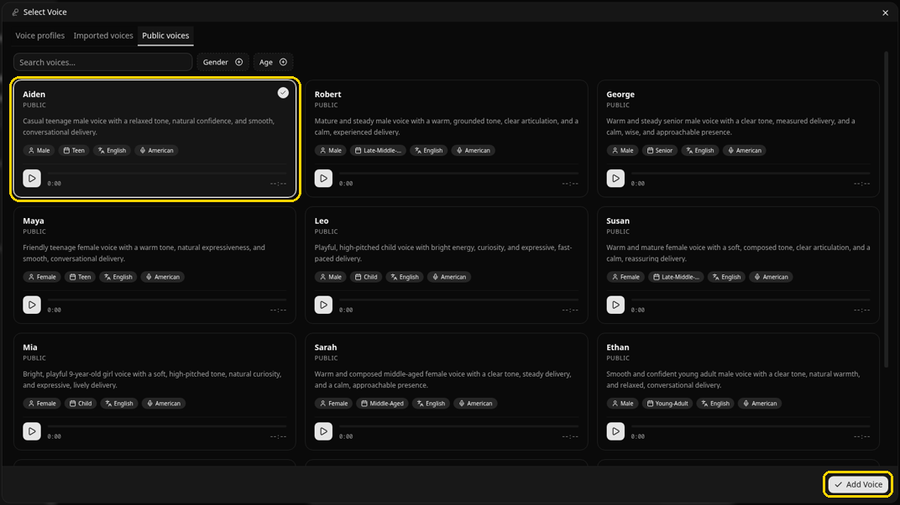
Select the Aiden card, then click Add Voice at the bottom right of the dialog, as illustrated.
Step 11: Check the Composer
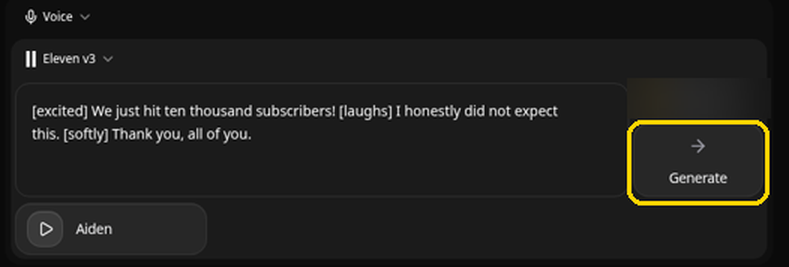
Check the selected model, script and voice. The screenshot shows Eleven v3, the example script, Aiden and Generate. When you are ready to request audio, use Generate. This guide does not claim to have run that request, verified tag behavior or inspected the resulting player and download controls.
ElevenLabs Tag Troubleshooting
If delivery does not match a cue, first confirm Eleven v3 is selected. Then simplify the instruction and make sure it agrees with the words. Avoid requesting a whisper and a shout on the same line. For Flash or Multilingual, remove v3-style directions and use context instead. A tag that is ignored or spoken aloud does not prove that every other voice will behave the same way.
FAQ
Is there a complete list of every Eleven v3 tag?
No finite list covers an open-ended natural-language prompt space. This reference preserves gathered examples and suggestions without claiming that every phrase is a documented, guaranteed token.
Can I write my own audio tags?
On Eleven v3, you can try a short free-form instruction in square brackets. Keep it focused and treat the result as voice-dependent. Arbitrary tags are not guaranteed to work.
Can I use the same tags with Flash and Multilingual?
Do not rely on v3-style audio tags with Eleven Flash v2.5 or Eleven Multilingual v2. ElevenLabs documents SSML break syntax for pauses on those models, whereas Eleven v3 uses natural-language pause cues and punctuation.
Have these examples been tested in Zoice?
No. This is a documentation-based ElevenLabs reference with illustrated composer steps. It does not report runtime tests, generated audio comparisons or verified API pass-through behavior.
Open Zoice AI Voice
Use Zoice AI Voice to enter an ElevenLabs script. For integration details, consult Zoice developer documentation and check which model options the current endpoint exposes.