Puppetry Alternative Tested, Compared & Ranked
Puppetry Alternative: Puppetry turns a portrait into a talking video, with 500 plus voices across 65 plus languages, voice cloning, and a set of free fruit and animal puppets that teachers and creators like to use. It prices by monthly creation counts and runs a free plan with watermarked exports. People move on when they want a steadier on screen character, finer control over audio or a plan that does not revolve around creation counts. This guide compares Zoice, VEED, Synthesia, Arcads and HeyGen.
Each tool takes a different route to a speaking video. One is an editor, one a business presenter product, one an ad maker and one a general avatar platform.
You will find a profile, features, strengths, limits, plans and a verdict on who benefits for every tool. Prices were taken from vendor pages, and we mark anything we could not confirm.
Quick Comparison of the Best Puppetry Alternative Tools
| Features & Capabilities | Zoice | VEED | Synthesia | Arcads | HeyGen |
|---|---|---|---|---|---|
| Quick Comparison | |||||
| Best For | Talking Photos and Host Videos | Browser Video Editing With Subtitles | Training and Business Videos | Creator Style Video Ads | Avatar Presenter Videos |
| AI Presenter Avatars | Yes | Yes | Yes | Yes | Yes |
| Voice Cloning | Yes | Not confirmed | Yes | Not confirmed | Yes |
| Script to Video | Yes | Yes | Yes | Yes | Yes |
| Free Plan | Available | Available | Available | Trial only | Available |
| Starting Price | $7.99/month | $12/user/month billed annually | $19/month | About $110/month | $29/month |
Best Puppetry Alternative
The best Puppetry alternative depends on whether you teach with a puppet, sell with a spokesperson or edit existing footage. A puppet tool is fun for a lesson. A broader workspace helps once the character becomes part of your brand.
Zoice ranks first because a Host, a voice and the finished video sit in one browser workspace. Type a script or provide audio, direct the Host with action prompts and use the same character again.
VEED, Synthesia, Arcads and HeyGen follow, each with a clear specialty. Skim the table above, then read the sections that fit your project.
1. Zoice
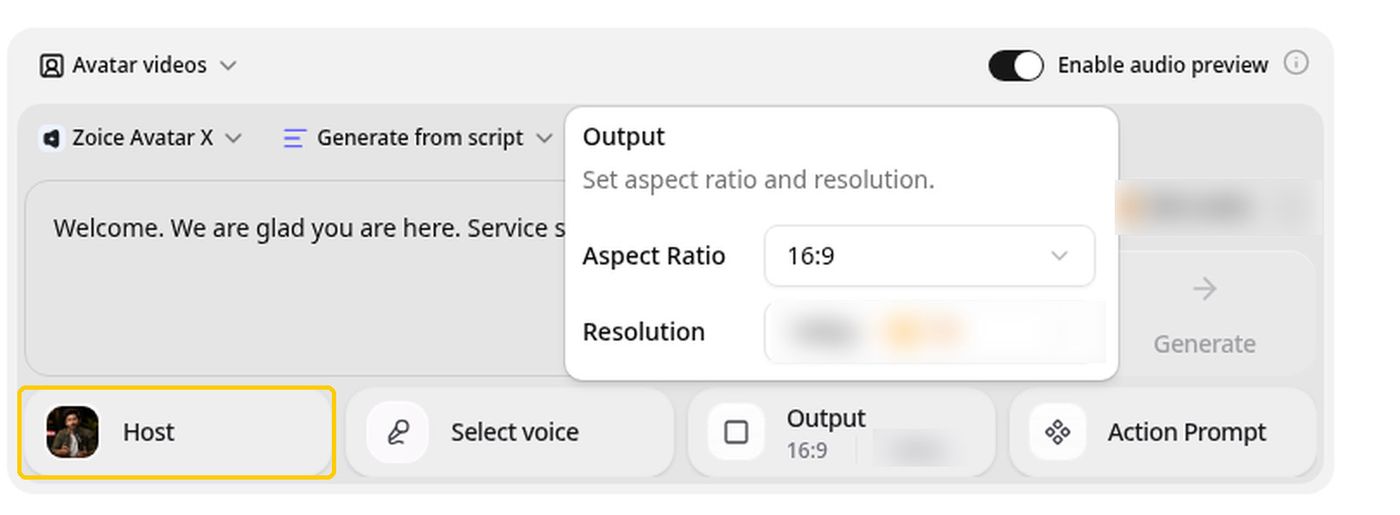
Zoice is a browser workspace around a Host. You can choose one from the public library or build one from a written description or a photo.
You can type a script, record audio, upload a file or save a trained voice profile, and every recording can be played back before you generate. Action prompts tell the Host what to do on screen.
Image, video, chat and transcription tools are part of the same login. If you start with a portrait, the AI talking photo generator page explains the steps.
Key Features
- AI avatar videos from a script
- Custom avatar characters
- Public character library
- Record or upload your own audio
- Voice profiles for cloned speech
- Action prompts for the Host
- AI images and AI videos
- AI chat and transcriptions
Best For:
- Small firms that need quick notices and explainers
- Content creators aiming to build a custom avatar character
- Training managers converting text based material into presenter videos
- Marketers creating product explainer videos and social media videos
- Educators who want lesson notes delivered by a presenter on video
- Business owners after a consistent Host over many videos
Zoice Pros
- No Camera Needed
A script or an audio file turns into a speaking video without any filming.
- Flexible Hosts
Hosts come from the library, a written description or an image.
- Voice Profiles
Voice profiles keep a trained voice on hand.
- Action Prompts
Action prompts direct the Host on screen.
- Check Before Generating
Playback lets you check audio before generating.
- Extra Tools
The account also covers image, video, chat and transcription work.
Zoice Cons
- Needs an Internet Connection:
Zoice runs in a browser and therefore needs an internet connection.
- Modest Public Library:
The public avatar library is smaller than the largest catalogs, which is why many people build a Host.
Zoice Pricing
Zoice has a free tier, four paid plans and a custom Enterprise option.
| Plan | Price | What's Included |
|---|---|---|
| Free | $0/month | No cost, with transcription, voice, image and chat tools |
| Starter | $7.99/month | Opens up avatar videos and AI videos, along with AI Voice and one Voice Profile |
| Basic | $29.99/month | Includes everything in Starter and three Voice Profiles |
| Creator | $49.99/month | Includes everything in Starter and five Voice Profiles |
| Agency | $89.99/month | Includes everything in Starter and ten Voice Profiles |
| Enterprise | Custom Pricing | Features set up around your team, with a support contact and multi staff access |
Starter costs $7.99 a month, Basic $29.99, Creator $49.99 and Agency $89.99, all before the 20% discount for yearly billing.
When to Use Zoice?
Zoice is a good fit when your talking character has to carry across many lessons or posts and you want to control the voice behind it.
2. VEED

VEED is a browser video editor with automatic subtitles, translation and dubbing, screen and webcam recording, brand templates, text to video and AI avatars.
Pro opens translation, dubbing and avatar access, and Studio adds custom templates. Plans are priced per user, and the free tier exports with a VEED mark.
It starts from editing footage and treats presenters as one feature among many.
Key Features
- Online video editor
- Automatic subtitles
- Translation and dubbing
- AI avatars
- Recording your desktop and webcam
- Brand templates
- Text to video
- Team workspaces
Best For:
- Social teams who put subtitles on all their videos
- Marketers editing webinars and product demos
- Instructors recording and editing lessons
- Teams that adapt videos into a number of markets
- Creators in search of an editor in the browser
- Agencies needing custom templates for clients
VEED Pros
- Browser Editor
Nothing needs installing because the editor runs in your browser.
- Subtitles
Paid plans offer automatic subtitles within fair use.
- Translation and Dubbing
Translation and dubbing arrive on Pro.
- AI Avatars
Pro includes access to AI avatars.
- Brand Templates
Studio brings custom templates for brand work.
- Recording Tools
Screen and webcam recording are built in.
VEED Cons
- Per User Pricing:
Per user pricing grows with the team.
- Editor First:
A scripted presenter is not its main strength, since it is an editor first.
VEED Pricing
VEED publishes Free, Creator, Pro, Studio and Enterprise plans.
| Plan | Price | What's Included |
|---|---|---|
| Free | $0/month | Basic editing, with a VEED mark on exports |
| Creator | $12/user/month billed annually, $22 monthly | No mark on exports and unlimited subtitles on a fair use basis |
| Pro | $22 to $24/user/month billed annually, $47 monthly | Everything in Creator along with dubbing, avatar access and translation |
| Studio | $39/user/month billed annually, $76 monthly | Custom templates and more, so see the vendor pricing page |
| Enterprise | Custom Pricing | Custom plans through the sales team |
Creator starts at $12 per user monthly on annual billing, and Studio at $39 per user monthly on annual billing.
When to Use VEED?
VEED suits people who have footage to polish. It is less fitting if the voice and face come from a script.
3. Synthesia
Synthesia produces AI avatar videos for companies, mostly for training, onboarding and internal updates. Starter has 125 plus stock avatars, Pro has 180 plus and Enterprise has 240 plus.
Personal avatars on paid plans let a staff member appear on screen. Other pieces include voice cloning, dubbing, bulk personalisation and PowerPoint import.
Enterprise adds single sign on and SCORM export for learning systems.
Key Features
- AI avatars
- Personal avatars
- Voice cloning
- AI dubbing
- Syren AI video agent
- PowerPoint import
- Bulk personalization
- AI screen recorder
Best For:
- Learning and development groups who build training courses
- People teams developing onboarding and policy videos
- Sales teams making tailored videos from a spreadsheet
- Companies translating videos for several markets with AI dubbing
- Product teams developing walkthroughs and release updates
- Communications teams sending internal notices
- Enterprises who need single sign on and a dedicated success manager
- Teams converting presentations into narrated presentations
Synthesia Pros
- Growing Catalog
Stock avatar counts rise from plan to plan.
- Personal Avatars
Personal avatars put a real person on screen.
- AI Dubbing
Dubbing handles translation.
- Slide Import
PowerPoint decks make a starting point.
- Bulk Personalisation
A spreadsheet can drive many versions of one video.
- Enterprise Support
Enterprise supports SSO and learning system export.
Synthesia Cons
- Watermark on Basic:
The free Basic plan watermarks videos.
- Few Seats:
Editor seats are limited on Starter and Pro.
Synthesia Pricing
Synthesia has a free Basic plan, Starter, Pro and Enterprise.
| Plan | Price | What's Included |
|---|---|---|
| Basic | $0/month | Templates are included, and videos carry a watermark |
| Starter | $19/month | Adds 125 plus avatars, downloads and three guests |
| Pro | $89/month | Adds 180 plus avatars, five guests and five personal avatars |
| Enterprise | Custom Pricing | Unlimited personal avatars, 240 plus avatars, SSO, SCORM export and a success manager |
The listed price is $19 a month for Starter and $89 a month for Pro.
When to Use Synthesia?
Synthesia is a match for companies that publish training or internal updates regularly. A teacher might find it formal.
4. Arcads
Arcads builds video ads in the style of creator testimonials. Pick an AI actor, write a script, and get a video of a person speaking to camera.
A studio and workflows speed up repeat ad work, and a trial lets you try every feature. Its prices appear only inside the app, with reported starting figures near $110 a month.
It targets performance marketers and advertisers.
Key Features
- AI actors
- Script to video ads
- Studio and workflows
- AI agent for scripts
- Audio driven generation
- Video model access
- Custom actors on Pro
Best For:
- Startup founders looking for ads without hiring content creators
- Groups that need custom actors and team seats
- Advertisers releasing on Meta and short video platforms
- Performance marketing professionals piloting lots of ad variations
- Online retailers that make creator style product ads
Arcads Pros
- Ad Focus
It is built for short ads that look like creator testimonials.
- AI Actors
AI actors stand in for creators you would otherwise ship products to.
- Workflows
Workflows help you repeat ad production.
- Pro Features
Pro and above bring custom actors, seats and developer access.
- Full Trial
The trial opens every feature.
Arcads Cons
- No Public Pricing:
Plans are visible only inside the app.
- High Starting Price:
Entry pricing is reported near $110 a month.
- Card Needed:
The trial needs a card and turns into a paid plan if you do not cancel.
Arcads Pricing
Arcads has no public price page, so these are reported list prices from inside the app.
| Plan | Price | What's Included |
|---|---|---|
| Trial | Card required | Requires a card and becomes Starter unless cancelled |
| Starter | About $110/month | Includes actors, the studio and workflows |
| Creator | About $220/month | Adds more usage and a bigger set of actors |
| Pro | About $550/month | Adds custom actors, ElevenLabs voices, seats and developer access |
| Scale and Business | See in app | Shown inside the app only |
| Enterprise | Custom Pricing | Discussed with sales |
Reported list prices are about $110, $220 and $550 monthly, which you should verify in the app.
When to Use Arcads?
Arcads is for advertisers testing many creative angles. A classroom or a casual creator will not need it.
5. HeyGen
HeyGen makes presenter videos for marketing, training and sales. Over 500 presenters and one custom video avatar are on the free tier.
Other tools include photo avatars, voice cloning, translation, an AI video agent and PowerPoint or PDF import. Business adds a workspace and brand kit.
Puppetry users will see a more corporate version of the same idea.
Key Features
- AI presenter avatars
- Custom video avatar
- Photo avatars
- AI voices and voice cloning
- Video translation
- AI video agent
- Templates and PowerPoint import
- Team workspace and brand kit
Best For:
- Learning teams that make onboarding videos from policies
- Sales reps delivering personal video messages in volume
- Agency groups delivering one video in multiple languages
- Founders who would like a digital version of themselves on camera
- Instructors building lessons around a steady presenter
HeyGen Pros
- Free Presenters
Free users get over 500 presenters.
- Photo Avatars
Photo avatars turn pictures into speakers.
- Voice Cloning
Voice cloning arrives on paid plans.
- Language Range
Paid plans offer over 175 languages and dialects.
- Proofreading
Pro lets you proofread translated scripts.
- Business Tools
Business adds SSO and a brand kit.
HeyGen Cons
- Label on Free:
Free exports carry a HeyGen label.
- Seat Costs:
Extra Business seats are $20 each per month.
HeyGen Pricing
HeyGen offers Free, Creator, Pro, Business and Enterprise.
| Plan | Price | What's Included |
|---|---|---|
| Free | $0/month | Branded exports, one custom avatar, Avatar IV, Video Agent and 500 plus presenters |
| Creator | $29/month | Drops the branding, offers 175 plus languages and puts your voice on a custom avatar |
| Pro | $49/month | Everything in Creator plus proofreading for translations |
| Business | $149/month plus $20 per seat | Team workspace, brand kit, SSO, integrations and learning system export |
| Enterprise | Custom Pricing | Custom terms, provisioning and a success manager |
Creator costs $29 a month and Pro costs $49. Business starts at $149 with $20 per added seat.
When to Use HeyGen?
HeyGen suits teams producing presenter videos in several languages.
Best Use Cases of Puppetry Alternative
These projects are where Puppetry users often look for something different.
Brand Spokesperson
For classroom explainers, a Host in Zoice can read your lesson notes, and Synthesia can structure a full course.
Internal Communications
For social posts, a Host speaks a short script, and VEED adds subtitles to the finished cut.
Language Practice
For onboarding, one steady Host in Zoice greets new hires, and HeyGen can translate it for other offices.
Product Explainers
For songs, upload a track and let a Host in Zoice perform it.
Marketing Campaigns
For ad tests, Zoice makes a quick spokesperson, while Arcads produces creator style variations.
Personalised Greetings
For podcasts, a Host in Zoice introduces an episode from your audio, and VEED trims the recording.
Pet and Character Content
For stories, build a narrator Host in Zoice, or lean on HeyGen for a presenter.
Sales Outreach
For events, a Host in Zoice announces the details, and HeyGen can render the invitation in other languages.
How We Compared the Best Puppetry Alternative
Puppetry runs on creation counts and portrait animation, so we compared its alternatives on ten points that matter beyond a single talking photo.
Ease of Use
We counted the steps from signup to a first speaking video.
Input Options
We noted whether each tool begins with a photo, a script, an audio file, footage or slides.
Voice and Audio
We noted which tools take a live recording, an upload, a cloned voice or a stock voice.
Character Options
We checked how each tool lets you build a character and bring it back, which matters for teaching series.
Customisation
We listed templates, editors and brand kits.
Pricing Transparency
Prices come only from vendor pages, and gaps are marked.
Free Plan Access
We noted free plans and whether exports are watermarked.
Platform Fit
We recorded whether each tool is browser based, offers an API or targets teams.
Support and Learning Material
We checked tutorials and help pages, because teachers and new creators lean on them.
Overall Performance
Each verdict connects a tool to a type of project.
How to Choose the Right Puppetry Alternative Before You Pay
A short checklist keeps you from paying for features you will not use.
Define Your Input
Decide whether you want a puppet, a spokesperson or an editor.
Test the Free Option
Try a free plan and check the exports for a watermark.
Check the Voice Options
Pick your voice source: your own, a clone or a stock voice.
Look at Character Control
Make sure the same character can return.
Read the Plan Details
Read each plan table for usage limits and features locked to higher tiers.
Think About Where You Work
Choose a tool that matches how you work, in a browser, by API or with a team.
Plan for Growth
Compare seat prices before more people join.
Frequently Asked Questions
1. What is the best Puppetry alternative?
Zoice is our first pick when you want a Host you can reuse with your own audio. VEED, Synthesia, Arcads and HeyGen each fit a narrower job.
2. Why look for a Puppetry alternative?
People generally leave a puppet tool for a steadier character, finer control of audio or a plan that is not driven by creation counts.
3. Is Zoice free to try?
Zoice has a free plan covering transcription, voice, image and chat tools, and avatar videos start with Starter at $7.99 a month.
4. Can I use my own audio with Zoice?
Yes. Record in the browser or upload a file, then listen before generating.
5. Can I create my own character in Zoice?
Yes. You can describe a character, upload an image or pick one from the library.
6. What are action prompts?
Action prompts are brief directions telling the Host what to do while your audio plays.
7. Does Zoice work in the browser?
Yes. It runs in a browser, so a connection is needed.
8. How does VEED compare?
Synthesia is built for business training with a big catalog, whereas Zoice centres on a Host you shape yourself.
9. Which tool suits beginners?
Browser tools with a free plan help beginners, and Zoice, VEED and HeyGen each have one.
10. Can I use these tools for business videos?
Yes. Paid plans are open to businesses, and Enterprise adds support and multi staff access.
11. How should I test these tools?
Run the same photo and recording through each tool and compare the results.
Conclusion
Puppetry is a charming way to make a portrait speak, but a recurring character benefits from a workspace built around one. The tools above approach that in different ways.
The easiest check on Zoice is to give a Host one of your own recordings. A free account, or Starter for avatar videos, is enough to compare it with VEED or HeyGen.