MotionVideo AI Alternative Tested, Compared & Ranked
MotionVideo AI Alternative: MotionVideo AI, also searched as MotionVideoAI, is a motion control video generator. You upload a subject image and a motion reference clip, and it animates the image so the character follows the movement in the clip, with optional text direction for the scene. Paid plans start at $19 a month. People look for a MotionVideo AI alternative when they also want talking avatars, voice and character swaps in the same account, or a free plan to test first.
For each tool we checked how motion is supplied, whether it has an AI avatar generator that can speak a script, and what happens once the video exists.
Every profile covers features, strengths, limits, plans and the jobs it suits. Prices come only from each vendor's own pricing page, and anything we could not verify is marked as such.
Quick Comparison of the Best MotionVideo AI Alternative Tools
| Features & Capabilities | Zoice | DomoAI | Kling | Vidnoz |
|---|---|---|---|---|
| Quick Comparison | ||||
| Best For | Motion Control, Character Swap and Avatars in One Account | Anime and Character Motion With Talking Avatars | Motion Control With Face Binding | Stock Presenter Avatar Videos |
| AI Avatar Generator | Yes | Yes | Yes | Yes |
| Motion Reference Video | Yes | Yes | Yes | Not confirmed |
| Character Swap | Yes | Yes | Not confirmed | Not confirmed |
| Voice Cloning | Yes | Yes | Not confirmed | Paid add on |
| Free Plan | Available | Free trial usage | Not confirmed | Available |
| Starting Price | $7.99/month | $9/month billed annually | See tool site | See tool site |
Best MotionVideo AI Alternative
The best MotionVideo AI alternative depends on what you do after the motion clip is made. MotionVideo AI focuses on one job: an image plus a motion reference becomes a short animated clip. If that clip is only one part of your video, you will want avatars, voice and swaps close by.
Zoice leads for MotionVideo AI users because Motion Control, Character Swap and talking avatar videos with your own voice sit in one account, with a free plan to start.
DomoAI, Kling and Vidnoz each lean a different way: anime friendly character motion with talking avatars, motion control with face binding, and a large stock presenter library.
1. Zoice
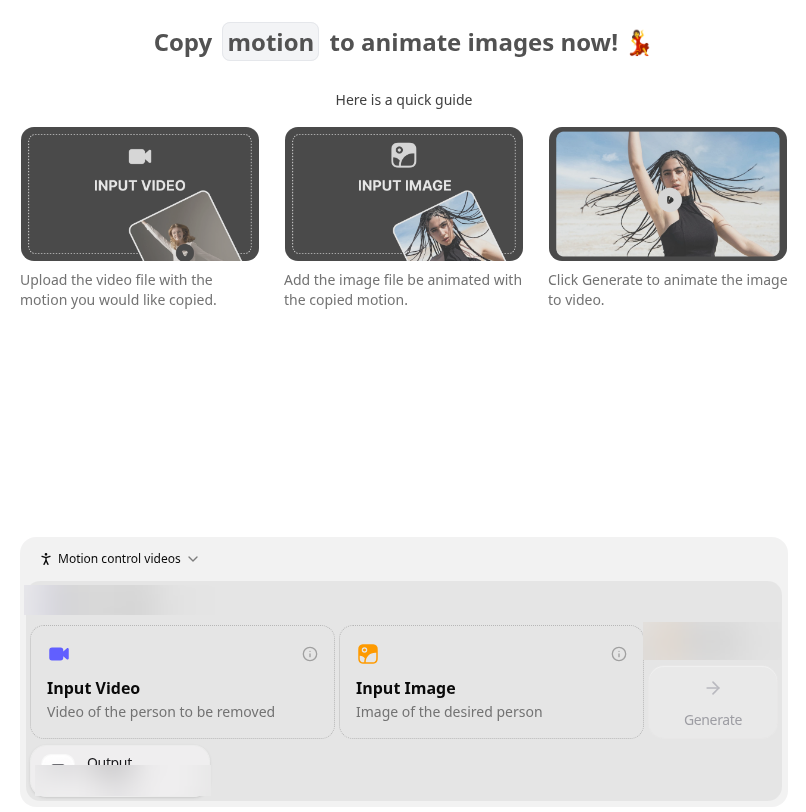
Zoice Motion Control works the way MotionVideo AI users expect: upload the video with the movement you want copied, add the image to animate and click Generate. There is no prompt to write, so the motion comes straight from your clip.
Next to it, Character Swap does the reverse job. You keep your own footage and replace the person in it with a new character from one image, swapping faces or bodies.
When the character needs to talk, the same account makes talking avatar videos. A Host speaks your script, a recording or an uploaded file, voice profiles keep a cloned voice steady, and action prompts give the Host cues. Teams that want this inside their own product can use the Zoice Developer Platform. Read more on the AI avatar generator page.
Key Features
- Motion Control from a reference video and one image
- Character Swap for faces or bodies in your own clip
- No prompt needed for motion or swaps
- AI avatar videos from a script
- Record or upload your own audio
- Voice profiles for cloned speech
- Action prompts for the Host
- Developer Platform for API access
Best For:
- Creators who want a character to copy a dance or gesture clip
- Brands animating a mascot from a motion reference
- Editors replacing the person in existing footage
- Marketers who need the same character to talk in later videos
- Educators turning lesson notes into a presenter video
- Developers adding avatar video to an app
Zoice Pros
- Two Way Motion
Motion Control and Character Swap cover both directions.
- No Prompt
Upload two files and click Generate.
- Talking Avatars
The same character can speak a script.
- Saved Voice
Voice profiles keep a voice consistent.
- Free Plan
A free plan covers voice, image, chat and transcription.
Zoice Cons
- Needs an Internet Connection:
Everything runs in the browser.
- Smaller Public Library:
The public avatar library is smaller than older suites.
Zoice Pricing
Zoice has a free plan, four paid plans and a custom Enterprise tier.
| Plan | Price | What's Included |
|---|---|---|
| Free | $0/month | Transcription, voice, images, chat |
| Starter | $7.99/month | Avatar videos, AI videos, voice, 1 voice profile |
| Basic | $29.99/month | Three voice profiles |
| Creator | $49.99/month | Five voice profiles |
| Agency | $89.99/month | Ten voice profiles |
| Enterprise | Custom Pricing | Support, custom features, multi staff access |
Starter is $7.99 monthly, Basic $29.99, Creator $49.99 and Agency $89.99. Billing yearly cuts 20%, and Enterprise pricing is custom.
When to Use Zoice?
Zoice suits MotionVideo AI users who want motion control, character swaps and a talking Host in one place.
2. DomoAI
DomoAI is an AI video platform with strong anime and character styles. Its Character to Video tool takes a motion video and a character image, and the character follows the movement while keeping its look. A Subject Only option keeps the original background.
Its Talking Avatar tool turns a front facing photo or character into a speaking video from a script or an uploaded recording, with text to speech, voice cloning from a short sample and expression prompts.
It suits creators who work with original characters and anime art.
Key Features
- Character to Video motion transfer
- Subject Only mode to keep the background
- Talking Avatar from a photo or drawing
- Script with text to speech or uploaded audio
- Voice cloning from a short sample
- Expression and action prompts
- Video to Video style changes
- Text to image for original characters
Best For:
- Anime and original character creators
- VTuber and character channels
- Dance clips with a custom character
- Talking character shorts
- Style transfer on existing clips
- Creators who want many art styles
DomoAI Pros
- Character Focus
Built around animating original characters.
- Motion Transfer
A motion clip drives the character image.
- Talking Avatar
Photos and drawings can speak.
- Voice Options
Text to speech, uploads and cloning are available.
DomoAI Cons
- Style Lean:
Results lean toward anime and stylised looks.
- Plan Limits:
Some features and speeds depend on the plan.
DomoAI Pricing
DomoAI lists Basic, Standard, Pro and Team plans, and new accounts get free trial usage.
| Plan | Price | What's Included |
|---|---|---|
| Basic | $9/month billed annually | Entry plan |
| Standard | $29/month billed annually | More usage and relax mode |
| Pro | $99/month billed annually | Highest individual plan |
| Team | $99/seat/month billed annually | Shared plan for teams |
Basic is $9 a month, Standard $29, Pro $99 and Team $99 per seat, all billed annually.
When to Use DomoAI?
DomoAI suits creators who animate original or anime characters and also want them to talk.
3. Kling
Kling is a large AI video platform. Its Motion Control takes a character image and a reference action video, or a pick from its motion library, and assigns that movement to the character. A face binding option helps keep the face consistent across angles.
Kling AI Avatar turns one character image plus uploaded audio or text to speech into a talking video, with optional prompts for emotion and actions, and a preset avatar library for a quick start.
It is a broad tool that also covers text and image to video.
Key Features
- Motion Control from an action video
- Motion library for preset movements
- Face binding for a consistent face
- Kling AI Avatar from one image
- Uploaded audio or text to speech
- Emotion and action prompts for avatars
- Text to video and image to video
- API access
Best For:
- Creators who want a library of preset motions
- Character videos that need a stable face
- Talking avatar clips from one image
- Cinematic AI video beyond avatars
- Developers using a video API
- Teams already using Kling for video
Kling Pros
- Motion Library
Preset motions save hunting for clips.
- Face Binding
Helps keep identity across angles.
- Avatar Tool
Images can speak with uploaded audio.
- Broad Suite
Text and image to video sit in the same app.
Kling Cons
- Busy Interface:
Many tools sit in one large app.
- Pricing Clarity:
We could not read a stable USD price on its site.
Kling Pricing
Kling lists its membership plans inside its own app. We could not confirm a stable USD price, so check the tool site before you choose a plan.
When to Use Kling?
Kling suits creators who want a motion library and face binding inside a wider video suite.
4. Vidnoz
Vidnoz is an AI video platform built around a large library of stock presenter avatars. You pick an avatar or a talking photo, type a script and choose a voice, then edit the scene in the browser.
A custom avatar and voice cloning are sold as add ons or come with higher plans, and there is a free plan with daily limits and a watermark.
We could not confirm a motion reference upload, so Vidnoz fits readers who want presenter avatars more than motion transfer.
Key Features
- Large stock avatar library
- Talking photo from one image
- Script to video in the browser
- AI voices for the script
- Custom avatar add on
- Voice clone add on
- Video templates for business scenes
- Free plan with daily limits
Best For:
- Small businesses making presenter videos
- Sales and marketing explainers
- Training and onboarding clips
- Talking photo social posts
- Teams testing avatars on a free plan
- Template based business videos
Vidnoz Pros
- Big Library
Many stock presenters to choose from.
- Free Plan
A free plan lets you test before paying.
- Templates
Business templates speed up editing.
- Talking Photo
One image can become a speaker.
Vidnoz Cons
- No Motion Transfer Confirmed:
We found no motion reference upload.
- Watermark on Free:
Free videos carry a watermark.
- Add On Costs:
Custom avatars and cloning cost extra on lower plans.
Vidnoz Pricing
Vidnoz has a free plan, Starter and Business plans and a custom Enterprise tier. The Avatar Pro custom avatar add on is $299 a year.
| Plan | Price | What's Included |
|---|---|---|
| Free | $0/month | Stock avatars and talking photos with daily limits |
| Starter | See tool site | More usage without the free limits |
| Business | See tool site | Higher limits and team features |
| Enterprise | Custom Pricing | Custom needs |
Starter and Business prices did not show as fixed figures on the pricing page, so check the tool site.
When to Use Vidnoz?
Vidnoz suits teams that want stock presenter avatars and templates more than motion control.
Best Use Cases of MotionVideo AI Alternative
These are jobs where a MotionVideo AI user needs more than one animated clip.
Dance and Trend Clips
For a dance trend, Zoice Motion Control copies the moves from your clip onto your character, and DomoAI Character to Video does the same for anime styles.
Mascot and Brand Characters
For a mascot, Zoice animates the mascot image from a motion clip and then lets the same character speak in an avatar video.
Replacing a Person in Footage
For existing footage, Zoice Character Swap replaces the person with one new character image, and DomoAI Subject Only keeps the background.
Talking Character Shorts
For a speaking character, Zoice, DomoAI and Kling AI Avatar all turn one image into a talking video.
Presenter Explainers
For a business explainer, Vidnoz offers a large stock presenter library, and Zoice adds a Host with your own saved voice.
Product and Gesture Demos
For a product demo, a motion clip of a presenter pointing or holding an item gives the character a clear gesture to follow.
Apps and Automation
For developers, the Zoice Developer Platform brings avatar video into your own product, and Kling also offers an API.
How We Compared the Best MotionVideo AI Alternative
MotionVideo AI is a focused motion control tool, so we compared alternatives on motion input first and then on everything a finished video needs.
Ease of Use
We checked whether each tool runs in the browser with no setup.
Motion Input
We noted whether a motion reference video drives the character.
Character Swap
We checked whether you can replace the person in your own footage.
Avatar Generator
We confirmed each tool has an AI avatar that can speak.
Voice and Audio
We recorded where voices come from and whether cloning exists.
Pricing Transparency
Prices come only from vendor pages.
Free Plan Access
We noted free plans, trials and watermarks.
Platform Fit
We recorded API access and team plans.
How to Choose the Right MotionVideo AI Alternative Before You Pay
Use this list to match a tool to the clips you plan to make.
Define Your Input
Decide whether motion comes from your own clip, a preset library or a script.
Test the Free Option
Look for free plans and watermarks before paying.
Check the Voice Options
Decide whether your character needs to speak and in whose voice.
Look at Character Control
Confirm the same character can return in later videos.
Read the Plan Details
Read plan tables for what each tier unlocks.
Think About Where You Work
Check for browser, API and team access.
Frequently Asked Questions
1. What is the best MotionVideo AI alternative?
Zoice is our pick because Motion Control, Character Swap and talking avatars sit in one account. DomoAI, Kling and Vidnoz are strong for anime characters, preset motions and stock presenters.
2. What is MotionVideo AI?
MotionVideo AI is a motion control video generator. It animates a subject image so it follows the movement in a motion reference clip.
3. Why look for a MotionVideo AI alternative?
People move on when they want talking avatars, voice, character swaps or a free plan alongside motion control.
4. Does Zoice have motion control?
Yes. Zoice Motion Control takes a video with the movement and an image to animate, then you click Generate with no prompt.
5. Can Zoice replace a person in my own video?
Yes. Zoice Character Swap replaces the person in your clip with a character from one image.
6. Can my animated character also talk?
Yes. In Zoice a Host can speak a script, a recording or an uploaded file, and voice profiles keep the voice consistent.
7. Is Zoice free to try?
Yes. The free plan covers voice, images, chat and transcription, and avatar videos and AI videos start on Starter at $7.99 a month.
8. Does Zoice have an API?
Yes. The Zoice Developer Platform lets developers add avatar video to their own apps.
9. Which tool suits anime characters?
DomoAI leans toward anime and original characters, and Zoice also animates illustrated characters from a motion clip.
10. What makes a good motion reference clip?
Use one person, fully in frame, filmed with a steady camera and clear movement, and match the framing of your character image.
11. How should I test these tools?
Run the same motion clip and character image through each tool and compare the results side by side.
Conclusion
MotionVideo AI is a focused way to turn an image and a motion clip into an animated character. When you also need that character to talk, to replace someone in your footage or to stay on a free plan while testing, the tools above fit better.
Try Zoice Motion Control with the same clip you would give MotionVideo AI, then give the character a voice in an avatar video.